
Arduino-Controlled Soil Moisture Sensing and Water Pump System
View and Edit Project In Cirkit Designer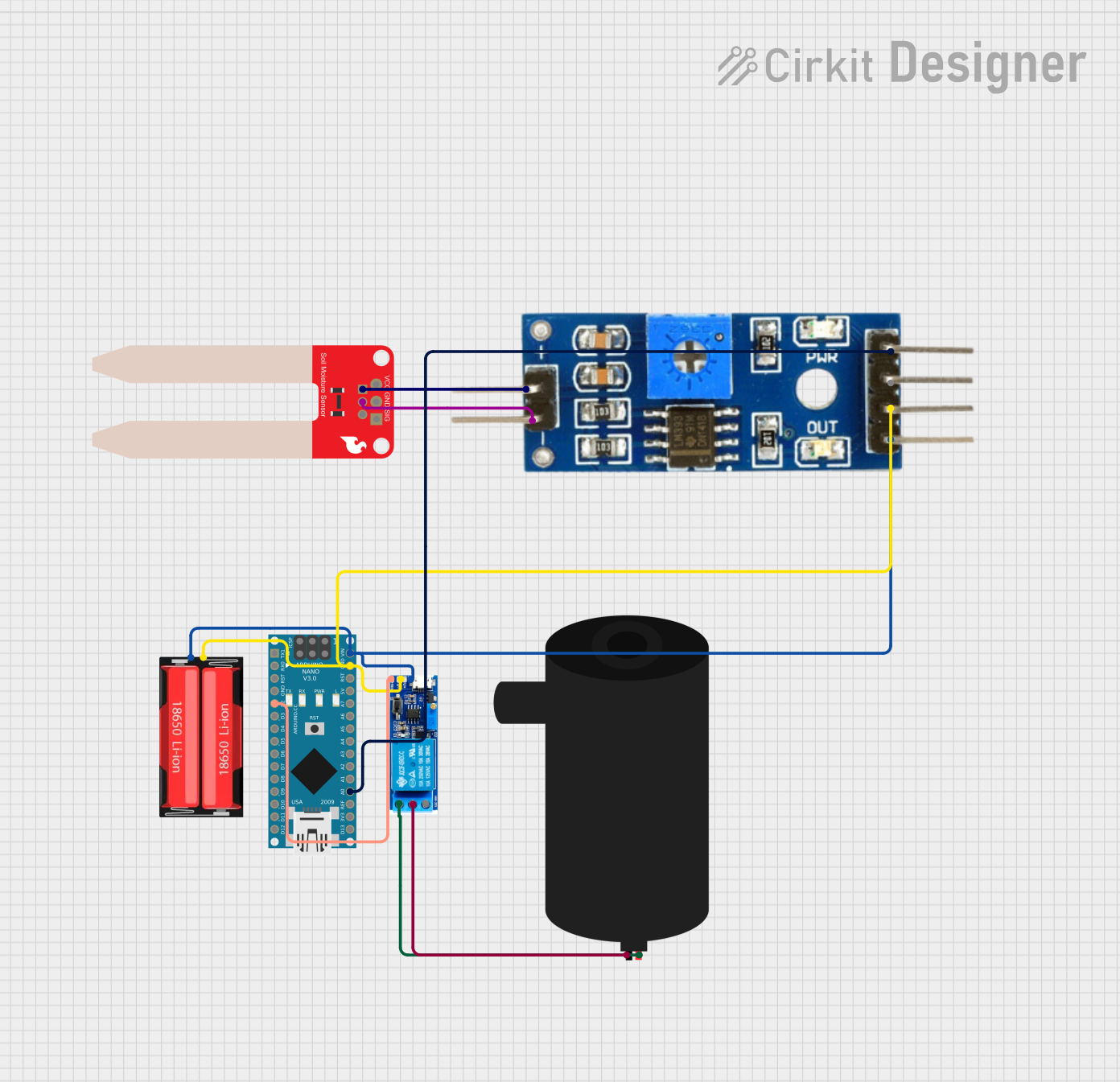
Circuit Documentation
Summary of the Circuit
This circuit is designed to monitor soil moisture levels and control a water pump based on the moisture data. It uses an Arduino Nano as the central microcontroller to read analog data from a Soil Moisture Sensor and then controls a relay module that switches a water pump on or off. The system is powered by an 18650 Li-Ion battery, which provides the necessary voltage to the components. The relay module acts as an intermediary to safely control the high-power water pump using the low-power signals from the Arduino Nano.
Component List
SparkFun Soil Moisture Sensor
- Pins: VCC, GND, SIG
- Description: This sensor measures the volumetric content of water in soil and outputs an analog signal to the microcontroller.
Soil Moisture Module
- Pins: positive, negative, Analog, Digital, Ground, VCC
- Description: An intermediary module that interfaces with the Soil Moisture Sensor and provides additional functionality such as digital output and power regulation.
Relay Module 5V-30V
- Pins: common contact, normally open, normally closed, trigger, V-, V+
- Description: An electronic switch that allows the Arduino Nano to control the water pump. It isolates the microcontroller from the high-power circuit of the pump.
18650 Li-Ion Battery
- Pins: Positive, Negative
- Description: A rechargeable battery that provides power to the circuit.
Water Pump
- Pins: positive, negative
- Description: An electromechanical device that moves water when powered.
Arduino Nano
- Pins: D1/TX, D0/RX, RESET, GND, D2, D3, D4, D5, D6, D7, D8, D9, D10, D11/MOSI, D12/MISO, VIN, 5V, A7, A6, A5, A4, A3, A2, A1, A0, AREF, 3V3, D13/SCK
- Description: A small, complete, breadboard-friendly board based on the ATmega328 (Arduino Nano 3.x). It is used to control the relay module based on the soil moisture sensor readings.
Wiring Details
SparkFun Soil Moisture Sensor
- VCC: Connected to the positive pin of the Soil Moisture Module.
- GND: Connected to the negative pin of the Soil Moisture Module.
- SIG: Not connected in the provided net list.
Soil Moisture Module
- VCC: Connected to the VIN pin of the Arduino Nano and the Positive pin of the 18650 Li-Ion Battery.
- Ground: Connected to the GND pin of the Arduino Nano and the Negative pin of the 18650 Li-Ion Battery.
- Analog: Connected to the A0 pin of the Arduino Nano.
- Digital: Not connected in the provided net list.
- positive: Connected to the VCC pin of the SparkFun Soil Moisture Sensor.
- negative: Connected to the GND pin of the SparkFun Soil Moisture Sensor.
Relay Module 5V-30V
- trigger: Connected to the D2 pin of the Arduino Nano.
- V+: Connected to the VIN pin of the Arduino Nano and the Positive pin of the 18650 Li-Ion Battery.
- V-: Connected to the GND pin of the Arduino Nano and the Negative pin of the 18650 Li-Ion Battery.
- common contact: Connected to the negative pin of the water pump.
- normally open: Connected to the positive pin of the water pump.
- normally closed: Not connected in the provided net list.
18650 Li-Ion Battery
- Positive: Connected to the VIN pin of the Arduino Nano, the V+ pin of the Relay Module, and the VCC pin of the Soil Moisture Module.
- Negative: Connected to the GND pin of the Arduino Nano, the V- pin of the Relay Module, and the Ground pin of the Soil Moisture Module.
Water Pump
- positive: Connected to the normally open pin of the Relay Module.
- negative: Connected to the common contact pin of the Relay Module.
Arduino Nano
- D2: Connected to the trigger pin of the Relay Module.
- VIN: Connected to the V+ pin of the Relay Module, the Positive pin of the 18650 Li-Ion Battery, and the VCC pin of the Soil Moisture Module.
- GND: Connected to the V- pin of the Relay Module, the Negative pin of the 18650 Li-Ion Battery, and the Ground pin of the Soil Moisture Module.
- A0: Connected to the Analog pin of the Soil Moisture Module.
- Other pins are not connected in the provided net list.
Documented Code
Arduino Nano Code (sketch.ino)
#define ledPin 6
#define sensorPin A0

void setup() {
  Serial.begin(9600);
  pinMode(sensorPin, OUTPUT);
}

void loop() {
  Serial.print("Analog output: ");
  Serial.println(readSensor());

  delay(500);
}

int readSensor() {
  int sensorValue = analogRead(sensorPin);  // Read the analog value from sensor
  int outputValue = map(sensorValue, 0, 1023, 255, 0); // map the 10-bit data to 8-bit data
  analogWrite(ledPin, outputValue); // generate PWM signal

  return outputValue;             // Return analog moisture value
}
Note: The code provided for the Arduino Nano includes a function readSensor() that reads the analog value from the soil moisture sensor connected to pin A0, maps the 10-bit analog input to an 8-bit value, and writes this value to ledPin (which is not connected in the provided net list). The Serial.print statements are used for debugging purposes to output the sensor value to the serial monitor. The pinMode for sensorPin should be set to INPUT instead of OUTPUT to correctly read the analog sensor data.
The code for the 18650 Li-Ion microcontroller instance is empty and thus not included in the documentation.