
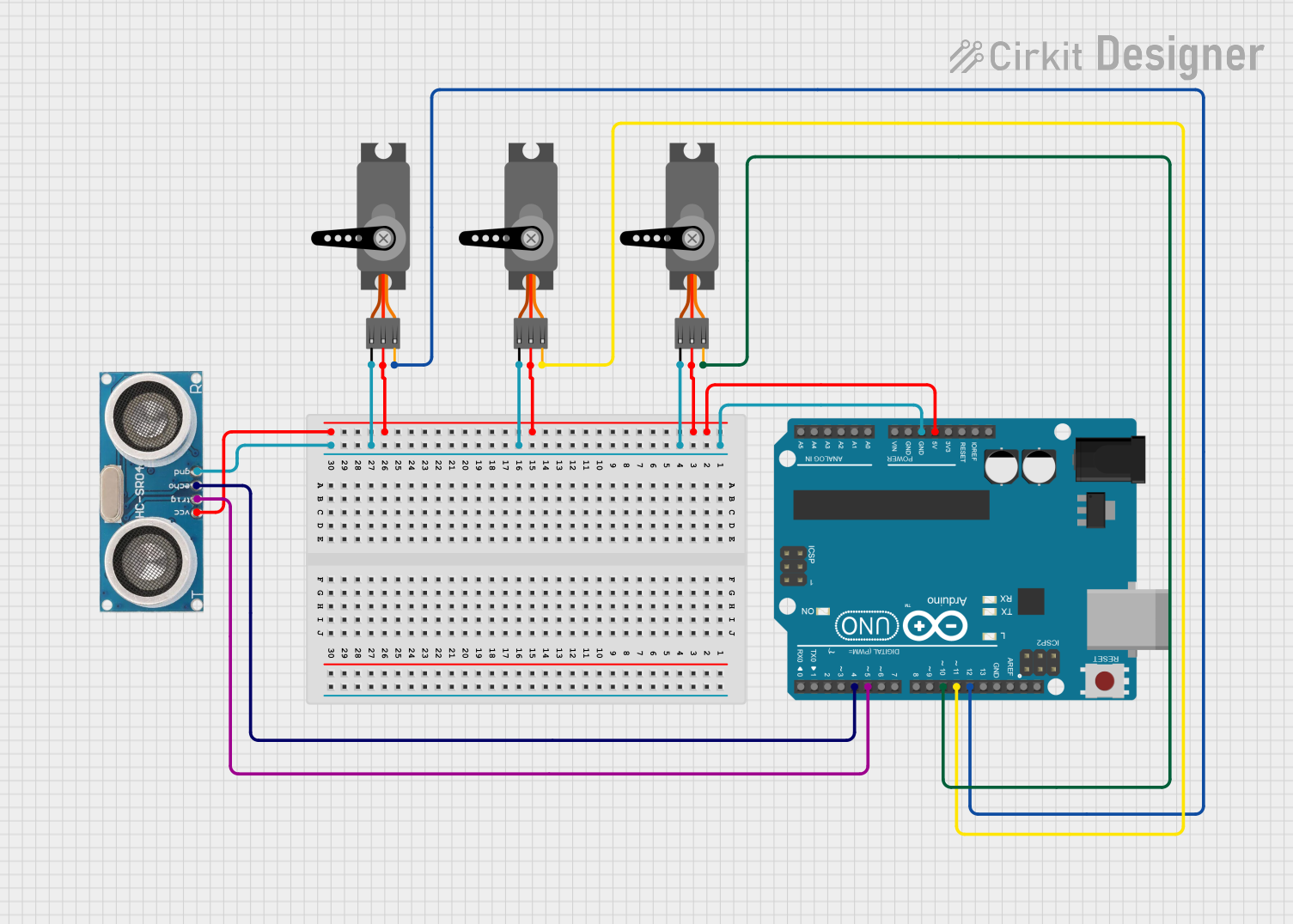
Circuit Documentation
Summary of the Circuit
This circuit is designed to control multiple servo motors and interface with an ultrasonic sensor using an Arduino UNO microcontroller. The servos are controlled via PWM signals from the Arduino, and the ultrasonic sensor is used to measure distances, which could be part of a larger system such as a robot or an automated process. The Arduino UNO provides the necessary power to the servos and the sensor, as well as the control signals for operation.
Component List
Servo Motors
- Description: Servo motors are rotary actuators that allow for precise control of angular position. They are commonly used in robotics, RC vehicles, and as actuators in various control systems.
- Pins: GND, VCC, PWM
Ultrasonic Sensor
- Description: An ultrasonic sensor is a device that can measure the distance to an object by using ultrasonic sound waves. It typically consists of a transmitter, which sends out a pulse of ultrasound, and a receiver, which detects the reflected sound.
- Pins: +VCC, Trigger, Echo, GND
Arduino UNO
- Description: The Arduino UNO is a microcontroller board based on the ATmega328P. It has a variety of digital and analog I/O pins and is widely used for prototyping and educational purposes.
- Pins: UNUSED, IOREF, Reset, 3.3V, 5V, GND, Vin, A0-A5, SCL, SDA, AREF, D0-D13
Wiring Details
Servo Motors
- Ground (GND): Connected to the Arduino UNO GND pin.
- Power (VCC): Connected to the Arduino UNO 5V pin.
- Control (PWM): Each servo motor is connected to a unique digital pin on the Arduino UNO for PWM control (D10, D11, D12).
Ultrasonic Sensor
- Power (+VCC): Connected to the Arduino UNO 5V pin.
- Ground (GND): Connected to the Arduino UNO GND pin.
- Trigger: Connected to the Arduino UNO digital pin D5.
- Echo: Connected to the Arduino UNO digital pin D4.
Arduino UNO
- 5V and GND: Provide power to the servo motors and the ultrasonic sensor.
- Digital Pins (D4, D5, D10, D11, D12): Control the ultrasonic sensor and servo motors.
Documented Code
Arduino UNO Code (sketch.ino)
void setup() {
  // put your setup code here, to run once:

}

void loop() {
  // put your main code here, to run repeatedly:

}
This code is a template for the Arduino UNO. The setup() function is intended to contain initialization code that runs once, such as pin mode settings. The loop() function is meant to contain the main logic of the program, which will run repeatedly.
Note: The actual implementation code for controlling the servo motors and reading the ultrasonic sensor data is not provided in the input and should be added to the setup() and loop() functions as needed.