
Arduino UNO-Based Automatic Plant Watering System with LCD Display and RGB LED Indicators
View and Edit Project In Cirkit Designer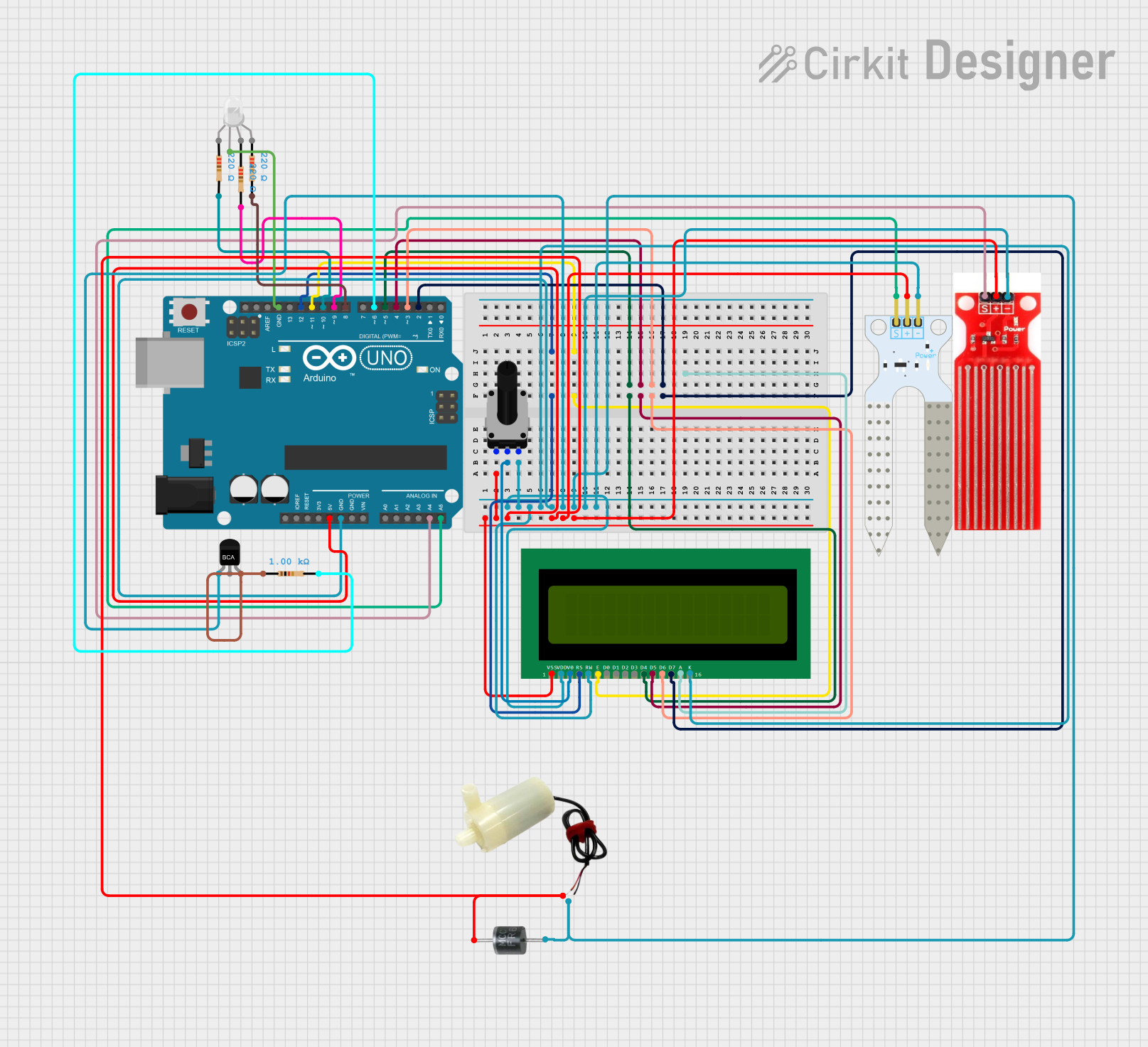
Automatic Water Dispenser for Plant Pot
Summary
This project is an automatic water dispenser system designed for plant pots. It uses a soil moisture sensor and a water level sensor to monitor the conditions of the plant. The system displays the water level on an LCD and activates a water pump when the soil moisture is low. Additionally, an RGB LED provides visual feedback on the system's status.
Component List
RGB LED (Wokwi compatible)
- Pins: R, COM, G, B
- Description: RGB LED for visual feedback.
- Properties: None
Water Sensor
- Pins: Signal, VCC, GND
- Description: Sensor to detect water level.
- Properties: None
Resistor (220 Ohms)
- Pins: pin1, pin2
- Description: Resistor for current limiting.
- Properties:
- Resistance: 220 Ohms
Resistor (1000 Ohms)
- Pins: pin1, pin2
- Description: Resistor for current limiting.
- Properties:
- Resistance: 1000 Ohms
16X2 LCD
- Pins: VSS, VDD, V0, RS, RW, E, D1, D0, D2, D3, D4, D6, D5, D7, A, K
- Description: LCD display for showing water level.
- Properties: None
Arduino UNO
- Pins: UNUSED, IOREF, Reset, 3.3V, 5V, GND, Vin, A0, A1, A2, A3, A4, A5, SCL, SDA, AREF, D13, D12, D11, D10, D9, D8, D7, D6, D5, D4, D3, D2, D1, D0
- Description: Microcontroller for controlling the system.
- Properties: None
Soil Moisture Sensor
- Pins: VCC, GND, SIG
- Description: Sensor to detect soil moisture level.
- Properties: None
5V Mini Water Pump
- Pins: positive pin, negative pin
- Description: Water pump for watering the plant.
- Properties: None
Rotary Potentiometer (1000 Ohms)
- Pins: leg1, wiper, leg2
- Description: Potentiometer for adjusting LCD contrast.
- Properties:
- Resistance: 1000 Ohms
NPN-Transistor
- Pins: E, C, B
- Description: Transistor for switching the water pump.
- Properties: None
FR607
- Pins: Cathode, Anode
- Description: Diode for protection.
- Properties: None
Wiring Details
RGB LED (Wokwi compatible)
- R: Connected to Arduino UNO pin D10 through a 220 Ohm resistor.
- COM: Connected to Arduino UNO GND.
- G: Connected to Arduino UNO pin D9 through a 220 Ohm resistor.
- B: Connected to Arduino UNO pin D6 through a 1000 Ohm resistor.
Water Sensor
- Signal: Connected to Arduino UNO pin A4.
- VCC: Connected to Arduino UNO 5V.
- GND: Connected to Arduino UNO GND.
Resistor (220 Ohms)
- pin1: Connected to Arduino UNO pin D10.
- pin2: Connected to RGB LED R pin.
Resistor (220 Ohms)
- pin1: Connected to Arduino UNO pin D9.
- pin2: Connected to RGB LED G pin.
Resistor (1000 Ohms)
- pin1: Connected to Arduino UNO pin D6.
- pin2: Connected to RGB LED B pin.
16X2 LCD
- VSS: Connected to Arduino UNO 5V.
- VDD: Connected to Arduino UNO GND.
- V0: Connected to Rotary Potentiometer wiper.
- RS: Connected to Arduino UNO pin D12.
- RW: Connected to Arduino UNO GND.
- E: Connected to Arduino UNO pin D11.
- D4: Connected to Arduino UNO pin D5.
- D5: Connected to Arduino UNO pin D4.
- D6: Connected to Arduino UNO pin D3.
- D7: Connected to Arduino UNO pin D2.
- A: Not connected.
- K: Connected to Arduino UNO GND.
Arduino UNO
- 5V: Connected to Rotary Potentiometer leg1, 16X2 LCD VSS, Water Sensor VCC, Soil Moisture Sensor VCC, 5V Mini Water Pump positive pin, FR607 Cathode.
- GND: Connected to Rotary Potentiometer leg2, 16X2 LCD VDD, 16X2 LCD RW, 16X2 LCD K, Water Sensor GND, Soil Moisture Sensor GND, 5V Mini Water Pump negative pin, FR607 Anode, RGB LED COM.
- A4: Connected to Water Sensor Signal.
- A5: Connected to Soil Moisture Sensor SIG.
- D12: Connected to 16X2 LCD RS.
- D11: Connected to 16X2 LCD E.
- D10: Connected to RGB LED R pin through a 220 Ohm resistor.
- D9: Connected to RGB LED G pin through a 220 Ohm resistor.
- D8: Connected to RGB LED B pin through a 1000 Ohm resistor.
- D6: Connected to RGB LED B pin through a 1000 Ohm resistor.
- D5: Connected to 16X2 LCD D4.
- D4: Connected to 16X2 LCD D5.
- D3: Connected to 16X2 LCD D6.
- D2: Connected to 16X2 LCD D7.
Soil Moisture Sensor
- VCC: Connected to Arduino UNO 5V.
- GND: Connected to Arduino UNO GND.
- SIG: Connected to Arduino UNO pin A5.
5V Mini Water Pump
- positive pin: Connected to Arduino UNO 5V.
- negative pin: Connected to Arduino UNO GND.
Rotary Potentiometer (1000 Ohms)
- leg1: Connected to Arduino UNO 5V.
- wiper: Connected to 16X2 LCD V0.
- leg2: Connected to Arduino UNO GND.
NPN-Transistor
- E: Connected to Arduino UNO GND.
- C: Not connected.
- B: Connected to 1000 Ohm resistor pin1.
FR607
- Cathode: Connected to Arduino UNO 5V.
- Anode: Connected to Arduino UNO GND.
Code Documentation
/*
 * Automatic Water Dispenser for Plant Pot
 * This code controls an automatic water dispenser system. It reads soil moisture
 * and water level sensors, displays the water level on an LCD, and activates a
 * water pump when the soil moisture is low.
 */

#include <LiquidCrystal.h>

// Pin definitions
const int soilMoisturePin = A5;
const int waterSensorPin = A4;
const int pumpPin = 10;
const int redLEDPin = 9;
const int greenLEDPin = 8;
const int blueLEDPin = 6;

// LCD pin definitions
const int rs = 12, en = 11, d4 = 5, d5 = 4, d6 = 3, d7 = 2;
LiquidCrystal lcd(rs, en, d4, d5, d6, d7);

void setup() {
  // Initialize the LCD
  lcd.begin(16, 2);
  lcd.print("Water Level:");

  // Initialize pins
  pinMode(soilMoisturePin, INPUT);
  pinMode(waterSensorPin, INPUT);
  pinMode(pumpPin, OUTPUT);
  pinMode(redLEDPin, OUTPUT);
  pinMode(greenLEDPin, OUTPUT);
  pinMode(blueLEDPin, OUTPUT);
}

void loop() {
  // Read sensor values
  int soilMoisture = analogRead(soilMoisturePin);
  int waterLevel = analogRead(waterSensorPin);

  // Convert water level to percentage
  int waterLevelPercent = map(waterLevel, 0, 1023, 0, 100);

  // Display water level on LCD
  lcd.setCursor(0, 1);
  lcd.print(waterLevelPercent);
  lcd.print("%");
  lcd.print("   "); // Clear any remaining characters

  // Check soil moisture and control pump
  if (soilMoisture < 300) { // Threshold for dry soil
    digitalWrite(pumpPin, HIGH); // Turn on pump
    digitalWrite(redLEDPin, HIGH); // Turn on red LED