
Battery-Powered Raspberry Pi Pico GPS and Sensor Data Logger
View and Edit Project In Cirkit Designer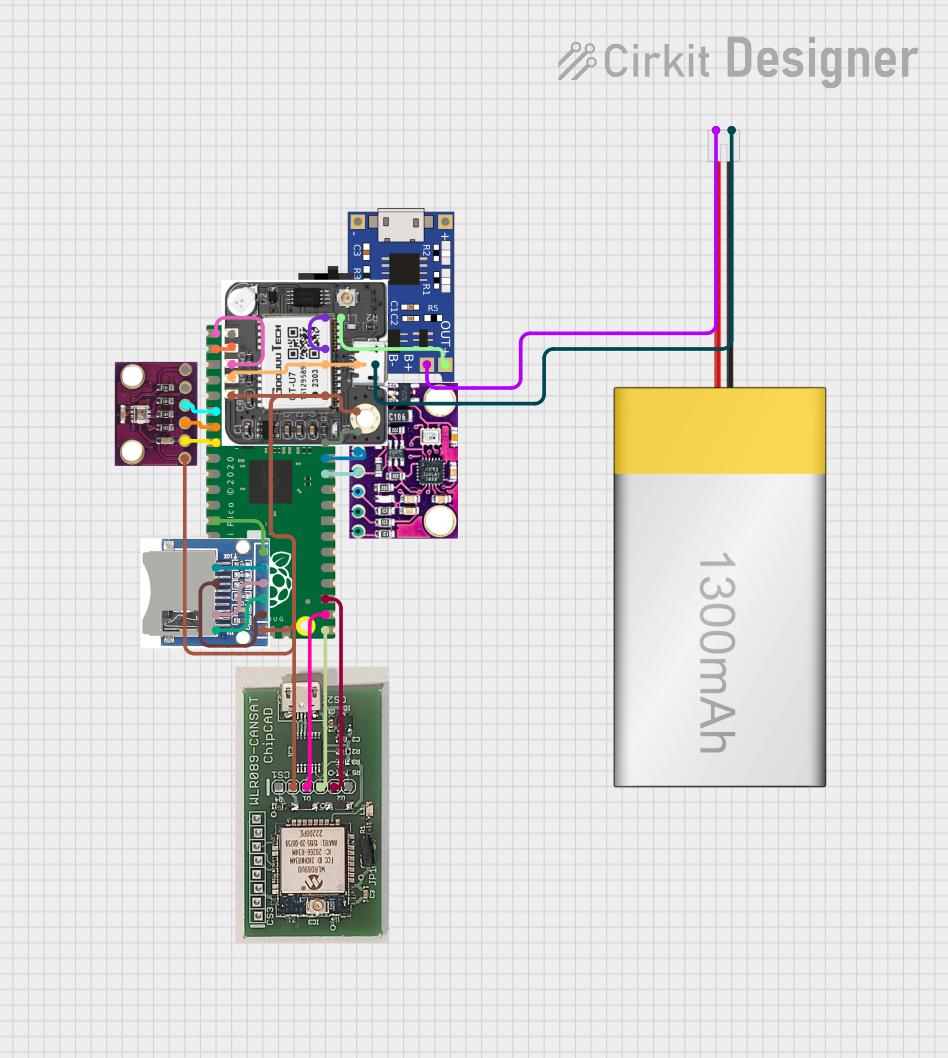
Circuit Documentation
Summary
This document provides a detailed overview of a circuit design that includes a Raspberry Pi Pico microcontroller, various sensors, a GPS module, a battery management system, and other components. The circuit is designed to interface with multiple peripherals and manage power efficiently.
Component List
Raspberry Pi Pico
- Description: A low-cost, high-performance microcontroller board with flexible digital interfaces.
- Pins: pin 1, pin 2, pin 3, pin 4, pin 5, pin 6, pin 7, pin 8, pin 9, pin 10, pin 11, pin 12, pin 13, pin 14, pin 15, pin 16, pin 17, pin 18, pin 19, pin 20, pin 21, pin 22, pin 23, pin 24, pin 25, pin 26, pin 27, pin 28, pin 29, pin 30, pin 31, pin 32, pin 33, pin 34, pin 35, pin 36, pin 37, pin 38, pin 39, pin 40, pin 41, pin 42, pin 43
TP4056
- Description: A lithium battery charger module with overcharge protection.
- Pins: OUT-, B-, B+, OUT+, IN-, IN+
LiPoly Battery (1300mAh)
- Description: A rechargeable lithium polymer battery.
- Pins: positive, negative
Toggle Switch
- Description: A simple on/off switch.
- Pins: L1, COM, L2
MPU9250/GY-91
- Description: A 9-axis motion tracking device.
- Pins: 3V3, GND, SCL, SDA, VIN/5V
neo 6m gps
- Description: A GPS module for location tracking.
- Pins: VCC, GND, RXD, TXD, PPS
BMP280
- Description: A barometric pressure sensor.
- Pins: VCC, GND, SCL, SDA, CSB, SDO
WLR089-CanSAT
- Description: A wireless communication module.
- Pins: USR, 3v6, TXD, RXD, GND, RES
SD SDHC
- Description: An SD card module for data storage.
- Pins: 3V3, CS, MOSI, CLK, MISO, GND
Wiring Details
Raspberry Pi Pico
- pin 1: Connected to neo 6m gps RXD
- pin 2: Connected to neo 6m gps TXD
- pin 6: Connected to BMP280 SDA
- pin 7: Connected to BMP280 SCL
- pin 8: Connected to BMP280 GND
- pin 13: Connected to SD SDHC GND
- pin 16: Connected to SD SDHC MISO
- pin 17: Connected to SD SDHC CS
- pin 19: Connected to SD SDHC CLK
- pin 20: Connected to SD SDHC MOSI
- pin 21: Connected to WLR089-CanSAT RXD
- pin 22: Connected to WLR089-CanSAT TXD
- pin 23: Connected to WLR089-CanSAT GND
- pin 31: Connected to MPU9250/GY-91 SDA
- pin 32: Connected to MPU9250/GY-91 SCL
- pin 33: Connected to MPU9250/GY-91 GND
- pin 36: Connected to MPU9250/GY-91 3V3, BMP280 VCC, WLR089-CanSAT 3v6, neo 6m gps VCC, SD SDHC 3V3
- pin 38: Connected to TP4056 OUT-, neo 6m gps GND
- pin 39: Connected to Toggle Switch COM
TP4056
- OUT-: Connected to Raspberry Pi Pico pin 38, neo 6m gps GND
- B-: Connected to LiPoly Battery (1300mAh) negative
- B+: Connected to LiPoly Battery (1300mAh) positive
- OUT+: Connected to Toggle Switch L2
LiPoly Battery (1300mAh)
- negative: Connected to TP4056 B-
- positive: Connected to TP4056 B+
Toggle Switch
- COM: Connected to Raspberry Pi Pico pin 39
- L2: Connected to TP4056 OUT+
MPU9250/GY-91
- SDA: Connected to Raspberry Pi Pico pin 31
- SCL: Connected to Raspberry Pi Pico pin 32
- GND: Connected to Raspberry Pi Pico pin 33
- 3V3: Connected to Raspberry Pi Pico pin 36
neo 6m gps
- RXD: Connected to Raspberry Pi Pico pin 1
- TXD: Connected to Raspberry Pi Pico pin 2
- GND: Connected to TP4056 OUT-, Raspberry Pi Pico pin 38
- VCC: Connected to Raspberry Pi Pico pin 36
BMP280
- SDA: Connected to Raspberry Pi Pico pin 6
- SCL: Connected to Raspberry Pi Pico pin 7
- GND: Connected to Raspberry Pi Pico pin 8
- VCC: Connected to Raspberry Pi Pico pin 36
WLR089-CanSAT
- RXD: Connected to Raspberry Pi Pico pin 21
- TXD: Connected to Raspberry Pi Pico pin 22
- GND: Connected to Raspberry Pi Pico pin 23
- 3v6: Connected to Raspberry Pi Pico pin 36
SD SDHC
- GND: Connected to Raspberry Pi Pico pin 13
- MISO: Connected to Raspberry Pi Pico pin 16
- CS: Connected to Raspberry Pi Pico pin 17
- CLK: Connected to Raspberry Pi Pico pin 19
- MOSI: Connected to Raspberry Pi Pico pin 20
- 3V3: Connected to Raspberry Pi Pico pin 36
Documented Code
Raspberry Pi Pico Code
void setup() {
  // put your setup code here, to run once:

}

void loop() {
  // put your main code here, to run repeatedly:

}
Additional Documentation
This document provides a comprehensive overview of the circuit design, including component descriptions, wiring details, and the code used for the Raspberry Pi Pico microcontroller.