
ESP32C3 Wi-Fi Enabled Weather Station with Micro SD Card Logging
View and Edit Project In Cirkit Designer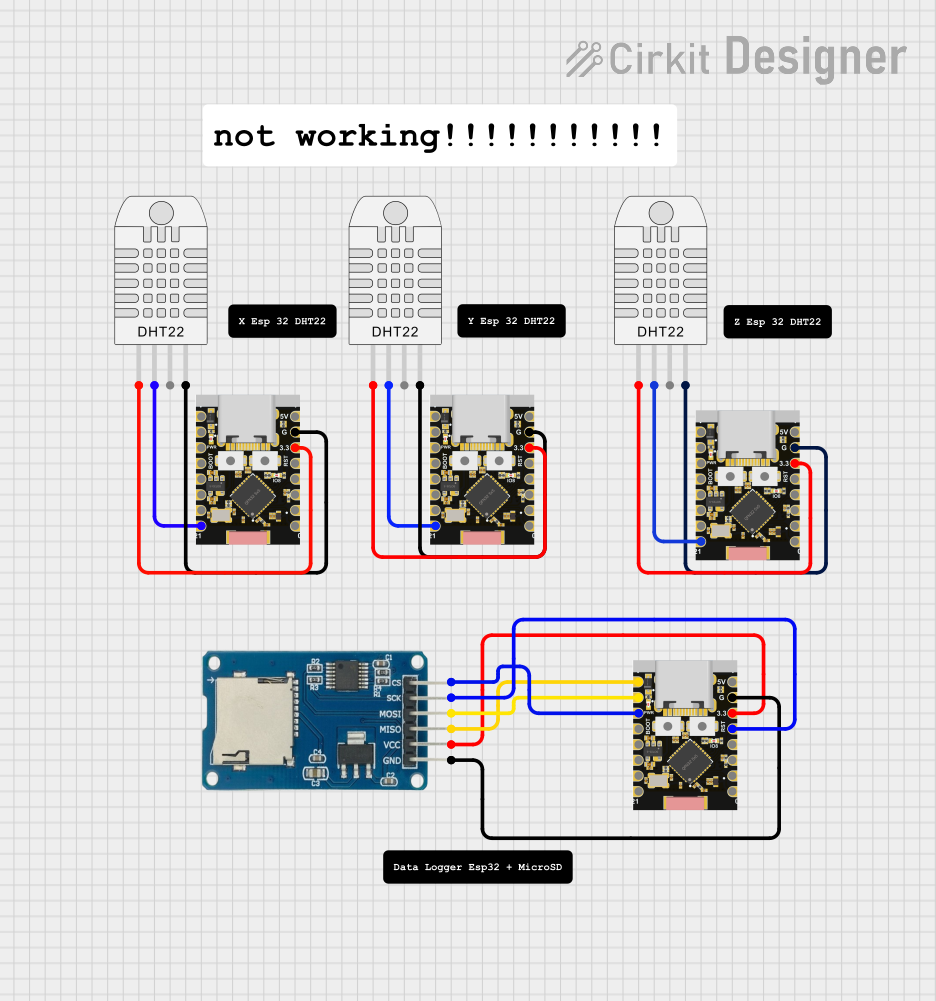
Circuit Documentation
Summary
This circuit involves multiple ESP32C3 Supermini microcontrollers, a Micro SD Card Module, and several DHT22 sensors. The ESP32C3 microcontrollers are used to interface with the sensors and the SD card module. The circuit is designed to scan WiFi networks and read data from the DHT22 sensors, which can then be stored on the SD card.
Component List
ESP32C3 Supermini
- Description: A compact microcontroller with WiFi and Bluetooth capabilities.
- Pins: GPIO05, GPIO06, GPIO07, GPIO08, GPIO09, GPIO10, GPIO20, GPIO21, GPIO00, GPIO01, GPIO02, GPIO03, GPIO04, 3.3V, GND, +5V
Micro SD Card Module
- Description: A module for interfacing with micro SD cards.
- Pins: cs, sck, mosi, miso, vcc, gnd
DHT22 (Wokwi Compatible)
- Description: A digital temperature and humidity sensor.
- Pins: VCC, SDA, NC, GND
Comment
- Description: Placeholder for comments in the circuit.
- Pins: None
Wiring Details
ESP32C3 Supermini (1)
- Connected to Micro SD Card Module:
- GPIO05 -> miso
- GPIO06 -> mosi
- GPIO07 -> cs
- GPIO04 -> sck
- 3.3V -> vcc
- GND -> gnd
ESP32C3 Supermini (2)
- Connected to DHT22 (1):
- GPIO21 -> SDA
- 3.3V -> VCC
- GND -> GND
ESP32C3 Supermini (3)
- Connected to DHT22 (2):
- GPIO21 -> SDA
- 3.3V -> VCC
- GND -> GND
ESP32C3 Supermini (4)
- Connected to DHT22 (3):
- GPIO21 -> SDA
- 3.3V -> VCC
- GND -> GND
Documented Code
WiFi Network Scanner
/*
 *  This sketch demonstrates how to scan WiFi networks.
 *  The API is based on the Arduino WiFi Shield library, but has significant changes as newer WiFi functions are supported.
 *  E.g. the return value of `encryptionType()` different because more modern encryption is supported.
 */
#include "WiFi.h"

void setup() {
  Serial.begin(115200);

  // Set WiFi to station mode and disconnect from an AP if it was previously connected.
  WiFi.mode(WIFI_STA);
  WiFi.disconnect();
  delay(100);

  Serial.println("Setup done");
}

void loop() {
  Serial.println("Scan start");

  // WiFi.scanNetworks will return the number of networks found.
  int n = WiFi.scanNetworks();
  Serial.println("Scan done");
  if (n == 0) {
    Serial.println("no networks found");
  } else {
    Serial.print(n);
    Serial.println(" networks found");
    Serial.println("Nr | SSID                             | RSSI | CH | Encryption");
    for (int i = 0; i < n; ++i) {
      // Print SSID and RSSI for each network found
      Serial.printf("%2d", i + 1);
      Serial.print(" | ");
      Serial.printf("%-32.32s", WiFi.SSID(i).c_str());
      Serial.print(" | ");
      Serial.printf("%4ld", WiFi.RSSI(i));
      Serial.print(" | ");
      Serial.printf("%2ld", WiFi.channel(i));
      Serial.print(" | ");
      switch (WiFi.encryptionType(i)) {
        case WIFI_AUTH_OPEN:            Serial.print("open"); break;
        case WIFI_AUTH_WEP:             Serial.print("WEP"); break;
        case WIFI_AUTH_WPA_PSK:         Serial.print("WPA"); break;
        case WIFI_AUTH_WPA2_PSK:        Serial.print("WPA2"); break;
        case WIFI_AUTH_WPA_WPA2_PSK:    Serial.print("WPA+WPA2"); break;
        case WIFI_AUTH_WPA2_ENTERPRISE: Serial.print("WPA2-EAP"); break;
        case WIFI_AUTH_WPA3_PSK:        Serial.print("WPA3"); break;
        case WIFI_AUTH_WPA2_WPA3_PSK:   Serial.print("WPA2+WPA3"); break;
        case WIFI_AUTH_WAPI_PSK:        Serial.print("WAPI"); break;
        default:                        Serial.print("unknown");
      }
      Serial.println();
      delay(10);
    }
  }
  Serial.println("");

  // Delete the scan result to free memory for code below.
  WiFi.scanDelete();

  // Wait a bit before scanning again.
  delay(5000);
}
Additional Files
- documentation.txt: Empty file for additional documentation.
- ESP32 Dht22.cpp: Empty file for DHT22 sensor code.