
Circuit Documentation
Summary of the Circuit
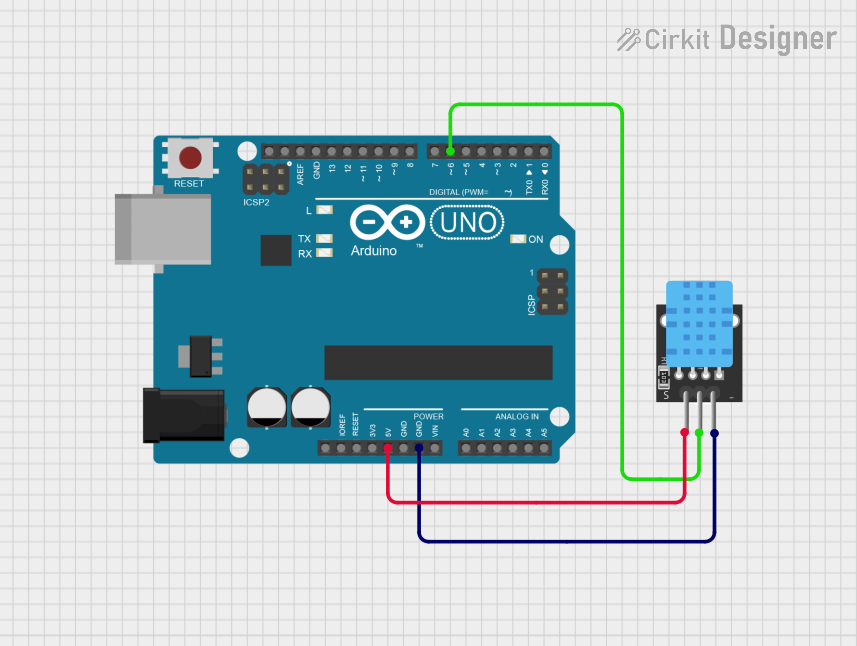
This circuit consists of an Arduino UNO microcontroller board interfaced with a KY-015 DHT11 temperature and humidity sensor module. The Arduino UNO is responsible for controlling the sensor module, reading temperature and humidity data, and communicating the information to a computer via the serial interface. The sensor module is powered by the 5V output from the Arduino and communicates with a digital input pin on the Arduino.
Component List
Arduino UNO
- Description: A microcontroller board based on the ATmega328P.
- Pins: UNUSED, IOREF, Reset, 3.3V, 5V, GND, Vin, A0-A5, SCL, SDA, AREF, D0-D13.
- Purpose: Acts as the central processing unit of the circuit, reading sensor data and handling communication.
KY-015 DHT11 Temperature and Humidity Sensor
- Description: A basic, low-cost digital temperature and humidity sensor.
- Pins: 5V, S (Signal), GND.
- Purpose: Measures the ambient temperature and humidity and sends the data to the Arduino UNO.
Wiring Details
Arduino UNO
- 5V: Provides power to the KY-015 DHT11 sensor.
- GND: Common ground with the KY-015 DHT11 sensor.
- D6: Receives the signal from the KY-015 DHT11 sensor's data pin.
KY-015 DHT11 Temperature and Humidity Sensor
- 5V: Connected to the 5V pin on the Arduino UNO for power.
- S (Signal): Connected to digital pin D6 on the Arduino UNO for data communication.
- GND: Connected to the ground (GND) pin on the Arduino UNO.
Documented Code
// include DHT library
#include<DHT.h>

// save pin to a variable
int tempPin = 6;

// clone the dht library
dht DHT;

void setup() {
  // put your setup code here, to run once:
  // begin serial monitor to enable communication between the board and the computer
  Serial.begin(9600);
  // set pinMode
  pinMode(tempPin, INPUT);
}

void loop() {
  // put your main code here, to run repeatedly:
  int chk = DHT.read11(tempPin); // check the data coming from the DHT pin
  Serial.print("Temperature = "); // print temperature on the serial monitor
  Serial.println(DHT.temperature);
}
File Name: sketch.ino
Description: This code initializes the DHT library for the temperature and humidity sensor, sets up the serial communication at 9600 baud rate, and continuously reads the temperature data from the sensor, printing it to the serial monitor. The tempPin variable is assigned to pin 6, which is connected to the sensor's data pin. The DHT.read11(tempPin) function reads the temperature and humidity from the sensor and stores it in the DHT object. The temperature is then printed to the serial monitor.