
Arduino and NodeMCU RFID Attendance System with OLED Display
View and Edit Project In Cirkit Designer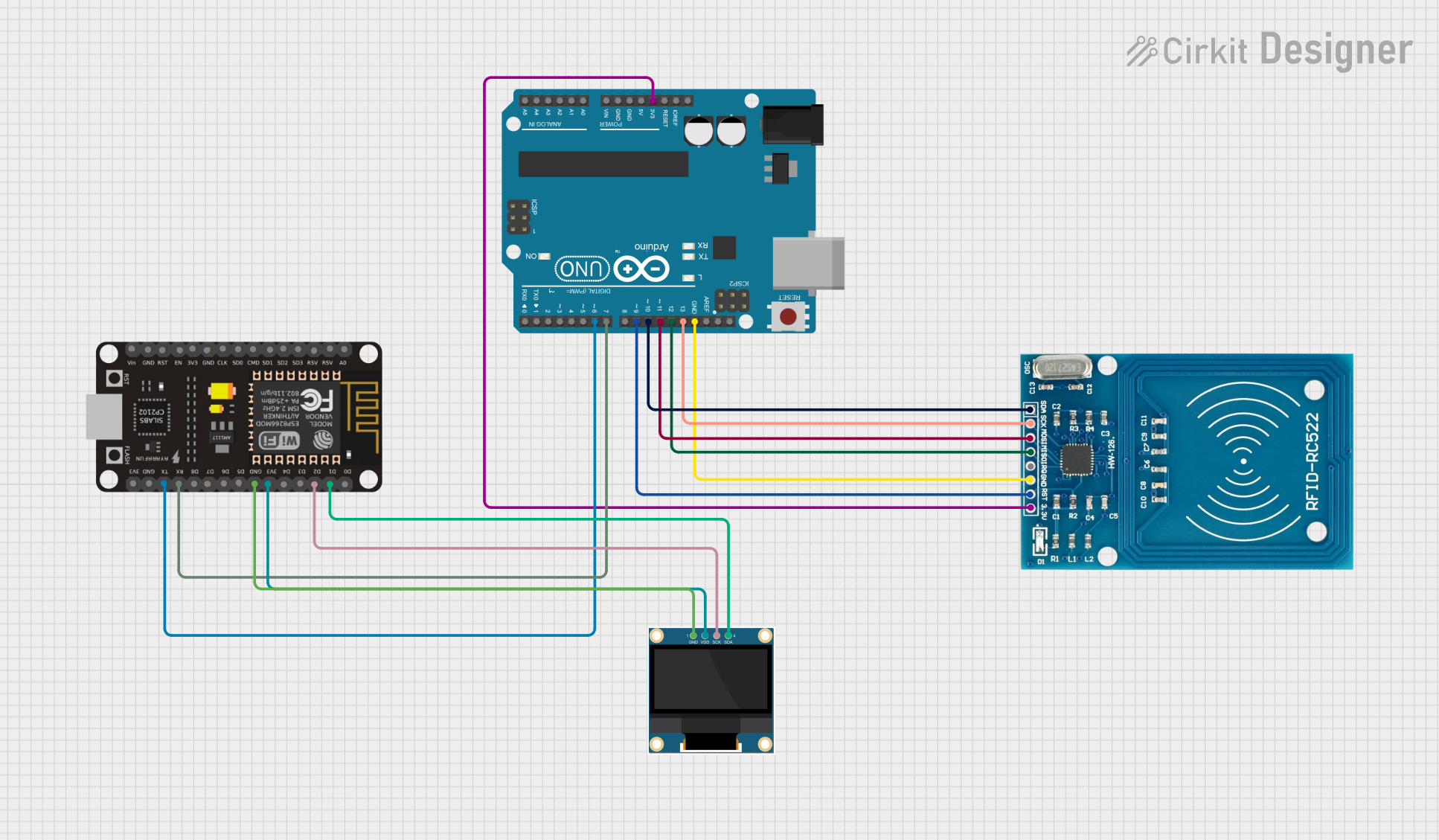
Circuit Documentation
Summary
This circuit integrates an Arduino UNO, a 0.96" OLED display, an RFID-RC522 module, and an ESP8266 NodeMCU. The Arduino UNO serves as the main controller, interfacing with the RFID module to read RFID tags and communicate with the ESP8266 NodeMCU for further processing. The OLED display is connected to the ESP8266 NodeMCU to display relevant information.
Component List
Arduino UNO
- Description: A microcontroller board based on the ATmega328P.
- Pins: UNUSED, IOREF, Reset, 3.3V, 5V, GND, Vin, A0, A1, A2, A3, A4, A5, SCL, SDA, AREF, D13, D12, D11, D10, D9, D8, D7, D6, D5, D4, D3, D2, D1, D0
0.96" OLED
- Description: A small OLED display module.
- Pins: GND, VDD, SCK, SDA
RFID-RC522
- Description: An RFID reader module.
- Pins: VCC (3.3V), RST, GND, IRQ, MISO, MOSI, SCK, SDA
ESP8266 NodeMCU
- Description: A low-cost Wi-Fi microchip with full TCP/IP stack and microcontroller capability.
- Pins: D0, D1, D2, D3, D4, 3V3, GND, D5, D6, D7, D8, RX, TX, A0, RSV, SD3, SD2, SD1, CMD, SD0, CLK, EN, RST, VIN
Wiring Details
Arduino UNO
- 3.3V: Connected to VCC (3.3V) of RFID-RC522
- GND: Connected to GND of RFID-RC522
- D13: Connected to SCK of RFID-RC522
- D12: Connected to MISO of RFID-RC522
- D11: Connected to MOSI of RFID-RC522
- D10: Connected to SDA of RFID-RC522
- D9: Connected to RST of RFID-RC522
- D7: Connected to RX of ESP8266 NodeMCU
- D6: Connected to TX of ESP8266 NodeMCU
0.96" OLED
- GND: Connected to GND of ESP8266 NodeMCU
- VDD: Connected to 3V3 of ESP8266 NodeMCU
- SCK: Connected to D2 of ESP8266 NodeMCU
- SDA: Connected to D1 of ESP8266 NodeMCU
RFID-RC522
- VCC (3.3V): Connected to 3.3V of Arduino UNO
- GND: Connected to GND of Arduino UNO
- SCK: Connected to D13 of Arduino UNO
- MISO: Connected to D12 of Arduino UNO
- MOSI: Connected to D11 of Arduino UNO
- SDA: Connected to D10 of Arduino UNO
- RST: Connected to D9 of Arduino UNO
ESP8266 NodeMCU
- RX: Connected to D7 of Arduino UNO
- TX: Connected to D6 of Arduino UNO
- GND: Connected to GND of 0.96" OLED
- 3V3: Connected to VDD of 0.96" OLED
- D2: Connected to SCK of 0.96" OLED
- D1: Connected to SDA of 0.96" OLED
Documented Code
Arduino UNO Code
#include <SPI.h>
#include <MFRC522.h>
#include <SoftwareSerial.h>

constexpr uint8_t RST_PIN = 9;  // Configurable, see typical pin layout
constexpr uint8_t SS_PIN = 10;  // Configurable, see typical pin layout
MFRC522 rfid(SS_PIN, RST_PIN);  // Create instance of the RFID class

SoftwareSerial espSerial(5, 6); // RX, TX pins for communication with NodeMCU

// Array of registered RFID tags
String registeredCards[] = {
  "93B55635",  // Registered Card 1
  "334E1B35",  // Registered Card 2
  "939B5435"   // Registered Card 3
};

const int numRegisteredCards = sizeof(registeredCards) / sizeof(registeredCards[0]);

void setup() {
  Serial.begin(9600);    // Start serial communication
  espSerial.begin(115200); // Initialize SoftwareSerial communication (for NodeMCU)
  SPI.begin();           // Initialize SPI bus for RFID
  rfid.PCD_Init();       // Initialize MFRC522
  Serial.println("System Ready! Place your card near the reader...");
}

void loop() {
  // Check for new RFID card
  if (!rfid.PICC_IsNewCardPresent()) return;

  if (rfid.PICC_ReadCardSerial()) {
    String tag = "";
    for (byte i = 0; i < rfid.uid.size; i++) {
      tag += String(rfid.uid.uidByte[i], HEX); // Convert UID to string
    }
    tag.toUpperCase(); // Ensure the tag is in uppercase
    Serial.println("Detected Card UID: " + tag); // Print UID to serial monitor

    // Check if the detected card UID matches any registered card
    bool isRegistered = false;
    for (int i = 0; i < numRegisteredCards; i++) {
      if (registeredCards[i] == tag) {
        isRegistered = true;
        break;
      }
    }

    // If card is registered, mark attendance, else deny access
    if (isRegistered) {
      Serial.println("Attendance Marked for Card UID: " + tag);
      espSerial.println(tag); // Send attendance info to NodeMCU
    } else {
      Serial.println("Access Not Allowed! Unregistered Card.");
      espSerial.println("Unregistered Card."); // Deny access to NodeMCU
    }

    rfid.PICC_HaltA();       // Stop reading
    rfid.PCD_StopCrypto1();  // Stop encryption
  }
}
0.96" OLED Code
void setup() {
  // put your setup code here, to run once:

}

void loop() {
  // put your main code here, to run repeatedly:

}
RFID-RC522 Code
#include <SPI.h>
#include <MFRC522.h>
#include <SoftwareSerial.h>

constexpr uint8_t RST_PIN = 9;  // Configurable, see typical pin layout
constexpr uint8_t SS_PIN = 10;  // Configurable, see typical pin layout
MFRC522 rfid(SS_PIN, RST_PIN);  // Create instance of the RFID class

SoftwareSerial espSerial(5, 6); // RX, TX pins for communication with NodeMCU

// Array of registered RFID tags
String registeredCards[] = {
  "93B55635",  // Registered Card 1
  "334E1B35",  // Registered Card 2
  "939B5435"   // Registered Card 3
};

const int numRegisteredCards = sizeof(registeredCards) / sizeof(registeredCards[0]);

void setup() {
  Serial.begin(9600);    // Start serial communication
  espSerial.begin(115200); // Initialize SoftwareSerial communication (for NodeMCU)
  SPI.begin();           // Initialize SPI bus for RFID
  rfid.PCD_Init();       // Initialize MFRC522
  Serial.println("System Ready! Place your card near the reader...");
}

void loop() {
  // Check for new RFID card
  if (!rfid.PICC_IsNewCardPresent()) return;

  if (rfid.PICC_ReadCardSerial()) {
    String tag = "";
    for (byte i = 0; i < rfid.uid.size; i++) {
      tag += String(rfid.uid.uidByte[i], HEX); // Convert UID to string
    }
    tag.toUpperCase(); // Ensure the tag is in uppercase
    Serial.println("Detected Card UID: " + tag); // Print UID to serial monitor

    // Check if the detected card UID matches any registered card
    bool isRegistered = false;
    for (int i = 0; i < numRegisteredCards; i++) {
      if (registeredCards[i] == tag) {
        isRegistered = true;
        break;
      }
    }

    // If card is registered, mark attendance, else deny access
    if (isRegistered) {
      Serial.println("Attendance Marked for Card UID: " + tag);