
Arduino UNO-Based IR Sensor and Servo-Controlled Display System
View and Edit Project In Cirkit Designer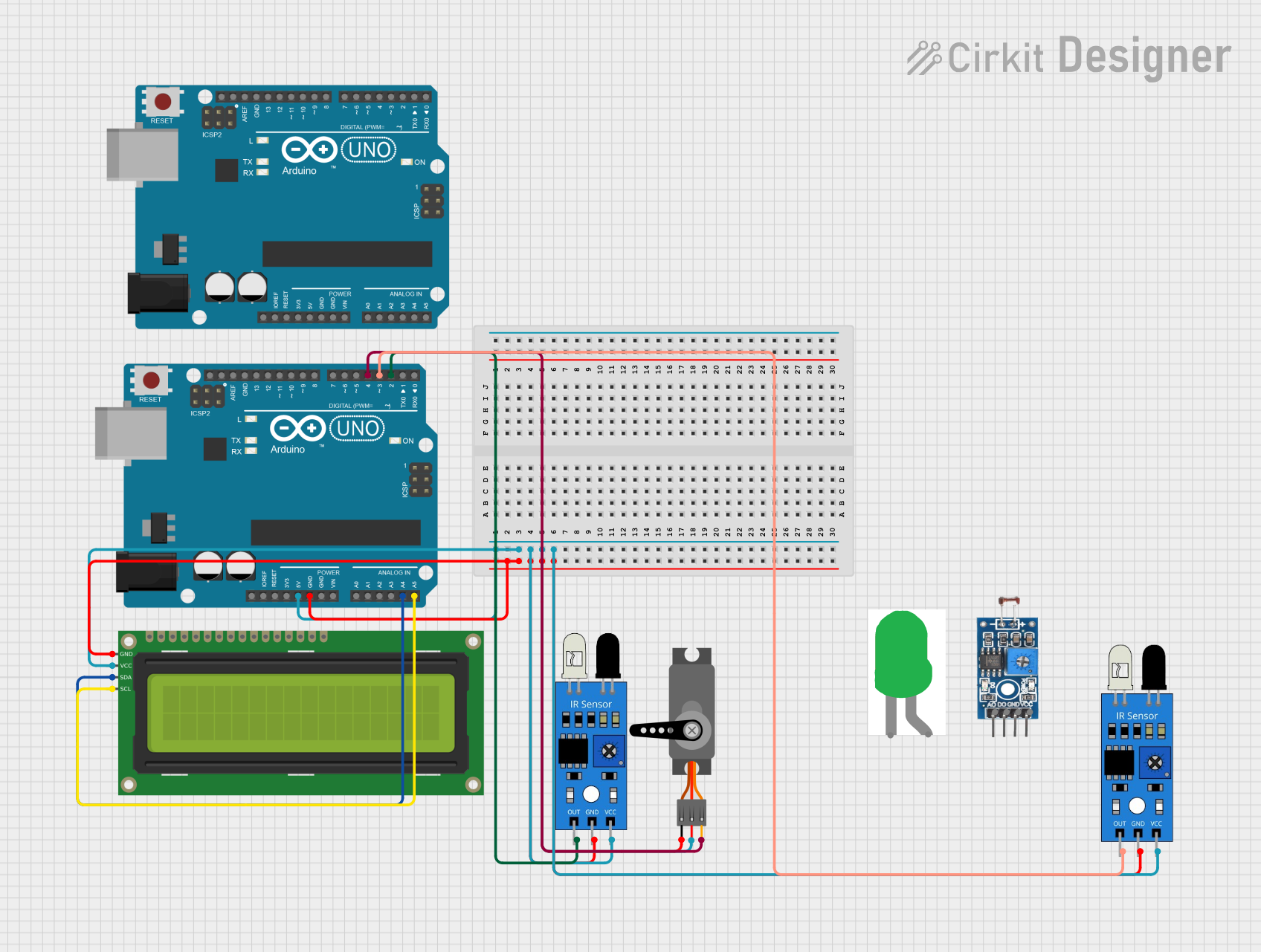
Circuit Documentation
Summary
This document provides a detailed overview of a circuit that includes various sensors, an Arduino UNO microcontroller, a servo motor, and an LCD display. The circuit is designed to interface with multiple sensors and output devices, with the Arduino UNO serving as the central control unit. The document includes a component list, wiring details, and the embedded code used in the microcontrollers.
Component List
IR Sensor
- Pins: out, gnd, vcc
- Description: Infrared sensor used for detecting objects or obstacles.
- Purpose in Circuit: Detects objects and sends a signal to the Arduino.
Arduino UNO
- Pins: UNUSED, IOREF, Reset, 3.3V, 5V, GND, Vin, A0, A1, A2, A3, A4, A5, SCL, SDA, AREF, D13, D12, D11, D10, D9, D8, D7, D6, D5, D4, D3, D2, D1, D0
- Description: Microcontroller board based on the ATmega328P.
- Purpose in Circuit: Central control unit that processes inputs from sensors and controls output devices.
Servo
- Pins: GND, VCC, PWM
- Description: Servo motor used for precise control of angular position.
- Purpose in Circuit: Provides mechanical movement based on control signals from the Arduino.
16x2 I2C LCD
- Pins: GND, VCC, SDA, SCL
- Description: 16x2 character LCD display with I2C interface.
- Purpose in Circuit: Displays information such as sensor readings.
LED: Two Pin (green)
- Pins: cathode, anode
- Description: Green LED used for visual indication.
- Purpose in Circuit: Provides visual feedback.
Photosensitive Sensor Module Digital Light Intensity Detection
- Pins: Analog Output, Digital Output, Ground, VCC
- Description: Sensor module for detecting light intensity.
- Purpose in Circuit: Measures light intensity and sends data to the Arduino.
Wiring Details
IR Sensor 1
- Pin out connected to Arduino UNO D3
- Pin gnd connected to Arduino UNO GND
- Pin vcc connected to Arduino UNO 5V
IR Sensor 2
- Pin out connected to Arduino UNO D2
- Pin gnd connected to Arduino UNO GND
- Pin vcc connected to Arduino UNO 5V
Arduino UNO
- Pin GND connected to IR Sensor 1 gnd, IR Sensor 2 gnd, Servo GND, 16x2 I2C LCD GND
- Pin 5V connected to IR Sensor 1 vcc, IR Sensor 2 vcc, Servo VCC, 16x2 I2C LCD VCC
- Pin D3 connected to IR Sensor 1 out
- Pin D2 connected to IR Sensor 2 out
- Pin A4 connected to 16x2 I2C LCD SDA
- Pin A5 connected to 16x2 I2C LCD SCL
- Pin D4 connected to Servo PWM
Servo
- Pin GND connected to Arduino UNO GND
- Pin VCC connected to Arduino UNO 5V
- Pin PWM connected to Arduino UNO D4
16x2 I2C LCD
- Pin GND connected to Arduino UNO GND
- Pin VCC connected to Arduino UNO 5V
- Pin SDA connected to Arduino UNO A4
- Pin SCL connected to Arduino UNO A5
Code Documentation
Arduino UNO (Instance 1)
File Name: sketch.ino
void setup() {
  // put your setup code here, to run once:

}

void loop() {
  // put your main code here, to run repeatedly:

}
File Name: documentation.txt
Arduino UNO (Instance 2)
File Name: sketch.ino
void setup() {
  // put your setup code here, to run once:

}

void loop() {
  // put your main code here, to run repeatedly:

}
File Name: documentation.txt
This document provides a comprehensive overview of the circuit, including the components used, their wiring details, and the embedded code for the microcontrollers.