
Arduino UNO Controlled Traffic Light System with Touch Sensor Interaction
View and Edit Project In Cirkit Designer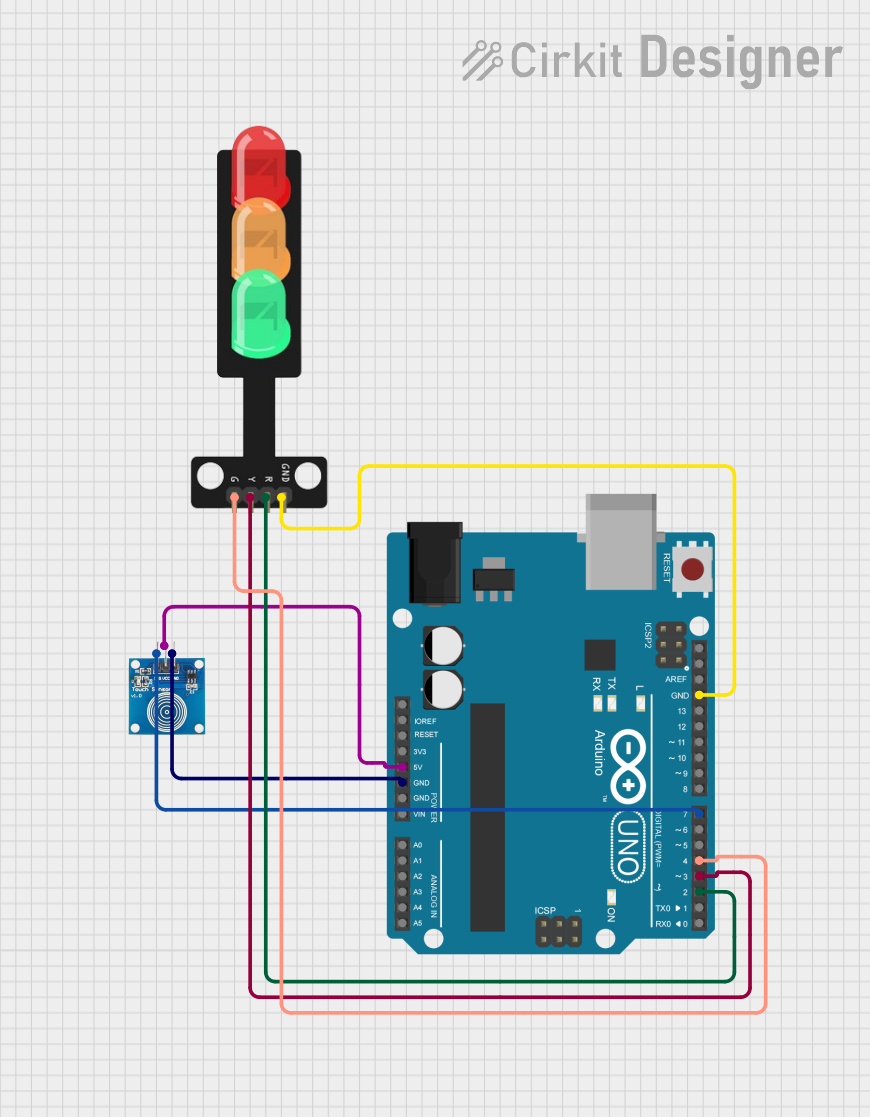
Traffic Light Control Circuit Documentation
Summary
This circuit is designed to control a traffic light system using an Arduino UNO microcontroller and a touch sensor. The system operates in a cycle where the state of the traffic light changes upon each touch sensor activation. The cycle progresses from red to yellow to green and then turns off all lights before repeating. The Arduino UNO reads the state of the touch sensor and controls the traffic light LEDs accordingly.
Component List
Arduino UNO
- Description: A microcontroller board based on the ATmega328P.
- Pins: UNUSED, IOREF, Reset, 3.3V, 5V, GND, Vin, A0-A5, SCL, SDA, AREF, D0-D13.
Touch Sensor
- Description: A capacitive touch sensor module.
- Pins: IO, VCC, GND.
Traffic Light
- Description: A module with three LEDs representing a traffic light.
- Pins: Green, Yellow, Red, GND.
Wiring Details
Arduino UNO
- 5V connected to Touch Sensor VCC.
- GND connected to Touch Sensor GND and Traffic Light GND.
- D7 connected to Touch Sensor IO.
- D2 connected to Traffic Light Red.
- D3 connected to Traffic Light Yellow.
- D4 connected to Traffic Light Green.
Touch Sensor
- VCC connected to Arduino UNO 5V.
- GND connected to Arduino UNO GND.
- IO connected to Arduino UNO D7.
Traffic Light
- Green connected to Arduino UNO D4.
- Yellow connected to Arduino UNO D3.
- Red connected to Arduino UNO D2.
- GND connected to Arduino UNO GND.
Documented Code
/*
 * This Arduino sketch controls a traffic light system using a touch sensor.
 * When the touch sensor is pressed, the red LED turns on. On the next press,
 * the yellow LED turns on. On the next press, the green LED turns on. On the
 * next press, all LEDs turn off. This cycle repeats with each subsequent press.
 */

const int touchPin = 7; // Pin connected to touch sensor
const int redLedPin = 2; // Pin connected to red LED
const int yellowLedPin = 3; // Pin connected to yellow LED
const int greenLedPin = 4; // Pin connected to green LED

int touchState = 0; // Current state of the touch sensor
int lastTouchState = 0; // Previous state of the touch sensor
int ledState = 0; // Current state of the LEDs

void setup() {
  pinMode(touchPin, INPUT);
  pinMode(redLedPin, OUTPUT);
  pinMode(yellowLedPin, OUTPUT);
  pinMode(greenLedPin, OUTPUT);
  digitalWrite(redLedPin, LOW);
  digitalWrite(yellowLedPin, LOW);
  digitalWrite(greenLedPin, LOW);
}

void loop() {
  touchState = digitalRead(touchPin);
  if (touchState == HIGH && lastTouchState == LOW) {
    ledState = (ledState + 1) % 4;
    updateLeds();
  }
  lastTouchState = touchState;
}

void updateLeds() {
  digitalWrite(redLedPin, ledState == 1 ? HIGH : LOW);
  digitalWrite(yellowLedPin, ledState == 2 ? HIGH : LOW);
  digitalWrite(greenLedPin, ledState == 3 ? HIGH : LOW);
}
This code is responsible for reading the state of the touch sensor and updating the traffic light LEDs. The setup() function initializes the pins, and the loop() function checks the sensor state to cycle through the LED states. The updateLeds() function sets the appropriate LED based on the current state.