
ESP32-Based Wi-Fi Controlled OLED Display with Dual Pushbutton Input
View and Edit Project In Cirkit Designer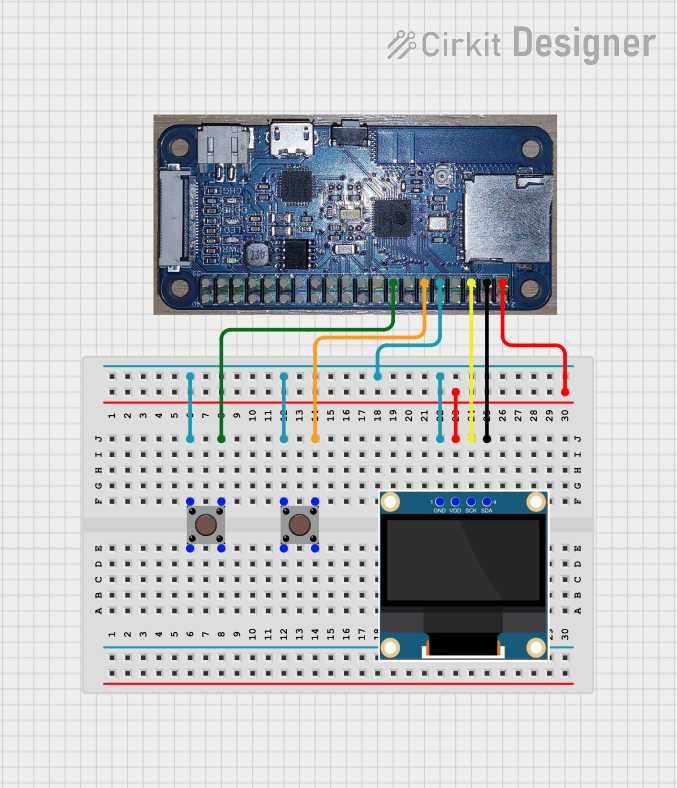
Circuit Documentation
Summary
This document provides a detailed overview of a circuit that includes an ESP32 microcontroller, a 0.96" OLED display, and two pushbuttons. The ESP32 serves as the main controller, interfacing with the OLED display for visual output and the pushbuttons for user input.
Component List
ESP32 One
- Description: A versatile microcontroller with built-in Wi-Fi and Bluetooth capabilities.
- Pins: LED_21, Y5_35, Y2_34, NC, GND, Y4/SCLK_14, MISO_12, Y3/MOSI_13, 3V3, I/O_2, CS2_15, I/O_19, HREF_27, LRC_32, Y9_36, SCL_23, SDA_18, DAC/PCLK_25, ADC_33, Y8_37, Y7_38, CS1_22, CS0_5, I/O_0, XCLK_4, Y6_39, BCLK_26, RXD_3, TXD_1, 5V
0.96" OLED
- Description: A small OLED display used for visual output.
- Pins: GND, VDD, SCK, SDA
Pushbutton 1
- Description: A simple pushbutton used for user input.
- Pins: Pin 3 (out), Pin 4 (out), Pin 1 (in), Pin 2 (in)
Pushbutton 2
- Description: Another simple pushbutton used for user input.
- Pins: Pin 3 (out), Pin 4 (out), Pin 1 (in), Pin 2 (in)
Wiring Details
ESP32 One
GND is connected to:
- GND of 0.96" OLED
- Pin 1 (in) of Pushbutton 1
- Pin 1 (in) of Pushbutton 2
I/O_2 is connected to:
- Pin 3 (out) of Pushbutton 1
I/O_19 is connected to:
- Pin 3 (out) of Pushbutton 2
3V3 is connected to:
- VDD of 0.96" OLED
SCL_23 is connected to:
- SCK of 0.96" OLED
SDA_18 is connected to:
- SDA of 0.96" OLED
0.96" OLED
GND is connected to:
- GND of ESP32 One
- Pin 1 (in) of Pushbutton 1
- Pin 1 (in) of Pushbutton 2
VDD is connected to:
- 3V3 of ESP32 One
SCK is connected to:
- SCL_23 of ESP32 One
SDA is connected to:
- SDA_18 of ESP32 One
Pushbutton 1
Pin 1 (in) is connected to:
- GND of ESP32 One
- GND of 0.96" OLED
- Pin 1 (in) of Pushbutton 2
Pin 3 (out) is connected to:
- I/O_2 of ESP32 One
Pushbutton 2
Pin 1 (in) is connected to:
- GND of ESP32 One
- GND of 0.96" OLED
- Pin 1 (in) of Pushbutton 1
Pin 3 (out) is connected to:
- I/O_19 of ESP32 One
Code
No code is provided for this circuit.