
ESP32-Based Smart Lock System with RFID and Fingerprint Authentication
View and Edit Project In Cirkit Designer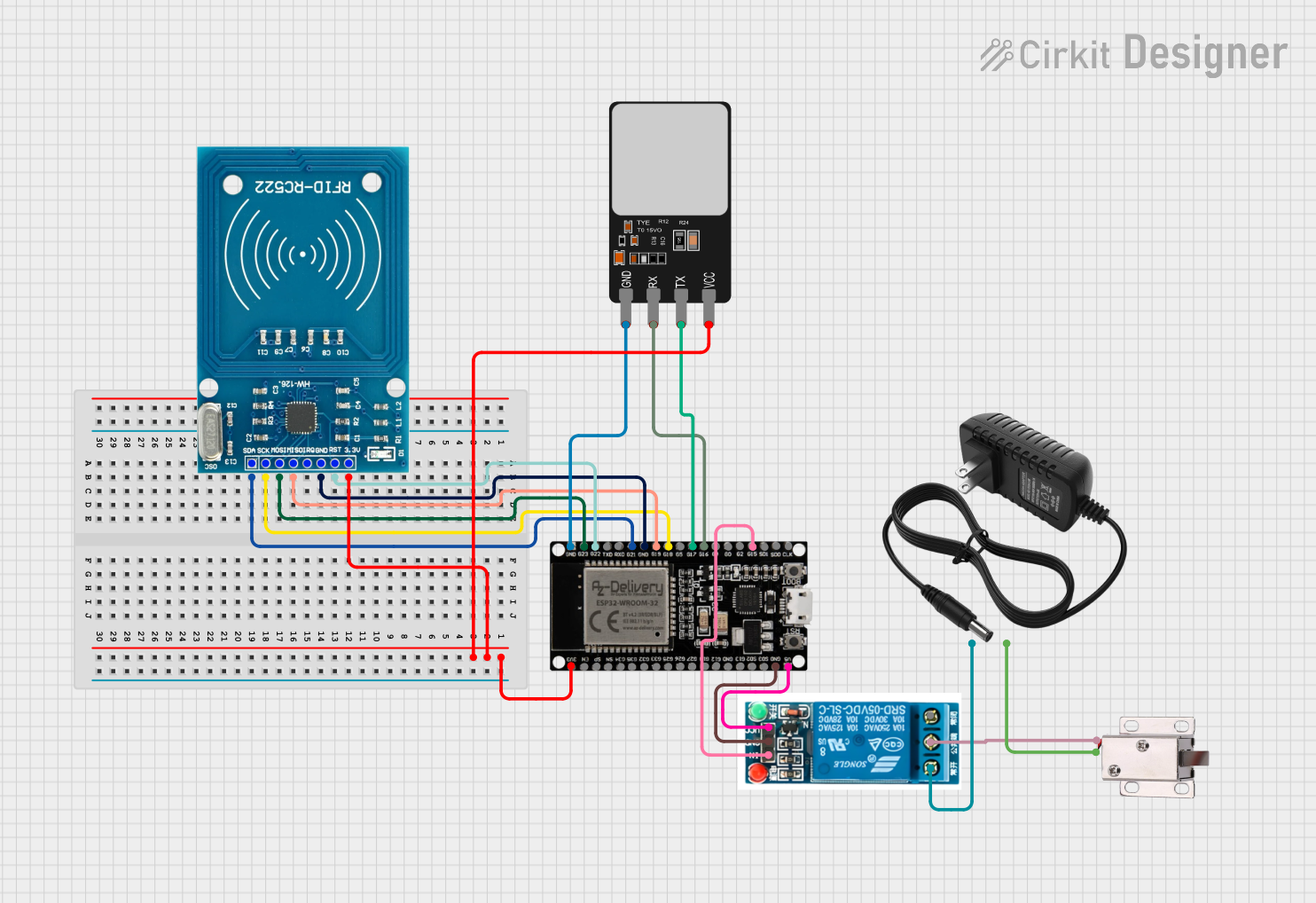
Circuit Documentation
Summary
This circuit is designed to control a 12V solenoid lock using an ESP32 microcontroller. The system integrates an RFID reader (RFID-RC522) and a fingerprint scanner to authenticate users. Upon successful authentication via either method, the ESP32 triggers a 5V relay to unlock the solenoid lock. The circuit is powered by a 12V power supply.
Component List
12V Solenoid Lock
- Pins: VCC, GND
- Description: Electromechanical lock that operates on 12V.
Fingerprint Scanner
- Pins: VCC, TX, RX, GND
- Description: Biometric sensor for fingerprint recognition.
12V Power Supply
- Pins: +, -
- Description: Provides 12V DC power to the circuit.
RFID-RC522
- Pins: VCC (3.3V), RST, GND, IRQ, MISO, MOSI, SCK, SDA
- Description: RFID reader module for reading RFID tags.
ESP32 38 PINS
- Pins: GND, G23, G22, TXD, RXD, G21, G19, G18, G5, G17, G16, G4, G0, G2, G15, SDI, SD0, CLK, 3V3, EN, SP, SN, G34, G35, G32, 33, G25, G26, G27, G14, G12, G13, SD2, SD3, 5V
- Description: Microcontroller with Wi-Fi and Bluetooth capabilities.
5V Relay
- Pins: Normally Open, Common terminal, Normally Closed, In, GND, VCC
- Description: Electromechanical relay that operates on 5V.
Wiring Details
12V Solenoid Lock
- VCC connected to Common terminal of the 5V relay.
- GND connected to - of the 12V power supply.
Fingerprint Scanner
- VCC connected to 3V3 of the ESP32.
- TX connected to G17 of the ESP32.
- RX connected to G16 of the ESP32.
- GND connected to GND of the ESP32.
12V Power Supply
- + connected to Normally Open of the 5V relay.
- - connected to GND of the 12V solenoid lock.
RFID-RC522
- VCC (3.3V) connected to 3V3 of the ESP32.
- RST connected to G22 of the ESP32.
- GND connected to GND of the ESP32.
- MISO connected to G19 of the ESP32.
- MOSI connected to G23 of the ESP32.
- SCK connected to G18 of the ESP32.
- SDA connected to G21 of the ESP32.
ESP32 38 PINS
- 3V3 connected to VCC (3.3V) of the RFID-RC522 and VCC of the Fingerprint Scanner.
- G22 connected to RST of the RFID-RC522.
- GND connected to GND of the RFID-RC522, Fingerprint Scanner, and 5V relay.
- G19 connected to MISO of the RFID-RC522.
- G23 connected to MOSI of the RFID-RC522.
- G18 connected to SCK of the RFID-RC522.
- G21 connected to SDA of the RFID-RC522.
- G17 connected to TX of the Fingerprint Scanner.
- G16 connected to RX of the Fingerprint Scanner.
- G15 connected to In of the 5V relay.
- 5V connected to VCC of the 5V relay.
5V Relay
- Common terminal connected to VCC of the 12V solenoid lock.
- Normally Open connected to + of the 12V power supply.
- In connected to G15 of the ESP32.
- GND connected to GND of the ESP32.
- VCC connected to 5V of the ESP32.
Code Documentation
#include <SPI.h>
#include <MFRC522.h>
#include <Adafruit_Fingerprint.h>

#define SS_PIN 21           // RFID SDA pin
#define RST_PIN 22          // RFID RST pin
#define FINGERPRINT_RX 17   // AS608 RX to ESP32 GPIO 17
#define FINGERPRINT_TX 16   // AS608 TX to ESP32 GPIO 16
#define RELAY_PIN 15        // Relay control pin

MFRC522 rfid(SS_PIN, RST_PIN);         // Create MFRC522 instance
Adafruit_Fingerprint finger = Adafruit_Fingerprint(&Serial2); // Use Serial2 for the fingerprint sensor

void setup() {
  Serial.begin(115200);                // Initialize serial communications for ESP32
  delay(1000);                         // Small delay for Serial startup

  // Initialize RFID
  SPI.begin();                         // Init SPI bus
  rfid.PCD_Init();                     // Init MFRC522
  pinMode(RELAY_PIN, OUTPUT);          // Set relay pin as output
  digitalWrite(RELAY_PIN, HIGH);       // Ensure relay is off at startup
  Serial.println("Place your card on the reader...");

  // Initialize fingerprint sensor
  Serial2.begin(57600, SERIAL_8N1, FINGERPRINT_RX, FINGERPRINT_TX);
  finger.begin(57600);                 // Initialize fingerprint sensor
  delay(1000);                         // Allow sensor time to initialize

  // Check if the fingerprint sensor is responding
  if (finger.verifyPassword()) {
    Serial.println("Fingerprint sensor initialized successfully.");
  } else {
    Serial.println("Failed to initialize fingerprint sensor. Check wiring.");
    while (1); // Halt if initialization fails
  }

  Serial.println("System ready. Use 'E' to enroll fingerprint.");
}

void loop() {
  // Check for RFID
  if (rfid.PICC_IsNewCardPresent() && rfid.PICC_ReadCardSerial()) {
    // Card read successfully, trigger the relay
    Serial.print("Card UID: ");
    for (byte i = 0; i < rfid.uid.size; i++) {
      Serial.print(rfid.uid.uidByte[i] < 0x10 ? " 0" : " ");
      Serial.print(rfid.uid.uidByte[i], HEX);
    }
    Serial.println();

    // Trigger the relay to unlock the solenoid
    unlockSolenoid();

    rfid.PICC_HaltA();               // Halt PICC
    rfid.PCD_StopCrypto1();         // Stop encryption on PCD
  }

  // Check for serial commands for enrollment
  if (Serial.available()) {
    char command = Serial.read();
    if (command == 'E') {
      enrollFingerprint();
    }
  }

  // Automatically check for fingerprint verification
  int result = finger.getImage();
  if (result == FINGERPRINT_OK) {
    // Fingerprint detected, process it
    if (finger.image2Tz() == FINGERPRINT_OK) {
      result = finger.fingerFastSearch();
      if (result == FINGERPRINT_OK) {
        Serial.println("Fingerprint verified!");
        unlockSolenoid(); // Unlock solenoid after verification
      }
    }
  }
}

void unlockSolenoid() {
  digitalWrite(RELAY_PIN, LOW);    // Unlock the solenoid
  delay(2000);                      // Keep unlocked for 2 seconds
  digitalWrite(RELAY_PIN, HIGH);   // Lock the solenoid again
}

void enrollFingerprint() {
  int id;
  Serial.println("Enter ID for new fingerprint (1-127): ");
  while (!Serial.available());
  id = Serial.parseInt();

  Serial.print("Enrolling fingerprint with ID "); Serial.println(id);
  delay(1000);

  if (finger.getImage() != FINGERPRINT_OK) {
    Serial.println("Failed to capture fingerprint image.");
    return;
  }
  if (finger.image2Tz(1) != FINGERPRINT_OK) {
    Serial.println("Failed to convert image.");
    return;
  }

  Serial.println("Place the same finger again.");
  delay(2000);

  if (finger.getImage() != FINGERPRINT_OK) {
    Serial.println("Failed to capture fingerprint image.");
    return;
  }
  if (finger.image2Tz(2) != FINGERPRINT_OK) {
    Serial.println("Failed to convert image.");
    return;
  }

  if (finger.createModel() != FINGERPRINT_OK) {
    Serial.println("Failed to create fingerprint model.");
    return;
  }
  if (finger.storeModel(id) != FINGERPRINT_OK) {
    Serial.println("