
Arduino UNO with APDS-9930 Sensor and NeoPixel Ring Light Control
View and Edit Project In Cirkit Designer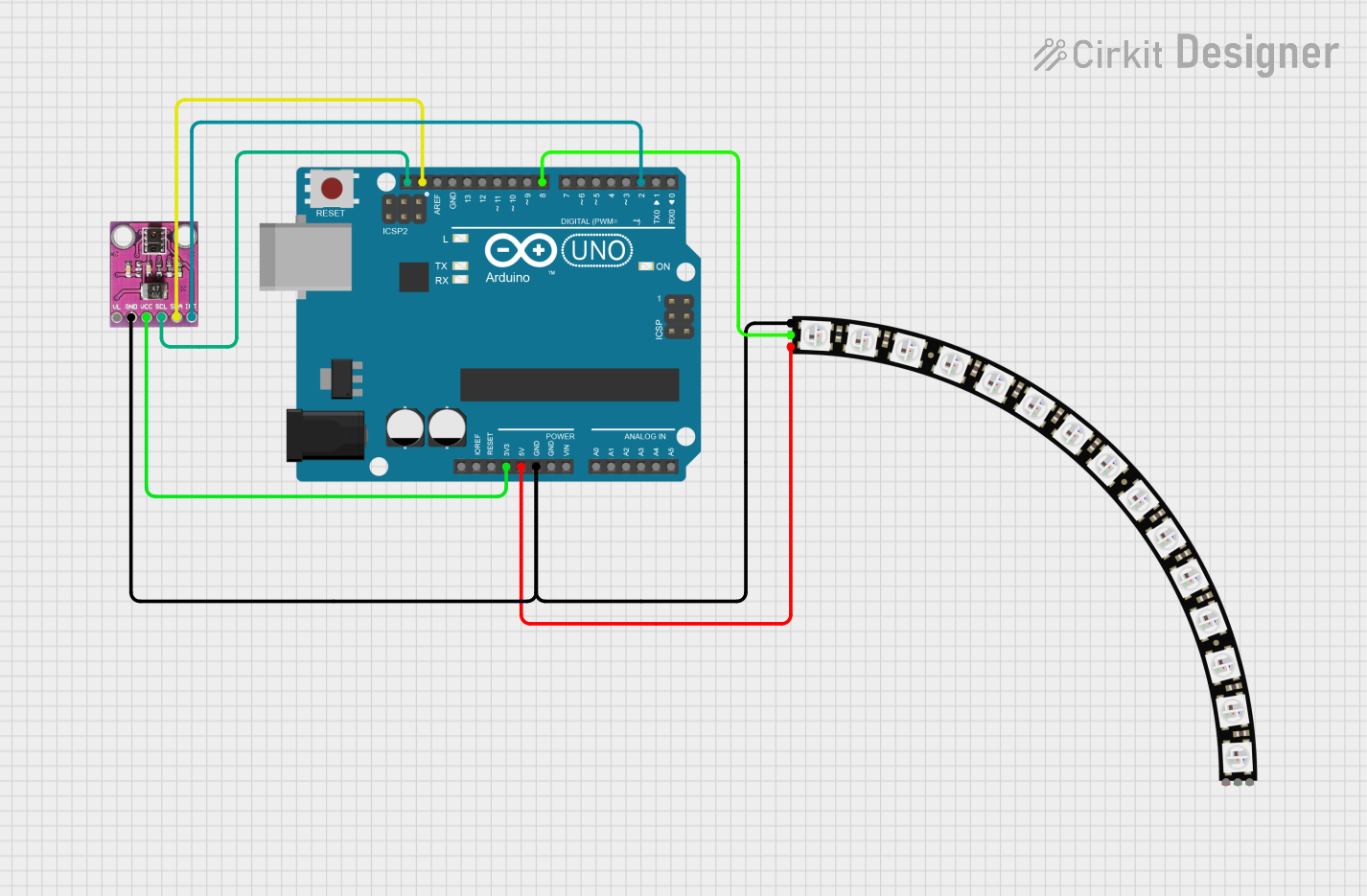
Circuit Documentation
Summary
This circuit integrates an Arduino UNO microcontroller with an APDS-9930 Proximity and Ambient Light Sensor and an Adafruit Quarter 60 NeoPixel Ring. The Arduino UNO serves as the central processing unit, controlling the NeoPixel Ring and interfacing with the APDS-9930 sensor for proximity and ambient light sensing. The NeoPixel Ring is powered by the Arduino and receives data signals for LED control. The APDS-9930 sensor is connected to the Arduino's I2C communication pins and an interrupt pin, although the interrupt functionality is not used in the current configuration.
Component List
Arduino UNO
- Description: A microcontroller board based on the ATmega328P.
- Purpose: Acts as the central controller for the circuit, interfacing with the sensor and controlling the NeoPixel Ring.
APDS-9930 Proximity and Ambient Light Sensor
- Description: A sensor that offers ambient light and proximity detection.
- Purpose: Provides ambient light and proximity sensing capabilities to the circuit.
Adafruit Quarter 60 NeoPixel Ring
- Description: A circular LED strip with 60 individually addressable RGB LEDs.
- Purpose: Displays visual information and effects controlled by the Arduino UNO.
Wiring Details
Arduino UNO
- 3.3V: Powers the APDS-9930 sensor.
- 5V: Powers the Adafruit NeoPixel Ring.
- GND: Common ground for the circuit.
- SCL: I2C clock line, connected to the APDS-9930 sensor.
- SDA: I2C data line, connected to the APDS-9930 sensor.
- D8: Data input for the NeoPixel Ring.
- D2: Connected to the INT pin of the APDS-9930 sensor (not used).
APDS-9930 Proximity and Ambient Light Sensor
- VCC (3.3V): Powered by the Arduino's 3.3V output.
- GND: Connected to the common ground.
- SCL: I2C clock line from the Arduino.
- SDA: I2C data line from the Arduino.
- INT (not used): Interrupt pin, connected to D2 on the Arduino (not used).
Adafruit Quarter 60 NeoPixel Ring
- VDD: Powered by the Arduino's 5V output.
- GND: Connected to the common ground.
- DATAIN: Receives data signals from D8 on the Arduino.
Documented Code
Arduino UNO Code (sketch.ino)
void setup() {
  // put your setup code here, to run once:

}

void loop() {
  // put your main code here, to run repeatedly:

}
This code template provides the basic structure for an Arduino sketch, with setup() and loop() functions defined. The setup() function is intended for initialization code that runs once at startup, while the loop() function contains code that runs continuously.
Note: The actual functionality for interacting with the APDS-9930 sensor and controlling the NeoPixel Ring needs to be implemented within these functions. This would typically involve initializing the sensor and NeoPixel libraries, setting up communication protocols, and writing the logic for sensor data handling and LED control.