
Arduino-Based Temperature and Humidity Monitoring with MAX30102 Pulse Oximetry
View and Edit Project In Cirkit Designer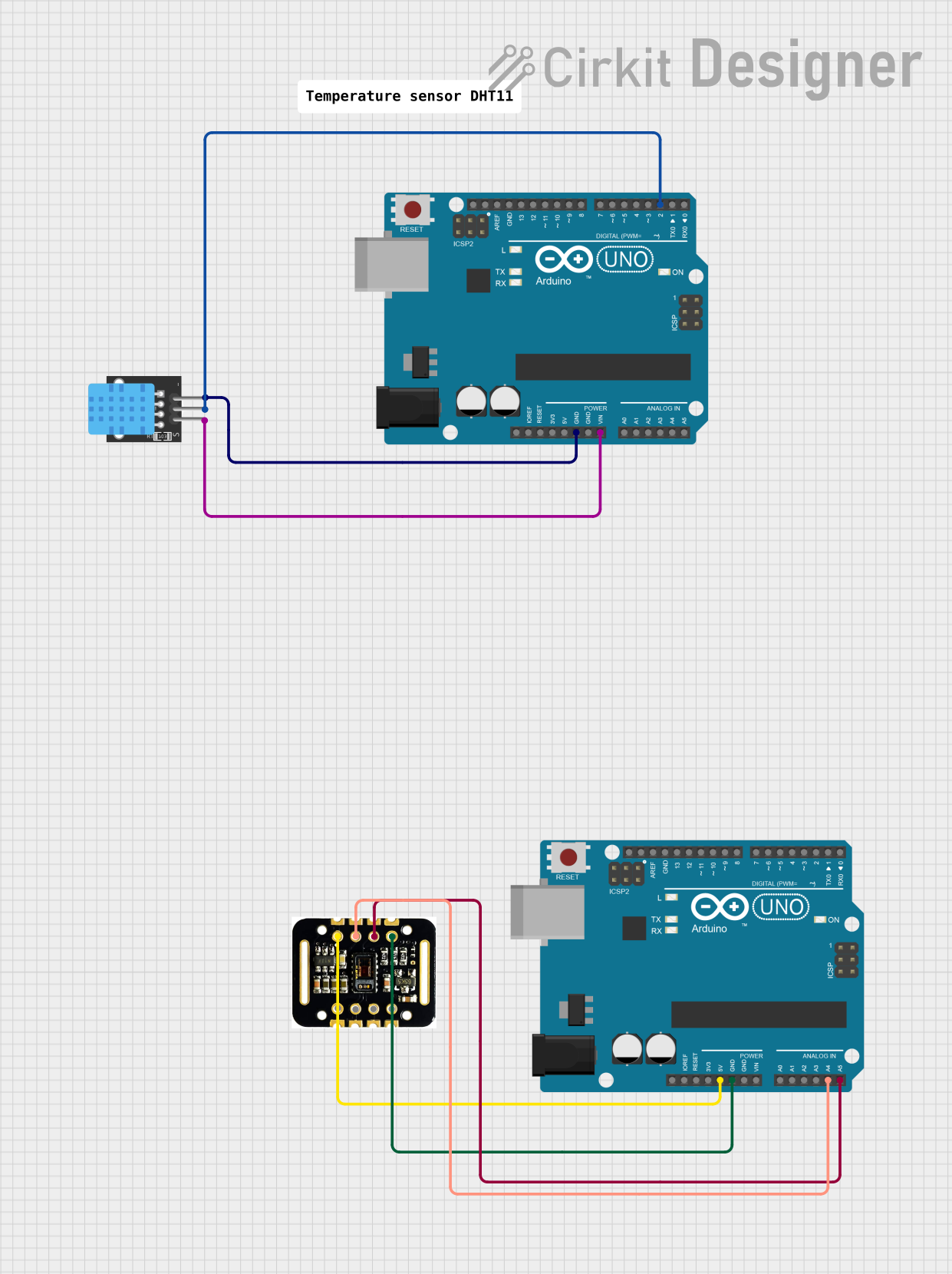
Circuit Documentation
Summary
The circuit in question consists of two Arduino UNO microcontrollers, a DHT11 temperature and humidity sensor, and a MAX30102 heart rate and blood oxygen saturation sensor. The DHT11 sensor is connected to one of the Arduino UNOs, which is programmed to read temperature, humidity, and calculate the heat index. The MAX30102 sensor is connected to the second Arduino UNO, but no specific code is provided for its operation. The circuit is designed to monitor environmental data and potentially human health indicators.
Component List
Arduino UNO
- Description: A microcontroller board based on the ATmega328P. It has 14 digital input/output pins, 6 analog inputs, a 16 MHz quartz crystal, a USB connection, a power jack, an ICSP header, and a reset button.
- Purpose: Acts as the central processing unit for the sensors, reading sensor data and executing embedded code.
DHT11
- Description: A basic, ultra low-cost digital temperature and humidity sensor. It uses a capacitive humidity sensor and a thermistor to measure the surrounding air and outputs a digital signal on the data pin.
- Purpose: Measures the temperature and humidity of the environment.
MAX30102 HR + SpO2 Sensor
- Description: An integrated pulse oximetry and heart-rate monitor sensor solution. It combines two LEDs, a photodetector, optimized optics, and low-noise analog signal processing to detect pulse oximetry and heart-rate signals.
- Purpose: Measures blood oxygen saturation and heart rate.
Wiring Details
DHT11 Sensor Wiring
- 5V: Connected to the Vin pin of the Arduino UNO.
- S (Signal): Connected to the digital pin D2 of the Arduino UNO.
- GND: Connected to the GND pin of the Arduino UNO.
MAX30102 Sensor Wiring
- VIN: Connected to the 5V pin of the second Arduino UNO.
- GND: Connected to the GND pin of the second Arduino UNO.
- SCL: Connected to the analog pin A5 of the second Arduino UNO.
- SDA: Connected to the analog pin A4 of the second Arduino UNO.
Documented Code
Arduino UNO (DHT11 Sensor Code)
#include "DHT.h"

#define DHTPIN 2     // Digital pin connected to the DHT sensor
#define DHTTYPE DHT11   // DHT 11

// Initialize DHT sensor.
DHT dht(DHTPIN, DHTTYPE);

void setup() {
  Serial.begin(9600);
  Serial.println("DHT11 test!");

  dht.begin();
}

void loop() {
  // Wait a few seconds between measurements.
  delay(2000);

  // Reading temperature or humidity takes about 250 milliseconds!
  float h = dht.readHumidity();
  // Read temperature as Celsius (the default)
  float t = dht.readTemperature();
  // Read temperature as Fahrenheit (isFahrenheit = true)
  float f = dht.readTemperature(true);

  // Check if any reads failed and exit early (to try again).
  if (isnan(h) || isnan(t) || isnan(f)) {
    Serial.println("Failed to read from DHT sensor!");
    return;
  }

  // Compute heat index in Fahrenheit (the default)
  float hif = dht.computeHeatIndex(f, h);
  // Compute heat index in Celsius (isFahreheit = false)
  float hic = dht.computeHeatIndex(t, h, false);

  Serial.print("Humidity: ");
  Serial.print(h);
  Serial.print(" %\t");
  Serial.print("Temperature: ");
  Serial.print(t);
  Serial.print(" °C ");
  Serial.print(f);
  Serial.print(" °F\t");
  Serial.print("Heat index: ");
  Serial.print(hic);
  Serial.print(" °C ");
  Serial.print(hif);
  Serial.println(" °F");
}
Arduino UNO (MAX30102 Sensor Code)
The code for the MAX30102 sensor is not provided in the input data. However, the sensor is wired to the second Arduino UNO, with SDA and SCL pins connected to A4 and A5, respectively, which are the default I2C pins on the Arduino UNO. The user would need to include a library for the MAX30102 and write code to initialize the sensor and read the data from it.
// Placeholder for MAX30102 sensor code
void setup() {
  // Initialize MAX30102 sensor here
}

void loop() {
  // Read data from MAX30102 sensor here
}
This concludes the documentation for the provided circuit. Further details and operational code for the MAX30102 sensor should be added as per the requirements of the project.