
Arduino-Based Rain-Sensing Motor Controller with L298N Driver
View and Edit Project In Cirkit Designer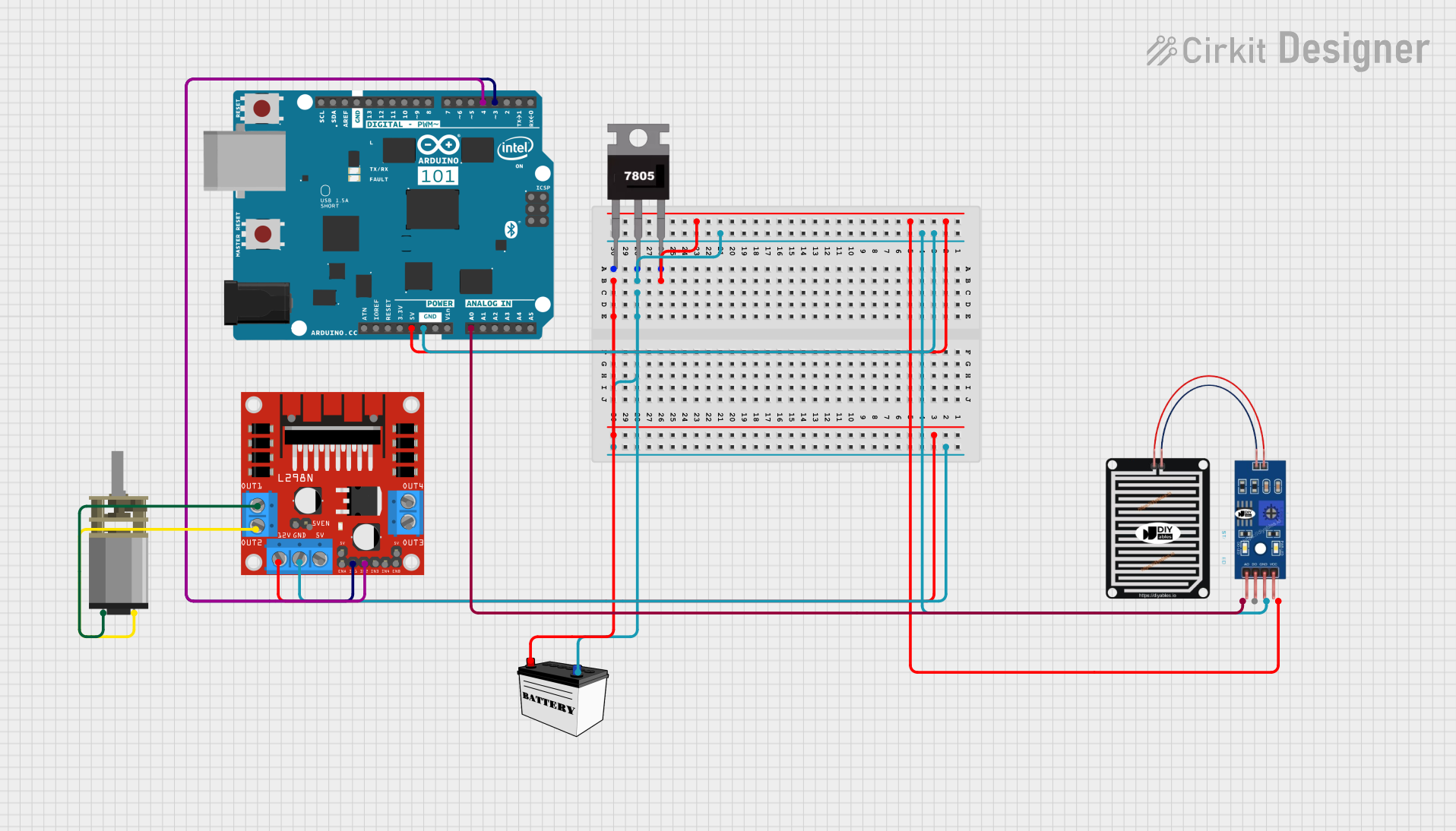
Circuit Documentation
Summary
This circuit is designed to control a DC motor based on the input from a rain sensor. The system uses an Arduino 101 microcontroller to read the rain sensor's output and drive the motor through an L298N motor driver. The motor will rotate forward when rain is detected and reverse when the rain stops. Power is supplied by a 12V battery, regulated to 5V using a 7805 voltage regulator.
Component List
Arduino 101
- Description: Microcontroller board based on the Intel Curie module.
- Pins: A5/SCL, A4/SDA, AREF, GND, D13/SCK, D12/MISO, D11 PWM/MOSI, D10 PWM/SS, D9 PWM, D8, D7, D6 PWM, D5 PWM, D4, D3 PWM, D2, D1/TX, D0/RX, AIN, ioref, RESET, 3V3, 5V, VIN, A0, A1, A2, A3, ICSP MISO, ICSP SCK, ICSP MOSI
RAIN SENSOR
- Description: Sensor to detect the presence of rain.
- Pins: AO, DO, GRD, VCC
L298N DC Motor Driver
- Description: Dual H-Bridge motor driver to control the direction and speed of DC motors.
- Pins: OUT1, OUT2, 12V, GND, 5V, OUT3, OUT4, 5V-ENA-JMP-I, 5V-ENA-JMP-O, +5V-J1, +5V-J2, ENA, IN1, IN2, IN3, IN4, ENB
7805 Voltage Regulator
- Description: Linear voltage regulator to convert 12V to 5V.
- Pins: Vin, Gnd, Vout
12V Battery (Small Size)
- Description: Power source for the circuit.
- Pins: VCC, GND
DC Mini Metal Gear Motor
- Description: Small DC motor with metal gears.
- Pins: IN1, IN2
Wiring Details
Arduino 101
- 5V: Connected to Vout of 7805 and VCC of RAIN SENSOR
- GND: Connected to GND of 7805, 12V Battery, L298N DC Motor Driver, and GRD of RAIN SENSOR
- D4: Connected to IN2 of L298N DC Motor Driver
- D3 PWM: Connected to IN1 of L298N DC Motor Driver
- A0: Connected to AO of RAIN SENSOR
RAIN SENSOR
- VCC: Connected to 5V of Arduino 101
- GRD: Connected to GND of Arduino 101
- AO: Connected to A0 of Arduino 101
L298N DC Motor Driver
- 12V: Connected to VCC of 12V Battery
- GND: Connected to GND of 12V Battery
- IN1: Connected to D3 PWM of Arduino 101
- IN2: Connected to D4 of Arduino 101
- OUT1: Connected to IN1 of DC Mini Metal Gear Motor
- OUT2: Connected to IN2 of DC Mini Metal Gear Motor
7805 Voltage Regulator
- Vin: Connected to VCC of 12V Battery
- Gnd: Connected to GND of 12V Battery
- Vout: Connected to 5V of Arduino 101 and VCC of RAIN SENSOR
12V Battery (Small Size)
- VCC: Connected to Vin of 7805 and 12V of L298N DC Motor Driver
- GND: Connected to GND of 7805, Arduino 101, L298N DC Motor Driver, and GRD of RAIN SENSOR
DC Mini Metal Gear Motor
- IN1: Connected to OUT1 of L298N DC Motor Driver
- IN2: Connected to OUT2 of L298N DC Motor Driver
Code Documentation
// Define the pins
const int rainSensorPin = A0;     // Pin connected to the rain sensor
const int motorForwardPin = 3;   // Pin connected to the motor for forward rotation
const int motorReversePin = 4;   // Pin connected to the motor for reverse rotation

// Variables to track the state of the sensor and motor
bool previousSensorState = LOW;  // Stores the previous state of the sensor

void setup() {
  pinMode(rainSensorPin, INPUT);
  pinMode(motorForwardPin, OUTPUT);
  pinMode(motorReversePin, OUTPUT);

  // Ensure motor is off at the start
  digitalWrite(motorForwardPin, LOW);
  digitalWrite(motorReversePin, LOW);
}

void loop() {
  int currentSensorState = digitalRead(rainSensorPin);

  if (currentSensorState == HIGH && previousSensorState == LOW) {
    // Rain starts: sensor goes from LOW to HIGH
    digitalWrite(motorForwardPin, HIGH);  // Turn motor forward
    delay(2000); // Run motor forward for 2 seconds
    digitalWrite(motorForwardPin, LOW);   // Stop the motor
  }
  else if (currentSensorState == LOW && previousSensorState == HIGH) {
    // Rain stops: sensor goes from HIGH to LOW
    digitalWrite(motorReversePin, HIGH);  // Turn motor in reverse
    delay(2000); // Run motor in reverse for 2 seconds
    digitalWrite(motorReversePin, LOW);   // Stop the motor
  }

  // Update the previous sensor state
  previousSensorState = currentSensorState;
}
This code reads the state of the rain sensor and controls the motor accordingly. When rain is detected, the motor runs forward for 2 seconds. When the rain stops, the motor runs in reverse for 2 seconds. The motor is controlled using the L298N motor driver, and the rain sensor is read through the analog pin A0 on the Arduino 101.