
Arduino UNO Line Following Robot with L298N Motor Driver and KY-033 Sensors
View and Edit Project In Cirkit Designer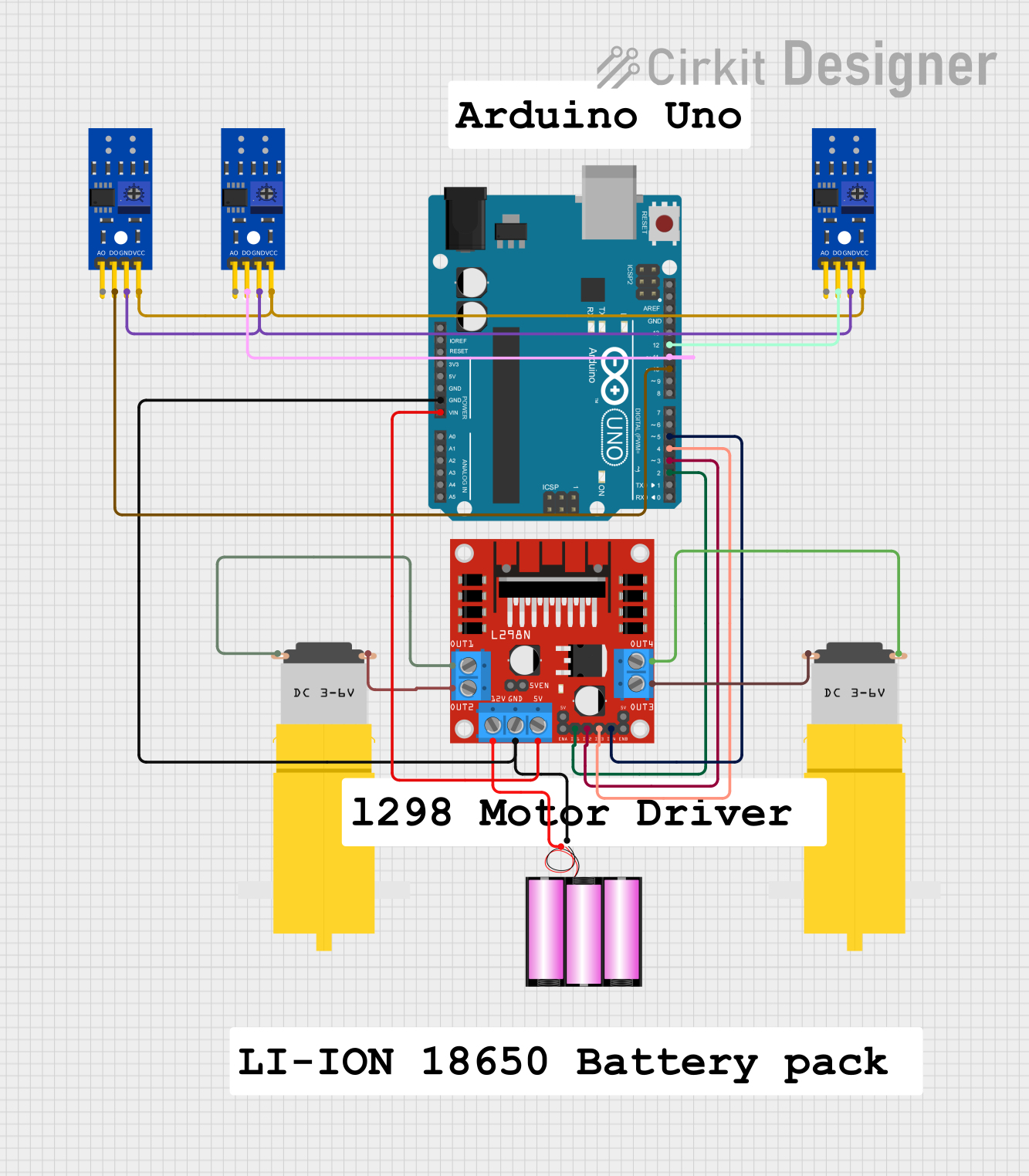
Circuit Documentation
Summary
This document provides a detailed overview of a circuit designed to control a line-following robot. The circuit includes an Arduino UNO microcontroller, an L298N DC motor driver, two hobby motors, a 12V battery, and three KY-033 line tracking sensors. The Arduino UNO reads the sensor values and controls the motors based on the sensor inputs to follow a line.
Component List
Arduino UNO
- Description: A microcontroller board based on the ATmega328P.
- Pins: UNUSED, IOREF, Reset, 3.3V, 5V, GND, Vin, A0, A1, A2, A3, A4, A5, SCL, SDA, AREF, D13, D12, D11, D10, D9, D8, D7, D6, D5, D4, D3, D2, D1, D0
L298N DC Motor Driver
- Description: A dual H-Bridge motor driver that allows control of two DC motors.
- Pins: OUT1, OUT2, 12V, GND, 5V, OUT3, OUT4, 5V-ENA-JMP-I, 5V-ENA-JMP-O, +5V-J1, +5V-J2, ENA, IN1, IN2, IN3, IN4, ENB
Motor amarillo motorreductor hobby
- Description: A small DC motor with a gearbox for increased torque.
- Pins: vcc, GND
Battery 12V
- Description: A 12V battery used to power the motor driver and motors.
- Pins: +, -
KY-033 Line Tracking Sensor
- Description: A sensor module used for line tracking applications.
- Pins: A0, D0, GND, VCC
Wiring Details
Arduino UNO
GND connected to:
- L298N DC motor driver (GND)
- Battery 12V (-)
Vin connected to:
- L298N DC motor driver (5V)
D12 connected to:
- KY-033 Line Tracking Sensor (D0)
D11 connected to:
- KY-033 Line Tracking Sensor (D0)
D10 connected to:
- KY-033 Line Tracking Sensor (D0)
D5 connected to:
- L298N DC motor driver (IN4)
D4 connected to:
- L298N DC motor driver (IN3)
D3 connected to:
- L298N DC motor driver (IN2)
D2 connected to:
- L298N DC motor driver (IN1)
L298N DC Motor Driver
GND connected to:
- Arduino UNO (GND)
- Battery 12V (-)
5V connected to:
- Arduino UNO (Vin)
IN4 connected to:
- Arduino UNO (D5)
IN3 connected to:
- Arduino UNO (D4)
IN2 connected to:
- Arduino UNO (D3)
IN1 connected to:
- Arduino UNO (D2)
OUT1 connected to:
- Motor amarillo motorreductor hobby (GND)
OUT2 connected to:
- Motor amarillo motorreductor hobby (vcc)
12V connected to:
- Battery 12V (+)
OUT3 connected to:
- Motor amarillo motorreductor hobby (GND)
OUT4 connected to:
- Motor amarillo motorreductor hobby (vcc)
Motor amarillo motorreductor hobby
GND connected to:
- L298N DC motor driver (OUT1)
- L298N DC motor driver (OUT3)
vcc connected to:
- L298N DC motor driver (OUT2)
- L298N DC motor driver (OUT4)
Battery 12V
- connected to:
- Arduino UNO (GND)
- L298N DC motor driver (GND)
+ connected to:
- L298N DC motor driver (12V)
KY-033 Line Tracking Sensor
D0 connected to:
- Arduino UNO (D12)
- Arduino UNO (D11)
- Arduino UNO (D10)
GND connected to:
- KY-033 Line Tracking Sensor (GND)
- KY-033 Line Tracking Sensor (GND)
- KY-033 Line Tracking Sensor (GND)
VCC connected to:
- KY-033 Line Tracking Sensor (VCC)
- KY-033 Line Tracking Sensor (VCC)
- KY-033 Line Tracking Sensor (VCC)
Code Documentation
// Pin definitions
const int sensor1Pin = 10; // D0 of KY-033
const int sensor2Pin = 11; // D0 of KY-033
const int sensor3Pin = 12; // D0 of KY-033
const int motor1Pin1 = 2;  // IN1 of L298N
const int motor1Pin2 = 3;  // IN2 of L298N
const int motor2Pin1 = 4;  // IN3 of L298N
const int motor2Pin2 = 5;  // IN4 of L298N

void setup() {
  // Initialize serial communication
  Serial.begin(9600);

  // Set motor pins as outputs
  pinMode(motor1Pin1, OUTPUT);
  pinMode(motor1Pin2, OUTPUT);
  pinMode(motor2Pin1, OUTPUT);
  pinMode(motor2Pin2, OUTPUT);

  // Set sensor pins as inputs
  pinMode(sensor1Pin, INPUT);
  pinMode(sensor2Pin, INPUT);
  pinMode(sensor3Pin, INPUT);
}

void loop() {
  // Read sensor values
  int sensor1Value = digitalRead(sensor1Pin);
  int sensor2Value = digitalRead(sensor2Pin);
  int sensor3Value = digitalRead(sensor3Pin);

  // Print sensor values to serial monitor
  Serial.print("Sensor1: ");
  Serial.print(sensor1Value);
  Serial.print(" Sensor2: ");
  Serial.print(sensor2Value);
  Serial.print(" Sensor3: ");
  Serial.println(sensor3Value);

  // Control motors based on sensor values
  if (sensor1Value == LOW && sensor2Value == HIGH && sensor3Value == LOW) {
    // Move forward
    digitalWrite(motor1Pin1, HIGH);
    digitalWrite(motor1Pin2, LOW);
    digitalWrite(motor2Pin1, HIGH);
    digitalWrite(motor2Pin2, LOW);
  } else if (sensor1Value == HIGH && sensor2Value == LOW && sensor3Value == LOW) {
    // Turn left
    digitalWrite(motor1Pin1, LOW);
    digitalWrite(motor1Pin2, HIGH);
    digitalWrite(motor2Pin1, HIGH);
    digitalWrite(motor2Pin2, LOW);
  } else if (sensor1Value == LOW && sensor2Value == LOW && sensor3Value == HIGH) {
    // Turn right
    digitalWrite(motor1Pin1, HIGH);
    digitalWrite(motor1Pin2, LOW);
    digitalWrite(motor2Pin1, LOW);
    digitalWrite(motor2Pin2, HIGH);
  } else {
    // Stop
    digitalWrite(motor1Pin1, LOW);
    digitalWrite(motor1Pin2, LOW);
    digitalWrite(motor2Pin1, LOW);
    digitalWrite(motor2Pin2, LOW);
  }

  // Small delay to stabilize readings
  delay(100);
}
This code initializes the pins for the sensors and motors, reads the sensor values, and controls the motors based on the sensor inputs to follow a line. The robot moves forward when the middle sensor detects the line, turns left when the left sensor detects the line, and turns right when the right sensor detects the line. If no sensor detects the line, the robot stops.