
Arduino UNO and HC-05 Bluetooth Controlled Medicine Dispenser with Servo Motors
View and Edit Project In Cirkit Designer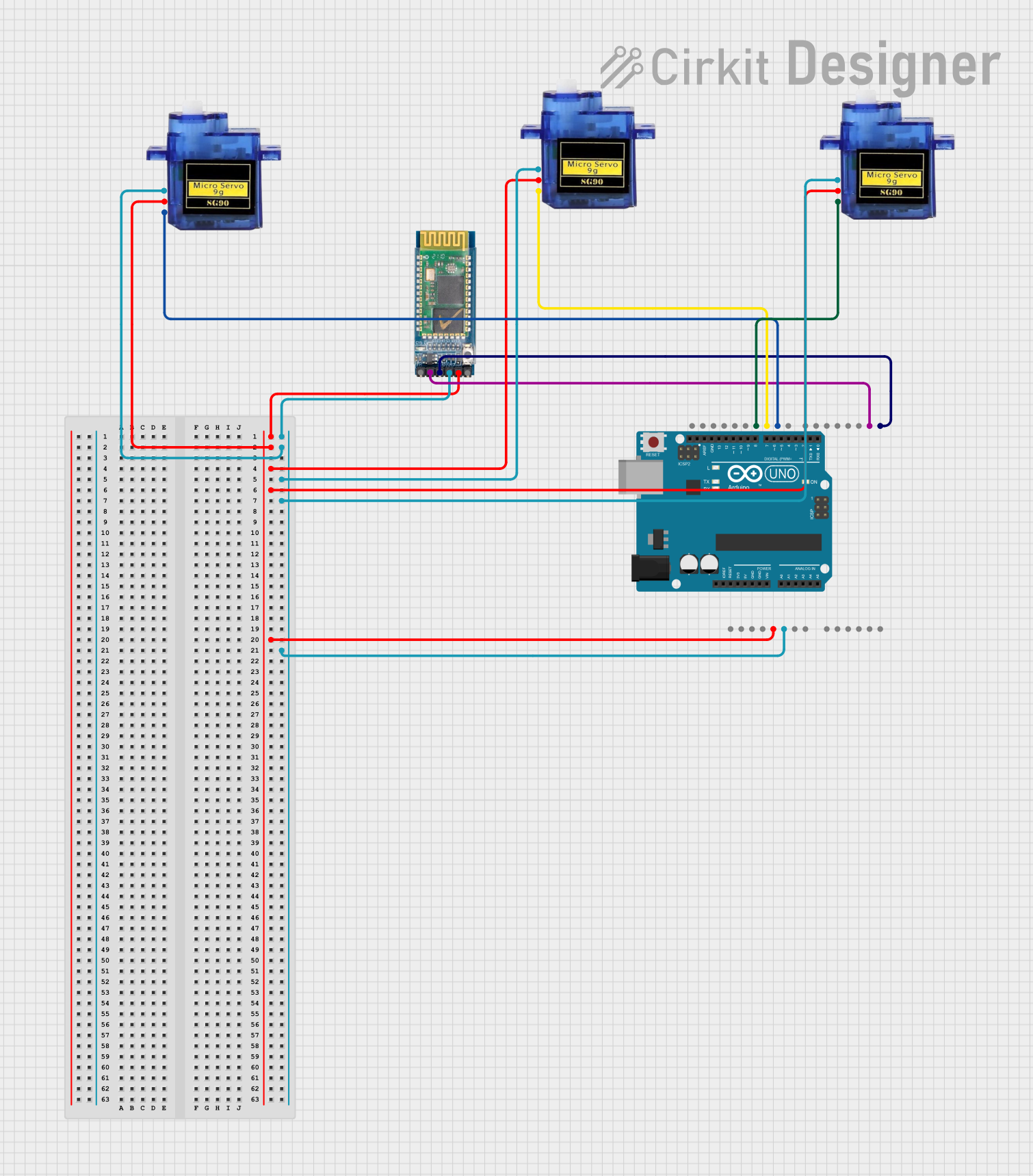
Circuit Documentation
Summary
This circuit is a Bluetooth-controlled medicine dispenser. It uses an Arduino UNO microcontroller to control three micro servos, which dispense different types of medicine based on commands received via a Bluetooth module (HC-05). The servos are labeled for dispensing Paracetamol, Amlodipine, and Dolo. The Bluetooth module communicates with the Arduino to receive commands and control the servos accordingly.
Component List
HC-05 Bluetooth Module
- Description: A Bluetooth module used for wireless communication.
- Pins: STATE, RXD, TXD, GND, VCC, EN
Arduino UNO
- Description: A microcontroller board based on the ATmega328P.
- Pins: UNUSED, IOREF, Reset, 3.3V, 5V, GND, Vin, A0, A1, A2, A3, A4, A5, SCL, SDA, AREF, D13, D12, D11, D10, D9, D8, D7, D6, D5, D4, D3, D2, D1, D0
Micro Servo 9G (Paracetamol)
- Description: A small servo motor used to dispense Paracetamol.
- Pins: GND, +5V, PWM
Micro Servo 9G (Amlodipine)
- Description: A small servo motor used to dispense Amlodipine.
- Pins: GND, +5V, PWM
Micro Servo 9G (Dolo)
- Description: A small servo motor used to dispense Dolo.
- Pins: GND, +5V, PWM
Wiring Details
HC-05 Bluetooth Module
- RXD connected to D1 on Arduino UNO
- TXD connected to D0 on Arduino UNO
- GND connected to GND on Arduino UNO
- VCC connected to 5V on Arduino UNO
Arduino UNO
- D1 connected to RXD on HC-05 Bluetooth Module
- D0 connected to TXD on HC-05 Bluetooth Module
- GND connected to GND on HC-05 Bluetooth Module, Micro Servo 9G (Paracetamol), Micro Servo 9G (Amlodipine), Micro Servo 9G (Dolo)
- 5V connected to VCC on HC-05 Bluetooth Module, Micro Servo 9G (Paracetamol), Micro Servo 9G (Amlodipine), Micro Servo 9G (Dolo)
- D9 connected to PWM on Micro Servo 9G (Paracetamol)
- D10 connected to PWM on Micro Servo 9G (Amlodipine)
- D11 connected to PWM on Micro Servo 9G (Dolo)
Micro Servo 9G (Paracetamol)
- GND connected to GND on Arduino UNO
- +5V connected to 5V on Arduino UNO
- PWM connected to D9 on Arduino UNO
Micro Servo 9G (Amlodipine)
- GND connected to GND on Arduino UNO
- +5V connected to 5V on Arduino UNO
- PWM connected to D10 on Arduino UNO
Micro Servo 9G (Dolo)
- GND connected to GND on Arduino UNO
- +5V connected to 5V on Arduino UNO
- PWM connected to D11 on Arduino UNO
Code Documentation
Arduino UNO Code
#include <Servo.h>

// Pin configuration
#define SERVO1_PIN 9
#define SERVO2_PIN 10
#define SERVO3_PIN 11

// Servo motor objects
Servo servo1; // Paracetamol
Servo servo2; // Amlodipine
Servo servo3; // Dolo

// Bluetooth input string
String bluetoothInput = "";

void setup() {
  // Attach servos to their pins
  servo1.attach(SERVO1_PIN);
  servo2.attach(SERVO2_PIN);
  servo3.attach(SERVO3_PIN);

  // Set initial servo positions to 0 degrees
  servo1.write(0);
  servo2.write(0);
  servo3.write(0);

  // Initialize Bluetooth communication on Arduino TX and RX
  Serial.begin(9600);

  // Display welcome message via Serial Monitor
  Serial.println("Medicine Dispenser Ready");
}

void loop() {
  // Check for Bluetooth input
  if (Serial.available()) {
    char receivedChar = Serial.read();

    // If end of input is detected
    if (receivedChar == '\n') {
      processInput(bluetoothInput);
      bluetoothInput = ""; // Reset input string
    } else {
      bluetoothInput += receivedChar; // Append character to input
    }
  }
}

void processInput(String input) {
  input.trim(); // Remove any leading/trailing whitespace

  if (input.equalsIgnoreCase("paracetamol")) {
    dispenseMedicine("Paracetamol", servo1);
  } else if (input.equalsIgnoreCase("amlodipine")) {
    dispenseMedicine("Amlodipine", servo2);
  } else if (input.equalsIgnoreCase("dolo")) {
    dispenseMedicine("Dolo", servo3);
  } else {
    Serial.println("Invalid Medicine");
  }
}

void dispenseMedicine(String medicineName, Servo &servo) {
  // Display dispensing message via Serial Monitor
  Serial.println("Dispensing: " + medicineName);

  // Rotate the servo to dispense
  servo.write(90); // Rotate to 90 degrees
  delay(1000); // Wait for 1 second
  servo.write(0); // Return to 0 degrees
  delay(500); // Wait for half a second

  // Indicate ready state
  Serial.println("Ready");
}
This code initializes the servos and sets up Bluetooth communication. It listens for commands via Bluetooth and dispenses the corresponding medicine by rotating the appropriate servo motor.