
Arduino UNO Controlled Automatic Plant Watering System with Bluetooth Interface
View and Edit Project In Cirkit Designer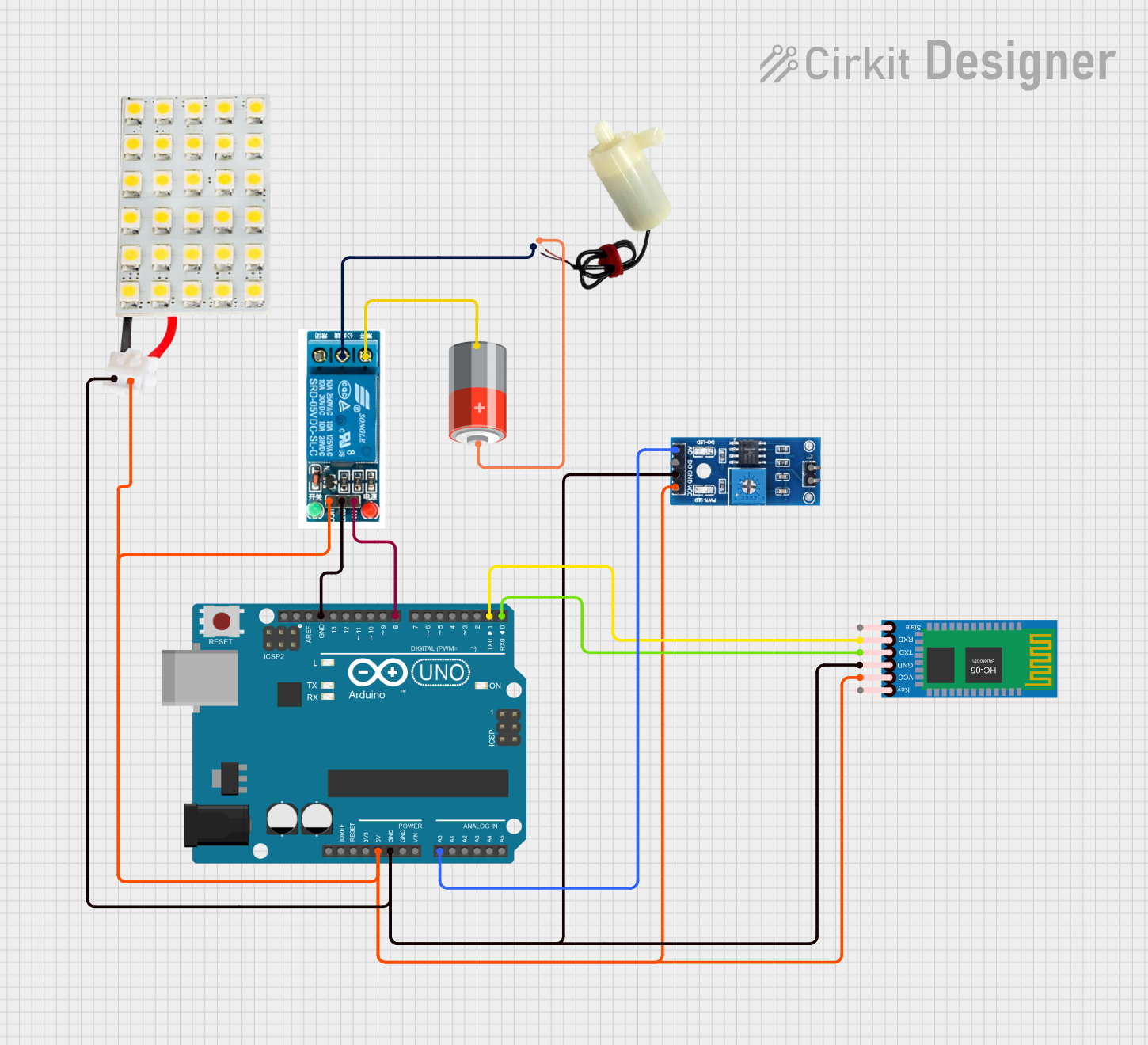
Circuit Documentation
Summary
This circuit is designed to monitor soil moisture levels and control a water pump based on the moisture content. It features an Arduino UNO microcontroller interfaced with an HC-05 Bluetooth module for wireless communication, a rain/snow sensor for detecting moisture levels, an LED board as an indicator, a 5V relay to control the water pump, and a 5V mini water pump for irrigation. The system operates in both automatic and manual modes, allowing for remote control via Bluetooth commands.
Component List
Arduino UNO
- Microcontroller board based on the ATmega328P
- Used for controlling the entire circuit, reading sensor data, and communicating with the Bluetooth module
HC-05 Bluetooth Module
- Wireless communication module
- Enables remote control of the circuit via Bluetooth
LED Board
- Visual indicator
- Used to display the status of the system or alerts
Rain/Snow Sensor - Board
- Moisture detection sensor
- Measures the moisture level in the soil
5V Relay
- Electromechanical switch
- Controls the power supply to the water pump
5V Mini Water Pump
- Actuator for pumping water
- Used to irrigate the soil when moisture levels are low
5V Battery
- Power source
- Supplies power to the water pump
Wiring Details
Arduino UNO
5Vconnected to VCC of relay, LED board, HC-05 Bluetooth module, and rain/snow sensorGNDconnected to GND of relay, LED board, HC-05 Bluetooth module, and rain/snow sensorA0connected to A0 (Analog) of rain/snow sensorD8connected to In of relayD1(TX) connected to RXD of HC-05 Bluetooth moduleD0(RX) connected to TXD of HC-05 Bluetooth module
HC-05 Bluetooth Module
VCCconnected to 5V of Arduino UNOGNDconnected to GND of Arduino UNOTXDconnected to D0 (RX) of Arduino UNORXDconnected to D1 (TX) of Arduino UNO
LED Board
VCCconnected to 5V of Arduino UNOGNDconnected to GND of Arduino UNO
Rain/Snow Sensor - Board
A0 (Analog)connected to A0 of Arduino UNOGNDconnected to GND of Arduino UNOVCC (5V)connected to 5V of Arduino UNO
5V Relay
VCCconnected to 5V of Arduino UNOGNDconnected to GND of Arduino UNOInconnected to D8 of Arduino UNONormally Openconnected to-of 5V BatteryCommon terminalconnected to negative pin of 5V mini water pump
5V Mini Water Pump
positive pinconnected to+of 5V Batterynegative pinconnected to Common terminal of 5V relay
5V Battery
+connected to positive pin of 5V mini water pump-connected to Normally Open of 5V relay
Documented Code
#define moistureSensorPin A0       // Soil moisture sensor pin
#define ledPin 7                   // LED pin
#define relayPin 8                 // Relay pin for motor control
#define thresholdPercent 20        // Moisture level threshold percentage

char value;                        // Variable for Bluetooth command
int moistureValue = 0;             // Variable for soil moisture reading
int moisturePercent = 0;           // Variable for moisture level in percentage

void setup() {
  Serial.begin(9600);              // Initialize serial communication for Bluetooth
  pinMode(ledPin, OUTPUT);         // Set LED pin as output
  pinMode(relayPin, OUTPUT);       // Set Relay pin as output for motor control
  digitalWrite(ledPin, LOW);       // Ensure LED is off initially
  digitalWrite(relayPin, LOW);     // Ensure motor is off initially
}

void loop() {
  BluetoothControl();              // Call Bluetooth control function
}

void BluetoothControl() {
  if (Serial.available() > 0) {    // Check if data is available from Bluetooth
    value = Serial.read();         // Read the incoming data
  }

  if (value == 'M') {
    ManualOperation();             // Execute Manual Mode
  } else if (value == 'A') {
    AutomaticOperation();          // Execute Automatic Mode
  } else {
    AutomaticOperation();          // Default to Automatic Mode if Bluetooth is disconnected
  }
}

void AutomaticOperation() {
  moistureValue = analogRead(moistureSensorPin);            // Read soil moisture value
  moisturePercent = map(moistureValue, 1023, 0, 0, 100);    // Convert to percentage

  Serial.print("Automatic Mode - Moisture Level: ");
  Serial.print(moisturePercent);
  Serial.println("%");                                      // Send moisture level as percentage

  if (moisturePercent < thresholdPercent) {
    digitalWrite(relayPin, HIGH);                           // Turn motor ON if soil is below 20%
    Serial.println("Soil moisture is low. Motor ON.");
  } else {
    digitalWrite(relayPin, LOW);                            // Turn motor OFF if soil is above 20%
    Serial.println("Soil moisture sufficient. Motor OFF.");
  }
  delay(1000);                                              // 1-second delay for consistent readings
}

void ManualOperation() {
  moistureValue = analogRead(moistureSensorPin);            // Read soil moisture value
  moisturePercent = map(moistureValue, 1023, 0, 0, 100);    // Convert to percentage

  Serial.print("Manual Mode - Moisture Level: ");
  Serial.print(moisturePercent);
  Serial.println("%");                                      // Send moisture level as percentage

  Serial.println("Send '1' to turn LED ON, '0' to turn LED OFF"); // Prompt for LED control
  Serial.println("Send '2' to turn Motor ON, '3' to turn Motor OFF"); // Prompt for Motor control

  if (Serial.available()) {
    char manualCommand = Serial.read();                    // Read command for LED and Motor control

    if (manualCommand == '1') {
      digitalWrite(ledPin, HIGH);                          // Turn LED on
      Serial.println("LED ON");
    } else if (manualCommand == '0') {
      digitalWrite(ledPin, LOW);                           // Turn LED off
      Serial.println("LED OFF");
    } else if (manualCommand == '2') {
      digitalWrite(relayPin, HIGH);                        // Turn motor on via relay
      Serial.println("Motor ON");
      Serial.print("Moisture Level: ");
      Serial.print(moisturePercent);
      Serial.println("%");                                 // Send moisture level as percentage
    } else if (manualCommand == '3') {
      digitalWrite(relayPin, LOW);                         // Turn motor off via relay
      Serial.println("Motor OFF");
      Serial.print("Moisture Level: ");
      Serial.print(moisturePercent);
      Serial.println("%");                                 // Send moisture level as percentage
    }
  }
}
This code is designed to run on the Arduino UNO microcontroller. It reads the soil moisture level from the rain/snow sensor and controls the water pump through the relay based on the moisture level. It also allows for manual control of the LED and pump via Bluetooth commands.