
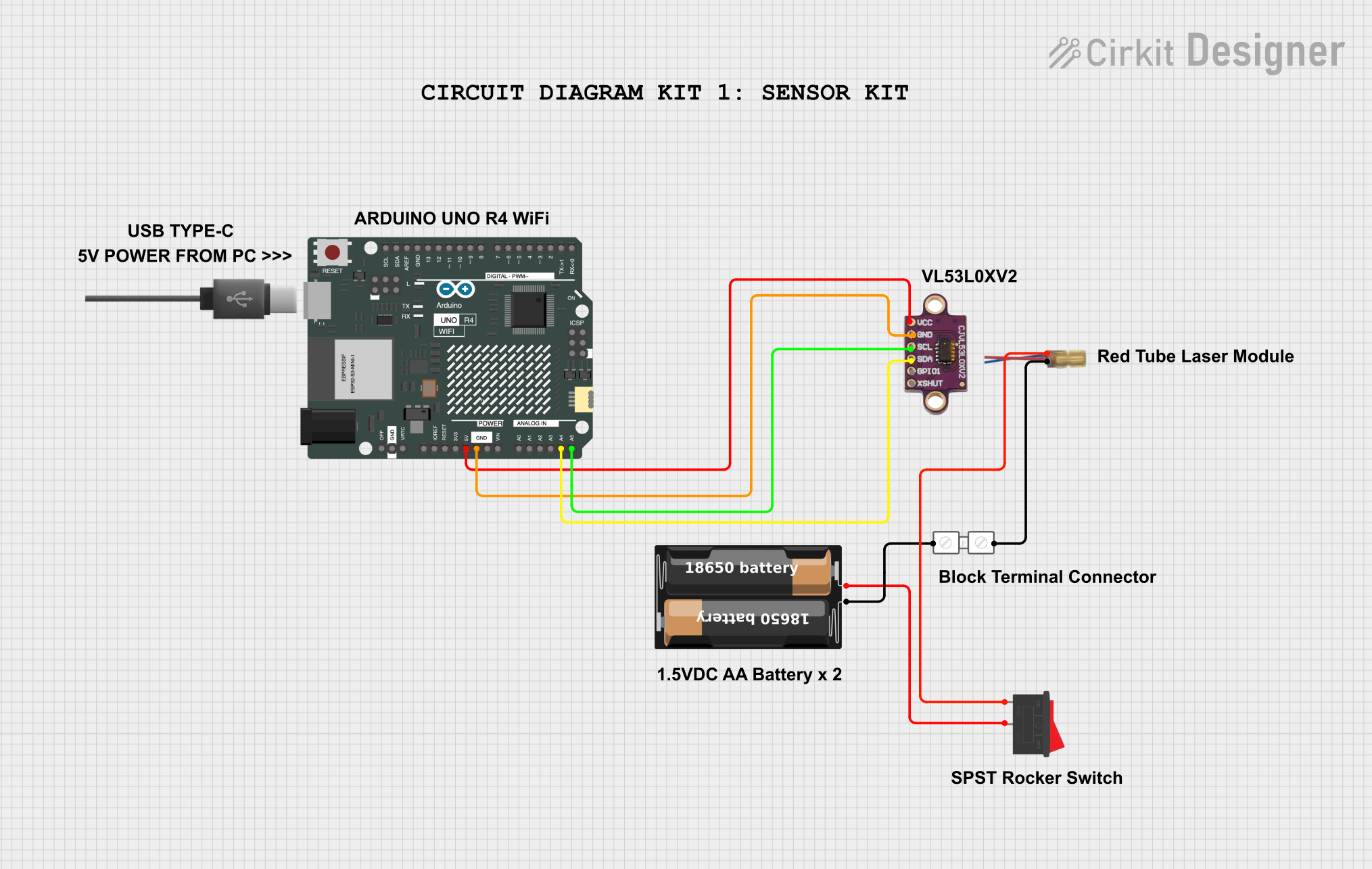
Circuit Documentation
Summary
This document provides a detailed overview of a circuit that includes an Arduino UNO R4 WiFi, a VL53L0X V2 sensor, a rocker switch, a battery case, a terminal block connector, and a tube laser module. The circuit is designed to interface the Arduino with the sensor and control the laser module using a rocker switch.
Component List
Arduino UNO R4 WiFi
- Description: A microcontroller board based on the ATmega328P, featuring built-in WiFi capabilities.
- Pins: OFF, GND, VRTC, IIC0_SCL, IIC0_SDA, 3V3, GPIO 41, GPIO 0, GPIO 42, GPIO 43, GPIO 44, BOOT, IOREF, RESET, 5V, VIN, A0, A1, A2, A3, A4, A5, RSPCKA, CIPO, COPI, D0/RX, D1/TX, D2, D3, D4, D5, D6, D7, D8, D9, D10, D11, D12, D13, AREF, SDA, SCL
Rocker Switch
- Description: A simple on/off switch.
- Pins: 1, 2
My Battery Case
- Description: A battery holder for providing power to the circuit.
- Pins: +, -
Terminal Block Connector
- Description: A connector for securing wire connections.
- Pins: in
VL53L0X V2
- Description: A time-of-flight distance sensor.
- Pins: vcc, GND, scl, SDA, SPI01, XSHUT
Tube Laser Module
- Description: A laser module for emitting a laser beam.
- Pins: +, -
USB Type-C
- Description: A USB Type-C connector.
- Pins: None
Wiring Details
Arduino UNO R4 WiFi
- 5V connected to vcc of VL53L0X V2
- GND connected to GND of VL53L0X V2
- A4 connected to SDA of VL53L0X V2
- A5 connected to scl of VL53L0X V2
Rocker Switch
- Pin 1 connected to + of Tube Laser Module
- Pin 2 connected to + of My Battery Case
My Battery Case
- + connected to Pin 2 of Rocker Switch
- - connected to in of Terminal Block Connector
Terminal Block Connector
- in connected to - of My Battery Case
- in connected to - of Tube Laser Module
VL53L0X V2
- vcc connected to 5V of Arduino UNO R4 WiFi
- GND connected to GND of Arduino UNO R4 WiFi
- SDA connected to A4 of Arduino UNO R4 WiFi
- scl connected to A5 of Arduino UNO R4 WiFi
Tube Laser Module
- + connected to Pin 1 of Rocker Switch
- - connected to in of Terminal Block Connector
Documented Code
Arduino UNO R4 WiFi Code
sketch.ino
void setup() {
  // put your setup code here, to run once:

}

void loop() {
  // put your main code here, to run repeatedly:

}
documentation.txt