
Arduino UNO-Based Line Following and Obstacle Avoidance Robot with Ultrasonic and IR Sensors
View and Edit Project In Cirkit Designer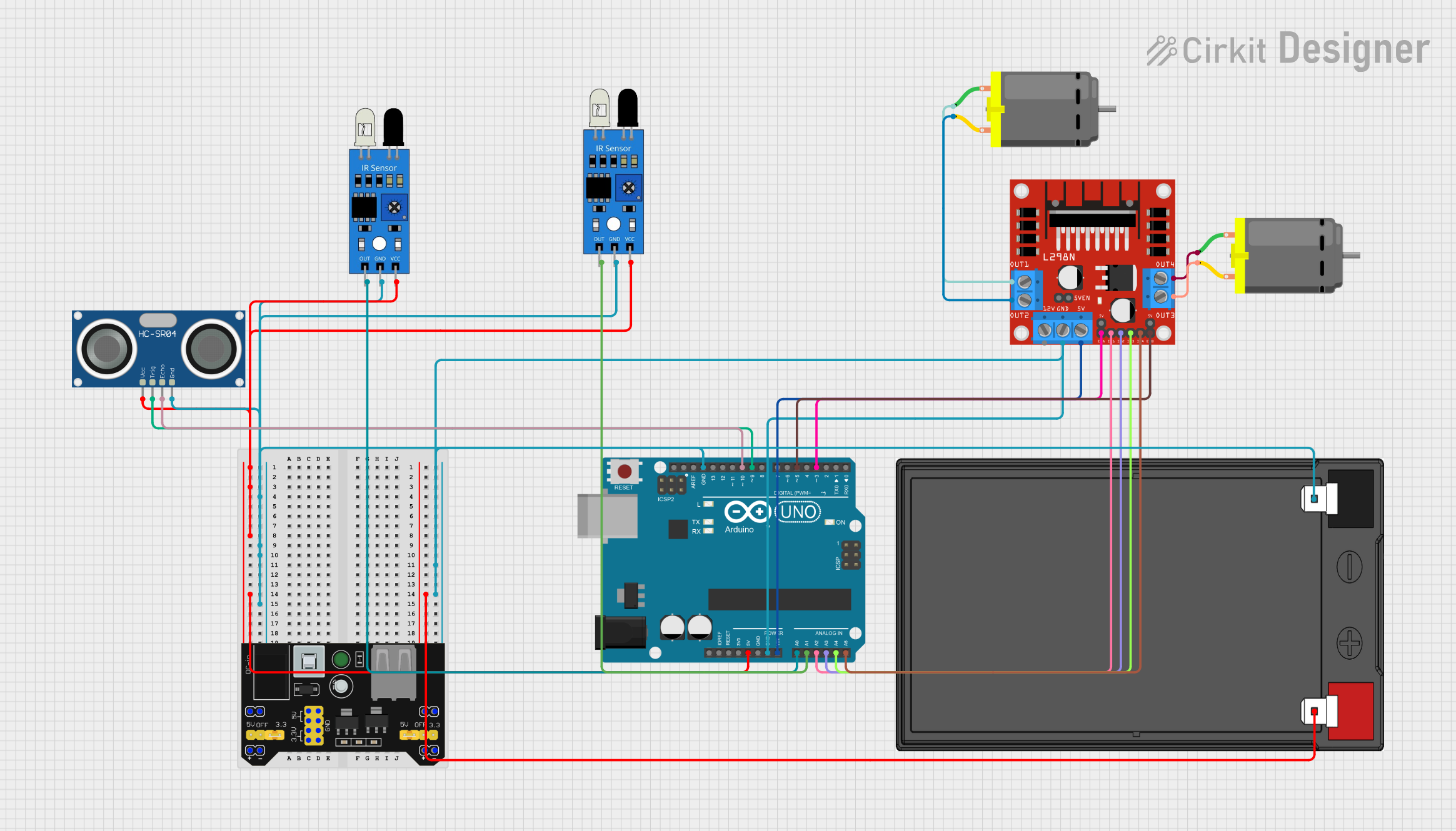
Circuit Documentation
Summary
This document provides a detailed overview of a circuit designed to control a robot with obstacle avoidance and line-following capabilities. The circuit includes an Arduino UNO microcontroller, an HC-SR04 ultrasonic sensor, IR sensors, a 12V battery, an L298N motor driver, DC motors, and an MB102 breadboard power supply module. The Arduino UNO is programmed to read sensor data and control the motors accordingly.
Component List
Arduino UNO
- Description: Microcontroller board based on the ATmega328P.
- Pins: UNUSED, IOREF, Reset, 3.3V, 5V, GND, Vin, A0, A1, A2, A3, A4, A5, SCL, SDA, AREF, D13, D12, D11, D10, D9, D8, D7, D6, D5, D4, D3, D2, D1, D0
HC-SR04 Ultrasonic Sensor
- Description: Ultrasonic distance sensor.
- Pins: VCC, TRIG, ECHO, GND
12V 7Ah Battery
- Description: Power source for the circuit.
- Pins: 12v +, 12v -
L298N DC Motor Driver
- Description: Dual H-Bridge motor driver.
- Pins: OUT1, OUT2, 12V, GND, 5V, OUT3, OUT4, 5V-ENA-JMP-I, 5V-ENA-JMP-O, +5V-J1, +5V-J2, ENA, IN1, IN2, IN3, IN4, ENB
DC Motor
- Description: Motor for driving the robot.
- Pins: pin 1, pin 2
IR Sensor
- Description: Infrared sensor for line following.
- Pins: out, gnd, vcc
MB102 Breadboard Power Supply Module 3.3V/5V
- Description: Power supply module for breadboard.
- Pins: VCC, GND, 3.3V, 5V
Wiring Details
Arduino UNO
- 5V connected to VCC of HC-SR04 Ultrasonic Sensor, IR Sensors, and MB102 Breadboard Power Supply Module.
- GND connected to GND of HC-SR04 Ultrasonic Sensor, IR Sensors, MB102 Breadboard Power Supply Module, and L298N DC Motor Driver.
- Vin connected to 5V of L298N DC Motor Driver.
- A0 connected to out of IR Sensor (Left).
- A1 connected to out of IR Sensor (Right).
- A2 connected to IN1 of L298N DC Motor Driver.
- A3 connected to IN2 of L298N DC Motor Driver.
- A4 connected to IN3 of L298N DC Motor Driver.
- A5 connected to IN4 of L298N DC Motor Driver.
- D10 connected to ECHO of HC-SR04 Ultrasonic Sensor.
- D9 connected to TRIG of HC-SR04 Ultrasonic Sensor.
- D5 connected to ENB of L298N DC Motor Driver.
- D3 connected to ENA of L298N DC Motor Driver.
HC-SR04 Ultrasonic Sensor
- VCC connected to 5V of Arduino UNO.
- GND connected to GND of Arduino UNO.
- ECHO connected to D10 of Arduino UNO.
- TRIG connected to D9 of Arduino UNO.
12V 7Ah Battery
- 12v + connected to VCC of MB102 Breadboard Power Supply Module.
- 12v - connected to GND of MB102 Breadboard Power Supply Module.
L298N DC Motor Driver
- 5V connected to Vin of Arduino UNO.
- GND connected to GND of Arduino UNO.
- IN1 connected to A2 of Arduino UNO.
- IN2 connected to A3 of Arduino UNO.
- IN3 connected to A4 of Arduino UNO.
- IN4 connected to A5 of Arduino UNO.
- ENA connected to D3 of Arduino UNO.
- ENB connected to D5 of Arduino UNO.
- OUT1 connected to pin 1 of DC Motor (Left).
- OUT2 connected to pin 2 of DC Motor (Left).
- OUT3 connected to pin 2 of DC Motor (Right).
- OUT4 connected to pin 1 of DC Motor (Right).
DC Motor (Left)
- pin 1 connected to OUT1 of L298N DC Motor Driver.
- pin 2 connected to OUT2 of L298N DC Motor Driver.
DC Motor (Right)
- pin 1 connected to OUT4 of L298N DC Motor Driver.
- pin 2 connected to OUT3 of L298N DC Motor Driver.
IR Sensor (Left)
- vcc connected to VCC of MB102 Breadboard Power Supply Module.
- gnd connected to GND of MB102 Breadboard Power Supply Module.
- out connected to A0 of Arduino UNO.
IR Sensor (Right)
- vcc connected to VCC of MB102 Breadboard Power Supply Module.
- gnd connected to GND of MB102 Breadboard Power Supply Module.
- out connected to A1 of Arduino UNO.
MB102 Breadboard Power Supply Module
- VCC connected to 12v + of 12V 7Ah Battery.
- GND connected to 12v - of 12V 7Ah Battery.
Documented Code
// Define ultrasonic sensor pins
const int trigPin = 9;
const int echoPin = 10;

// Define line-following sensor pins
const int lineFollower1 = A0; // Left sensor
const int lineFollower2 = A1; // Right sensor

// Define motor control pins
const int ENA = 3;  // PWM for left motor speed
const int ENB = 5;  // PWM for right motor speed
const int IN1 = A2; // Left motor direction pin 1
const int IN2 = A3; // Left motor direction pin 2
const int IN3 = A4; // Right motor direction pin 1
const int IN4 = A5; // Right motor direction pin 2

// Define constants
const int safeDistance = 20; // Safe distance in cm
const int lineThreshold = 800; // Threshold for line detection
const int motorSpeed = 150;

// Function to initialize pins and components
void setup() {
    Serial.begin(9600); // Initialize Serial Monitor

    // Motor control pins
    pinMode(ENA, OUTPUT);
    pinMode(ENB, OUTPUT);
    pinMode(IN1, OUTPUT);
    pinMode(IN2, OUTPUT);
    pinMode(IN3, OUTPUT);
    pinMode(IN4, OUTPUT);

    // Ultrasonic sensor pins
    pinMode(trigPin, OUTPUT);
    pinMode(echoPin, INPUT);
}

// Function to calculate distance from ultrasonic sensor
long getDistance() {
    digitalWrite(trigPin, LOW);
    delayMicroseconds(2);
    digitalWrite(trigPin, HIGH);
    delayMicroseconds(10);
    digitalWrite(trigPin, LOW);

    long duration = pulseIn(echoPin, HIGH);
    long distance = duration * 0.034 / 2;

    // Debugging: Print distance
    if (distance > 0) {
        Serial.print("Ultrasonic Distance: ");
        Serial.print(distance);
        Serial.println(" cm");
    } else {
        Serial.println("No echo received.");
    }
    return distance;
}

// Function to stop motors
void stopMotors() {
    analogWrite(ENA, 0);
    analogWrite(ENB, 0);
    Serial.println("Motors stopped.");
}

// Function to move forward
void moveForward() {
    digitalWrite(IN1, HIGH);
    digitalWrite(IN2, LOW);
    digitalWrite(IN3, HIGH);
    digitalWrite(IN4, LOW);
    analogWrite(ENA, motorSpeed);
    analogWrite(ENB, motorSpeed);
    Serial.println("Motors moving forward.");
}

// Function to move backward
void moveBackward() {
    digitalWrite(IN1, LOW);
    digitalWrite(IN2, HIGH);
    digitalWrite(IN3, LOW);
    digitalWrite(IN4, HIGH);
    analogWrite(ENA, motorSpeed);
    analogWrite(ENB, motorSpeed);
    Serial.println("Motors moving backward.");
}

// Obstacle avoidance with debugging
void avoidObstacle() {
    Serial.println("Obstacle detected! Starting avoidance maneuver...");
    stopMotors();