
Circuit Documentation
Summary of the Circuit
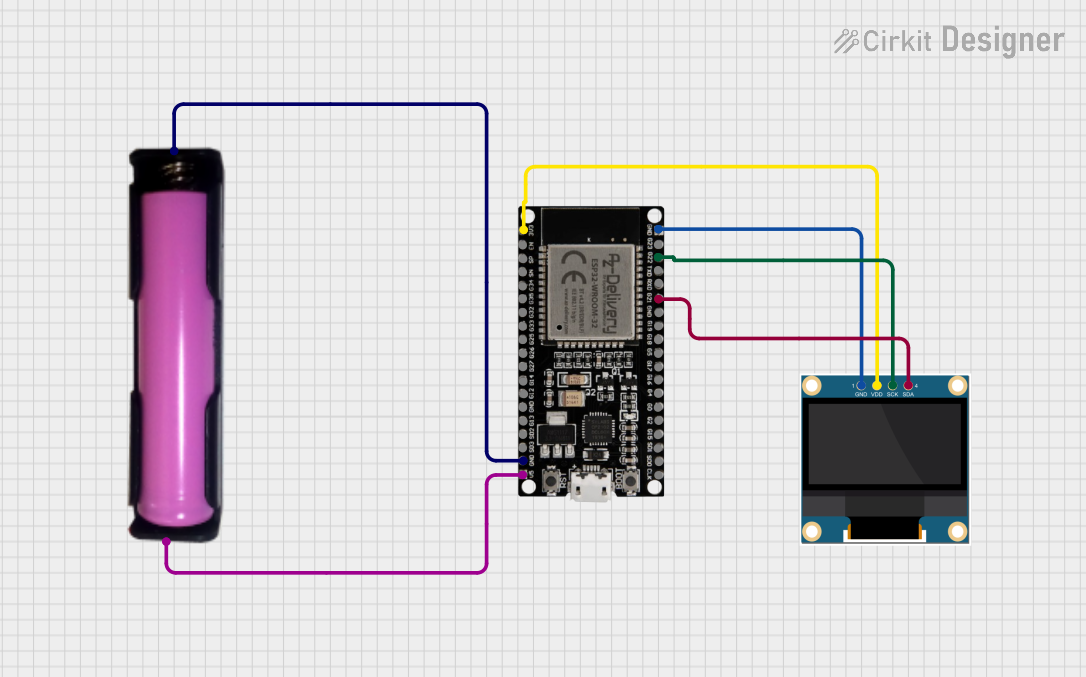
This circuit consists of an ESP32 microcontroller, a 0.96" OLED display, and a single 18650 battery in a holder to provide power. The ESP32 is responsible for controlling the OLED display, which is used to show the message "Hello, World!". The 18650 battery provides the necessary power to the ESP32 and the OLED display. The ESP32 communicates with the OLED display via the I2C protocol, using its GPIO21 and GPIO22 pins as SDA (data line) and SCL (clock line), respectively.
Component List
ESP32 38 PINS
- Description: A microcontroller with Wi-Fi and Bluetooth capabilities, featuring a wide range of GPIO pins.
- Pins: GND, G23, G22, TXD, RXD, G21, G19, G18, G5, G17, G16, G4, G0, G2, G15, SDI, SD0, CLK, 3V3, EN, SP, SN, G34, G35, G32, 33, G25, G26, G27, G14, G12, G13, SD2, SD3, 5V
18650 in holder
- Description: A battery holder for a single 18650 lithium-ion cell.
- Pins: GND, VCC
0.96" OLED
- Description: A small OLED display suitable for displaying text and graphics.
- Pins: GND, VDD, SCK, SDA
Wiring Details
ESP32 38 PINS
- GND connected to 0.96" OLED GND and 18650 in holder GND
- G22 (SCL) connected to 0.96" OLED SCK
- G21 (SDA) connected to 0.96" OLED SDA
- 3V3 connected to 0.96" OLED VDD
- 5V connected to 18650 in holder VCC
18650 in holder
- GND connected to ESP32 GND
- VCC connected to ESP32 5V
0.96" OLED
- GND connected to ESP32 GND
- VDD connected to ESP32 3V3
- SCK connected to ESP32 G22
- SDA connected to ESP32 G21
Documented Code
/*
 * This Arduino Sketch is for an ESP32 microcontroller connected to a 0.96" OLED display.
 * The circuit is powered by a 18650 battery. The code displays 'Hello, World!' on the OLED.
 */

#include <Wire.h>
#include <Adafruit_GFX.h>
#include <Adafruit_SSD1306.h>

#define SCREEN_WIDTH 128 // OLED display width, in pixels
#define SCREEN_HEIGHT 64 // OLED display height, in pixels

// Declaration for an SSD1306 display connected to I2C (SDA, SCL pins)
#define OLED_RESET    -1 // Reset pin # (or -1 if sharing Arduino reset pin)
Adafruit_SSD1306 display(SCREEN_WIDTH, SCREEN_HEIGHT, &Wire, OLED_RESET);

void setup() {
  // Initialize the I2C communication
  Wire.begin(21, 22); // SDA, SCL

  // Initialize the OLED display
  if(!display.begin(SSD1306_SWITCHCAPVCC, 0x3C)) { // Address 0x3C for 128x64
    Serial.println(F("SSD1306 allocation failed"));
    for(;;);
  }

  // Clear the buffer
  display.clearDisplay();

  // Display 'Hello, World!' text
  display.setTextSize(1);      // Normal 1:1 pixel scale
  display.setTextColor(SSD1306_WHITE); // Draw white text
  display.setCursor(0,10);     // Start at top-left corner
  display.println(F("Hello, World!"));

  // Update the display with the new text
  display.display();
}

// The loop function is not used in this sketch.
void loop() {
  // Nothing to do here.
}
This code initializes the I2C communication with the OLED display using the ESP32's GPIO21 and GPIO22 as SDA and SCL, respectively. It then initializes the display and prints "Hello, World!" on the screen. The code is designed to run once during the setup() function, as the loop() function is intentionally left empty.