
Circuit Documentation
Summary
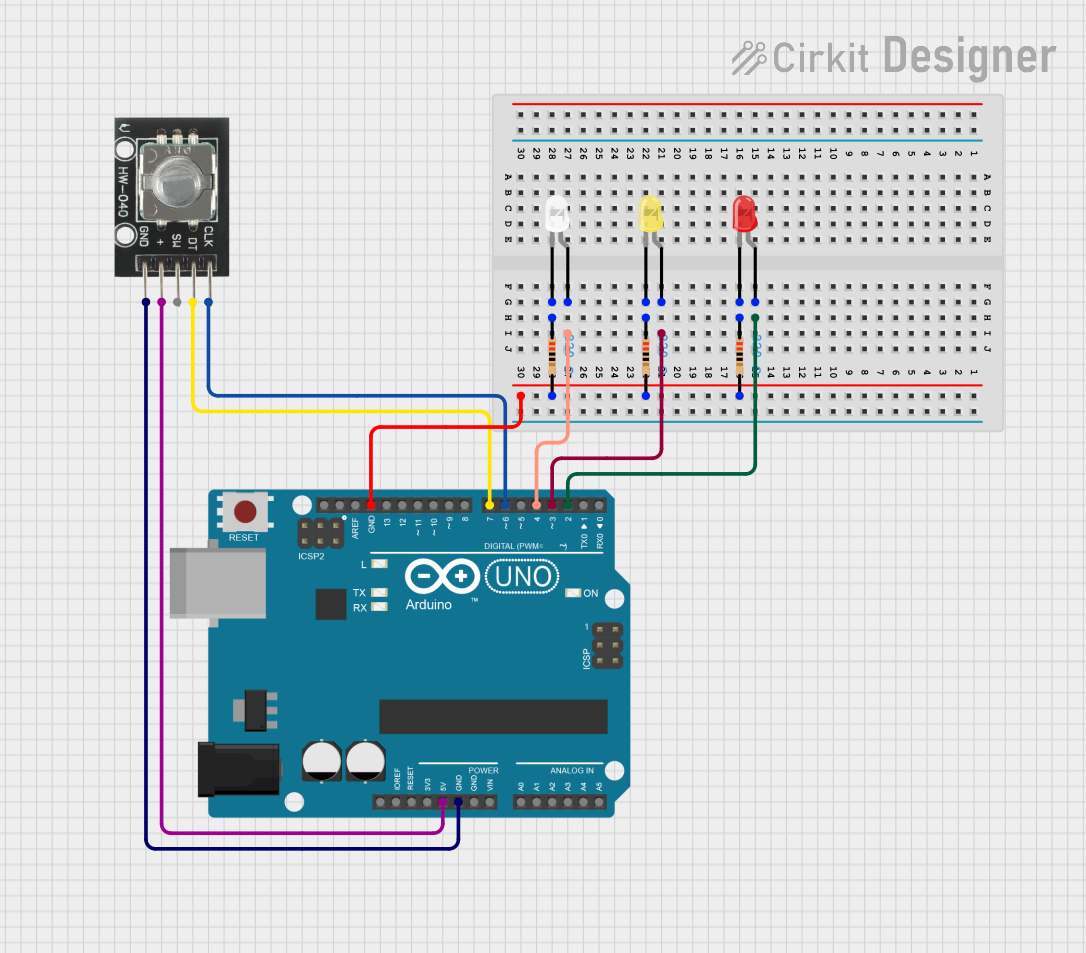
This circuit consists of an Arduino UNO microcontroller, a rotary encoder, three LEDs (red, yellow, and white), and three resistors. The rotary encoder is used to provide input to the Arduino, which then controls the LEDs. The resistors are used to limit the current through the LEDs.
Component List
HW-040 Rotary Encoder
- Pins: GND, +, SW, DT, CLK
- Description: Rotary encoder used for input.
- Purpose in Circuit: Provides input to the Arduino.
Arduino UNO
- Pins: UNUSED, IOREF, Reset, 3.3V, 5V, GND, Vin, A0, A1, A2, A3, A4, A5, SCL, SDA, AREF, D13, D12, D11, D10, D9, D8, D7, D6, D5, D4, D3, D2, D1, D0
- Description: Microcontroller board.
- Purpose in Circuit: Central control unit.
LED: Two Pin (red)
- Pins: cathode, anode
- Description: Red LED.
- Purpose in Circuit: Visual indicator.
LED: Two Pin (yellow)
- Pins: cathode, anode
- Description: Yellow LED.
- Purpose in Circuit: Visual indicator.
LED: Two Pin (white)
- Pins: cathode, anode
- Description: White LED.
- Purpose in Circuit: Visual indicator.
Resistor (220 Ohms)
- Pins: pin1, pin2
- Description: Resistor with 220 Ohms resistance.
- Purpose in Circuit: Current limiting for LEDs.
Wiring Details
HW-040 Rotary Encoder
- GND connected to Arduino UNO GND
- + connected to Arduino UNO 5V
- DT connected to Arduino UNO D7
- CLK connected to Arduino UNO D6
Arduino UNO
- D2 connected to Red LED anode
- D3 connected to Yellow LED anode
- D4 connected to White LED anode
- GND connected to:
- Resistor pin2 (Red LED)
- Resistor pin2 (Yellow LED)
- Resistor pin2 (White LED)
- HW-040 Rotary Encoder GND
LED: Two Pin (red)
- anode connected to Arduino UNO D2
- cathode connected to Resistor pin1
LED: Two Pin (yellow)
- anode connected to Arduino UNO D3
- cathode connected to Resistor pin1
LED: Two Pin (white)
- anode connected to Arduino UNO D4
- cathode connected to Resistor pin1
Resistor (220 Ohms)
- pin1 connected to:
- Red LED cathode
- Yellow LED cathode
- White LED cathode
- pin2 connected to Arduino UNO GND
Documented Code
Arduino UNO Code (sketch.ino)
void setup() {
  // put your setup code here, to run once:

}

void loop() {
  // put your main code here, to run repeatedly:

}
Additional Documentation (documentation.txt)