
Arduino UNO Smart Parking System with IR Sensors and LCD Display
View and Edit Project In Cirkit Designer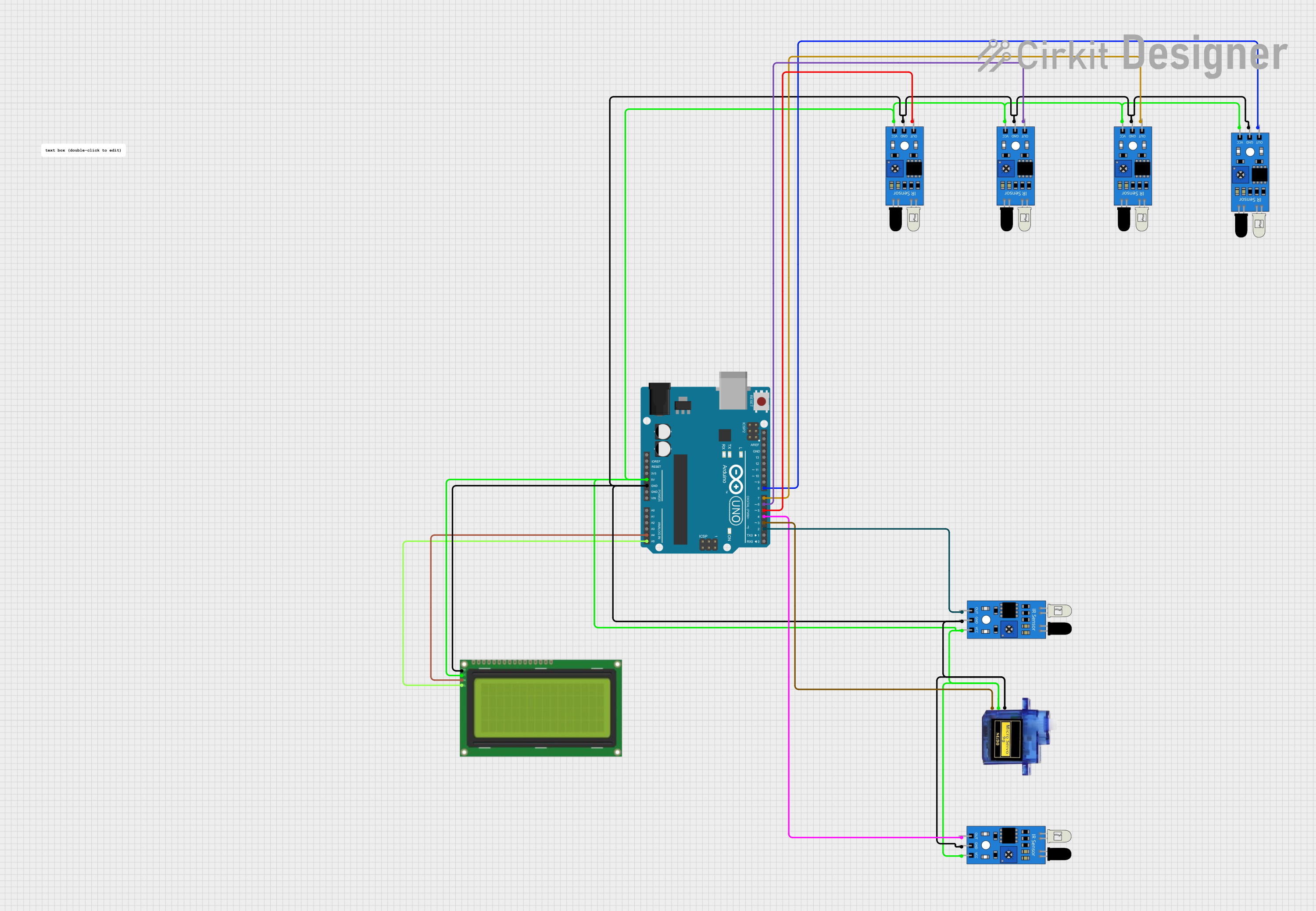
Smart Parking System Documentation
Summary
This document provides a detailed overview of a Smart Parking System designed using an Arduino UNO, multiple IR sensors, a 20x4 LCD display with I2C, and a micro servo motor. The system monitors parking slots using IR sensors and displays the status on an LCD. A servo motor controls the gate based on the availability of slots.
Component List
Arduino UNO
- Description: A microcontroller board based on the ATmega328P.
- Pins: UNUSED, IOREF, Reset, 3.3V, 5V, GND, Vin, A0, A1, A2, A3, A4, A5, SCL, SDA, AREF, D13, D12, D11, D10, D9, D8, D7, D6, D5, D4, D3, D2, D1, D0
IR Sensor
- Description: Infrared sensor used to detect the presence of a car.
- Pins: out, gnd, vcc
Micro Servo 9G
- Description: A small servo motor used to control the gate.
- Pins: GND, +5V, PWM
LCD 20x4 I2C
- Description: A 20x4 character LCD display with I2C interface.
- Pins: GND, 5v, SCA, SCL
Comment
- Description: Placeholder for comments or notes.
- Pins: None
Wiring Details
Arduino UNO
- 5V: Connected to the 5V pin of the LCD, vcc pin of all IR sensors, and +5V pin of the Micro Servo 9G.
- GND: Connected to the GND pin of the LCD, gnd pin of all IR sensors, and GND pin of the Micro Servo 9G.
- A4: Connected to the SCA pin of the LCD.
- A5: Connected to the SCL pin of the LCD.
- D8: Connected to the out pin of one IR sensor.
- D7: Connected to the out pin of another IR sensor.
- D6: Connected to the out pin of another IR sensor.
- D5: Connected to the out pin of another IR sensor.
- D4: Connected to the out pin of another IR sensor.
- D3: Connected to the PWM pin of the Micro Servo 9G.
- D2: Connected to the out pin of another IR sensor.
IR Sensor
- vcc: Connected to the 5V pin of the Arduino UNO.
- gnd: Connected to the GND pin of the Arduino UNO.
- out: Connected to various digital pins (D2, D4, D5, D6, D7, D8) of the Arduino UNO.
Micro Servo 9G
- +5V: Connected to the 5V pin of the Arduino UNO.
- GND: Connected to the GND pin of the Arduino UNO.
- PWM: Connected to the D3 pin of the Arduino UNO.
LCD 20x4 I2C
- 5v: Connected to the 5V pin of the Arduino UNO.
- GND: Connected to the GND pin of the Arduino UNO.
- SCA: Connected to the A4 pin of the Arduino UNO.
- SCL: Connected to the A5 pin of the Arduino UNO.
Documented Code
/*
 * Smart Parking System using Arduino UNO, IR Sensors, and 20x4 LCD Display with I2C
 * This system monitors parking slots using IR sensors and displays the status on
 * an LCD. A servo motor controls the gate based on the availability of slots.
 */

#include <Servo.h>
#include <Wire.h>
#include <LiquidCrystal_I2C.h>

LiquidCrystal_I2C lcd(0x27, 20, 4);
Servo myservo;

// Define IR sensor pins
#define ir_enter 2
#define ir_back 4
#define ir_car1 5
#define ir_car2 6
#define ir_car3 7
#define ir_car4 8

// Variables to store sensor states
int S1 = 0, S2 = 0, S3 = 0, S4 = 0;
int flag1 = 0, flag2 = 0;
int slot = 4;

void setup() {
  Serial.begin(9600);

  // Initialize IR sensor pins
  pinMode(ir_car1, INPUT);
  pinMode(ir_car2, INPUT);
  pinMode(ir_car3, INPUT);
  pinMode(ir_car4, INPUT);
  pinMode(ir_enter, INPUT);
  pinMode(ir_back, INPUT);

  // Initialize servo motor
  myservo.attach(3);
  myservo.write(90);

  // Initialize LCD
  lcd.init();
  lcd.backlight();
  lcd.setCursor(0, 1);
  lcd.print(" Hi Welcome To ");
  lcd.setCursor(0, 2);
  lcd.print(" JustDoElectronics");
  delay(5000);
  lcd.clear();
  lcd.setCursor(0, 0);
  lcd.print("   Today's Project  ");
  lcd.setCursor(0, 1);
  lcd.print("    Car  Parking  ");
  lcd.setCursor(0, 2);
  lcd.print("       System     ");
  delay(5000);
  lcd.clear();

  // Read initial sensor states
  Read_Sensor();
  int total = S1 + S2 + S3 + S4;
  slot = slot - total;
}

void loop() {
  // Read sensor states
  Read_Sensor();

  // Display available slots
  lcd.setCursor(0, 0);
  lcd.print(" Available Slot: ");
  lcd.print(slot);
  lcd.print("    ");

  // Display status of each slot
  lcd.setCursor(0, 1);
  if (S1 == 1) {
    lcd.print("S1:Full ");
  } else {
    lcd.print("S1:Empty");
  }
  lcd.setCursor(11, 1);
  if (S2 == 1) {
    lcd.print("S2:Full ");
  } else {
    lcd.print("S2:Empty");
  }
  lcd.setCursor(0, 2);
  if (S3 == 1) {
    lcd.print("S3:Full ");
  } else {
    lcd.print("S3:Empty");
  }
  lcd.setCursor(11, 2);
  if (S4 == 1) {
    lcd.print("S4:Full ");
  } else {
    lcd.print("S4:Empty");
  }

  // Check for car entering
  if (digitalRead(ir_enter) == 0 && flag1 == 0) {
    if (slot > 0) {
      flag1 = 1;
      if (flag2 == 0) {
        myservo.write(180);
        slot = slot - 1;
      }
    } else {
      lcd.setCursor(0, 0);
      lcd.print(" Sorry Parking Full ");
      delay(1500);
    }
  }

  // Check for car exiting
  if (digitalRead(ir_back) == 0 && flag2 == 0) {
    flag2 = 1;
    if (flag1 == 0) {
      myservo.write(180);
      slot = slot + 1;
    }
  }

  // Reset flags and servo position
  if (flag1 == 1 && flag2 == 1) {
    delay(1000);
    myservo.write(90);
    flag1 = 0, flag2 = 0;
  }

  delay(1);
}

void Read_Sensor() {
  // Reset sensor states
  S1 = 0, S2 = 0, S3 = 0, S4 = 0;

  // Read each sensor
  if (digitalRead(ir_car1) == 0) {
    S1 = 1;
  }
  if (digitalRead(ir_car2) == 0) {
    S2 = 1;
  }
  if (digitalRead(ir_car3) == 0) {
    S3 = 1;
  }
  if (digitalRead(ir_car4) == 0) {
    S4 = 1;
  }
}
This code initializes the IR sensors, servo motor, and LCD display. It continuously reads the state of the IR sensors to determine the availability of parking slots and updates the LCD display accordingly. The servo motor is used to control the gate based on the availability of slots.