
Arduino UNO-Based Water Flow and Temperature Monitoring System with LCD Display
View and Edit Project In Cirkit Designer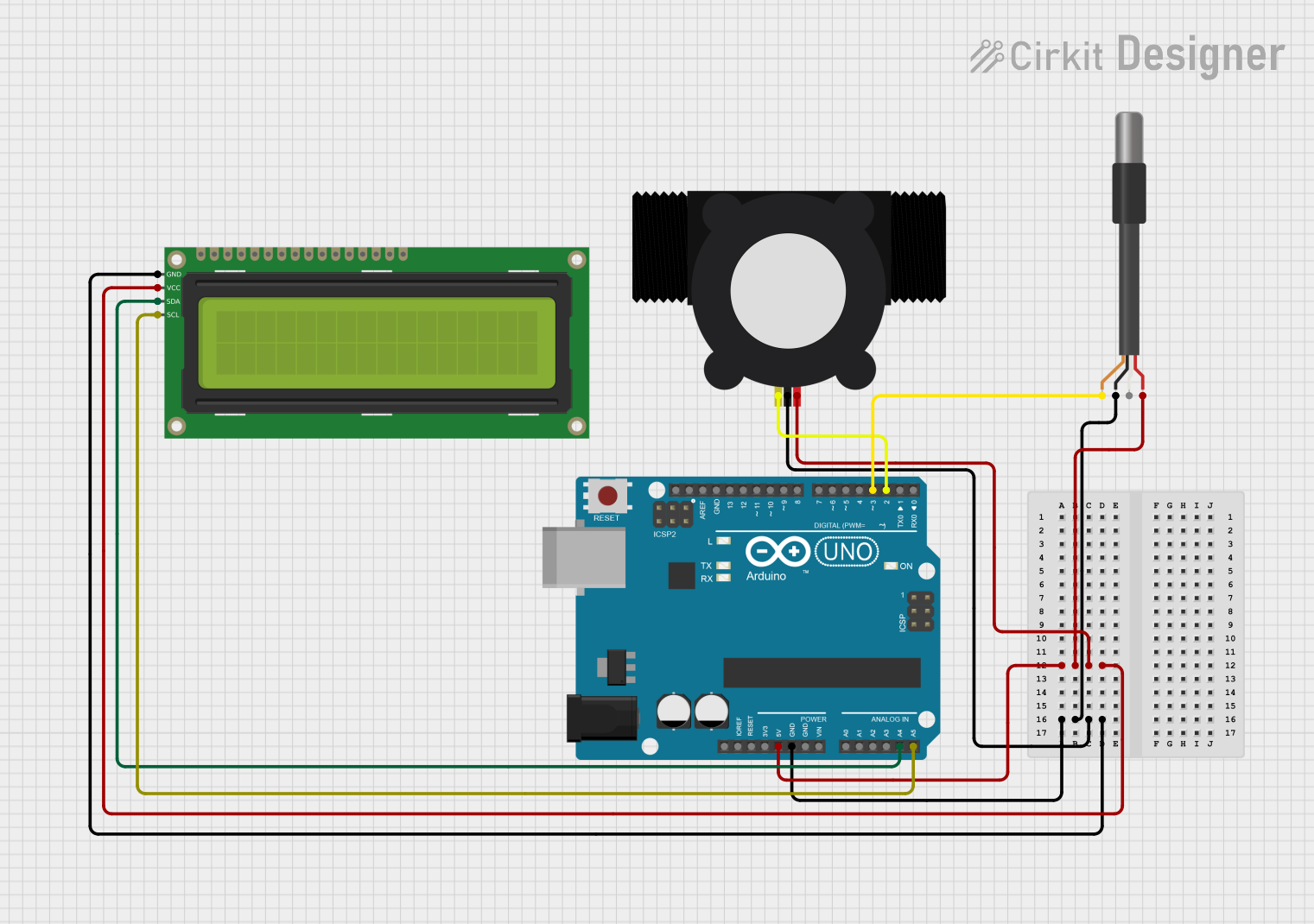
Circuit Documentation
Summary
This circuit is designed to monitor water flow and temperature using an Arduino UNO microcontroller. It utilizes a YF-S201 Water Flow Meter to measure the flow rate and a DS18B20 1-Wire Temperature Sensor to measure the temperature. The readings are displayed on a 16x2 I2C LCD.
Component List
YF-S201 Water Flow Meter
- Description: Measures the rate of water flow.
- Pins: SIG, GND, VCC
DS18B20 1-Wire Temperature Sensor Probe Cable
- Description: Measures temperature.
- Pins: shield, GND, DQ, VDD
Arduino UNO
- Description: Microcontroller used to process sensor data and control the display.
- Pins: UNUSED, IOREF, Reset, 3.3V, 5V, GND, Vin, A0, A1, A2, A3, A4, A5, SCL, SDA, AREF, D13, D12, D11, D10, D9, D8, D7, D6, D5, D4, D3, D2, D1, D0
16x2 I2C LCD
- Description: Displays the flow rate and temperature readings.
- Pins: GND, VCC, SDA, SCL
Wiring Details
YF-S201 Water Flow Meter
- SIG: Connected to Arduino UNO pin D2
- GND: Connected to Arduino UNO GND
- VCC: Connected to Arduino UNO 5V
DS18B20 1-Wire Temperature Sensor Probe Cable
- shield: Connected to Arduino UNO pin D3
- GND: Connected to Arduino UNO GND
- DQ: Not connected (assumed to be internally connected to shield)
- VDD: Connected to Arduino UNO 5V
Arduino UNO
- 5V: Connected to VCC of YF-S201 Water Flow Meter, VDD of DS18B20 Temperature Sensor, and VCC of 16x2 I2C LCD
- GND: Connected to GND of YF-S201 Water Flow Meter, GND of DS18B20 Temperature Sensor, and GND of 16x2 I2C LCD
- D2: Connected to SIG of YF-S201 Water Flow Meter
- D3: Connected to shield of DS18B20 Temperature Sensor
- A4: Connected to SDA of 16x2 I2C LCD
- A5: Connected to SCL of 16x2 I2C LCD
16x2 I2C LCD
- GND: Connected to Arduino UNO GND
- VCC: Connected to Arduino UNO 5V
- SDA: Connected to Arduino UNO pin A4
- SCL: Connected to Arduino UNO pin A5
Code Documentation
#include <Wire.h>
#include <LiquidCrystal_I2C.h>
#include <OneWire.h>
#include <DallasTemperature.h>

// LCD I2C address
LiquidCrystal_I2C lcd(0x27, 16, 2); // Address 0x27, 16x2 LCD

// Flow sensor setup
const int flowSensorPin = 2; // Interrupt pin for YF-S201
volatile unsigned int pulseCount = 0;
float flowRate = 0.0;
unsigned long lastFlowUpdateTime = 0;

// DS18B20 setup
const int oneWireBus = 3; // Data pin for DS18B20
OneWire oneWire(oneWireBus);
DallasTemperature sensors(&oneWire);

// Flow sensor calibration
const float calibrationFactor = 4.5; // Check the datasheet for your model

// Interrupt Service Routine (ISR)
void pulseCounter() {
  pulseCount++;
}

void setup() {
  // Initialize LCD
  lcd.init();
  lcd.backlight();
  lcd.setCursor(0, 0);
  lcd.print("Initializing...");

  // Setup flow sensor
  pinMode(flowSensorPin, INPUT_PULLUP);
  attachInterrupt(digitalPinToInterrupt(flowSensorPin), pulseCounter, FALLING);

  // Initialize DS18B20 sensor
  sensors.begin();

  // Display ready message
  lcd.clear();
  lcd.setCursor(0, 0);
  lcd.print("Flow & Temp");
  lcd.setCursor(0, 1);
  lcd.print("Monitor Ready");
  delay(2000);
}

void loop() {
  // Calculate flow rate
  unsigned long currentTime = millis();
  if ((currentTime - lastFlowUpdateTime) > 1000) { // Update every 1 second
    detachInterrupt(digitalPinToInterrupt(flowSensorPin)); // Disable interrupt

    // Calculate flow rate (L/min)
    flowRate = (pulseCount / calibrationFactor) / 60.0;

    pulseCount = 0; // Reset pulse counter
    lastFlowUpdateTime = currentTime; // Update timestamp

    attachInterrupt(digitalPinToInterrupt(flowSensorPin), pulseCounter, FALLING); // Re-enable interrupt
  }

  // Sanity check: Ensure flow rate is within a reasonable range
  if (flowRate < 0 || flowRate > 100) { // Adjust the upper limit based on expected flow rate
    flowRate = 0.0; // Reset to 0 if the reading is unrealistic
  }

  // Request temperature
  sensors.requestTemperatures();
  float temperature = sensors.getTempCByIndex(0); // Get first sensor reading

  // Display readings on LCD
  lcd.clear();

  // Line 1: Flow Rate
  lcd.setCursor(0, 0);
  lcd.print("Flow: ");
  lcd.print(flowRate, 2); // Show 2 decimal places
  lcd.print(" L/m");

  // Line 2: Temperature
  lcd.setCursor(0, 1);
  lcd.print("Temp: ");
  if (temperature == DEVICE_DISCONNECTED_C) {
    lcd.print("Error");
  } else {
    lcd.print(temperature, 1); // Show 1 decimal place
    lcd.print((char)223); // Degree symbol
    lcd.print("C");
  }

  delay(1000); // Refresh every second
}
This code initializes the LCD, sets up the flow sensor and temperature sensor, and continuously updates the LCD with the current flow rate and temperature readings. The flow rate is calculated based on the pulse count from the flow sensor, and the temperature is read from the DS18B20 sensor.