
Arduino UNO Bluetooth-Controlled Line Following Robot with Object Detection
View and Edit Project In Cirkit Designer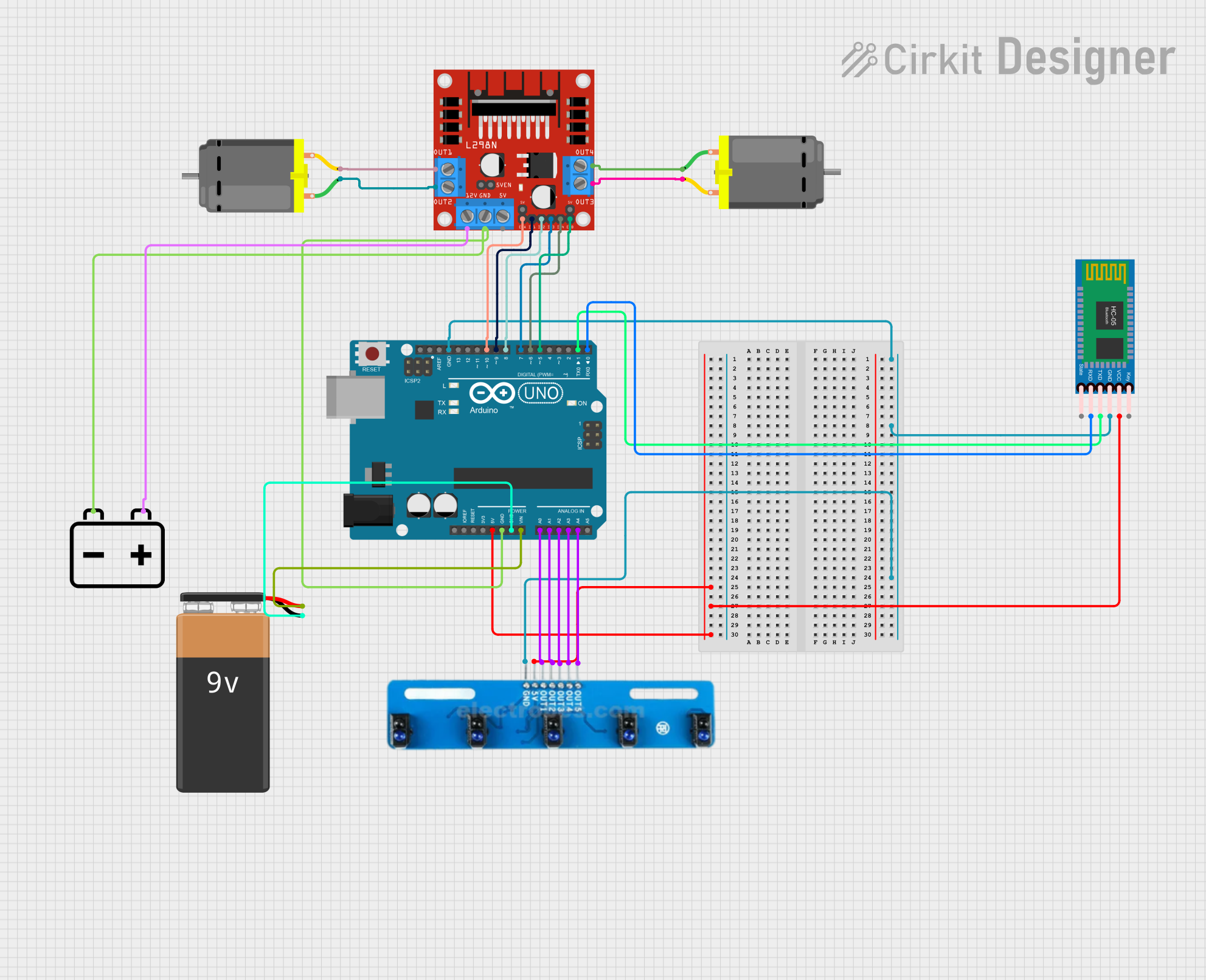
Circuit Documentation
Summary
This circuit is designed to control a robotic vehicle with the ability to follow a line and detect objects. The vehicle is equipped with an Arduino UNO microcontroller, an L298N DC motor driver, two DC motors, a 5-channel IR array for line detection, an HC-05 Bluetooth module for wireless communication, and a 12V battery for power. The Arduino UNO is programmed to operate in both manual and automatic modes, allowing for Bluetooth control or autonomous operation.
Component List
Arduino UNO
- Description: Microcontroller board based on the ATmega328P.
- Pins: UNUSED, IOREF, Reset, 3.3V, 5V, GND, Vin, A0, A1, A2, A3, A4, A5, SCL, SDA, AREF, D13, D12, D11, D10, D9, D8, D7, D6, D5, D4, D3, D2, D1, D0
L298N DC Motor Driver
- Description: Dual H-Bridge motor driver for controlling DC motors.
- Pins: OUT1, OUT2, 12V, GND, 5V, OUT3, OUT4, 5V-ENA-JMP-I, 5V-ENA-JMP-O, +5V-J1, +5V-J2, ENA, IN1, IN2, IN3, IN4, ENB
DC Motor (Motor 1)
- Description: Standard DC motor.
- Pins: pin 1, pin 2
DC Motor (Motor 2)
- Description: Standard DC motor.
- Pins: pin 1, pin 2
5 Channel IR Array
- Description: Infrared sensor array for line detection.
- Pins: A5, A4, A3, A2, A1, VCC, GND
12V Battery
- Description: Power source for the circuit.
- Pins: -, +
HC-05 Bluetooth Module
- Description: Bluetooth module for wireless communication.
- Pins: Key, VCC, GND, TXD, RXD, State
9V Battery
- Description: Additional power source for the Arduino UNO.
- Pins: -, +
Wiring Details
Arduino UNO
GND connected to:
- HC-05 Bluetooth Module (GND)
- 5 Channel IR Array (GND)
- L298N DC Motor Driver (GND)
- 12V Battery (-)
- 9V Battery (-)
5V connected to:
- HC-05 Bluetooth Module (VCC)
- 5 Channel IR Array (VCC)
Vin connected to:
- 9V Battery (+)
A0 connected to:
- 5 Channel IR Array (A1)
A1 connected to:
- 5 Channel IR Array (A2)
A2 connected to:
- 5 Channel IR Array (A3)
A3 connected to:
- 5 Channel IR Array (A4)
A4 connected to:
- 5 Channel IR Array (A5)
D10 connected to:
- L298N DC Motor Driver (ENA)
D9 connected to:
- L298N DC Motor Driver (IN1)
D8 connected to:
- L298N DC Motor Driver (IN2)
D7 connected to:
- L298N DC Motor Driver (IN3)
D6 connected to:
- L298N DC Motor Driver (IN4)
D5 connected to:
- L298N DC Motor Driver (ENB)
D1 connected to:
- HC-05 Bluetooth Module (TXD)
D0 connected to:
- HC-05 Bluetooth Module (RXD)
L298N DC Motor Driver
GND connected to:
- 12V Battery (-)
- Arduino UNO (GND)
12V connected to:
- 12V Battery (+)
OUT1 connected to:
- DC Motor 2 (pin 2)
OUT2 connected to:
- DC Motor 2 (pin 1)
OUT3 connected to:
- DC Motor 1 (pin 2)
OUT4 connected to:
- DC Motor 1 (pin 1)
DC Motor (Motor 1)
pin 1 connected to:
- L298N DC Motor Driver (OUT4)
pin 2 connected to:
- L298N DC Motor Driver (OUT3)
DC Motor (Motor 2)
pin 1 connected to:
- L298N DC Motor Driver (OUT2)
pin 2 connected to:
- L298N DC Motor Driver (OUT1)
5 Channel IR Array
GND connected to:
- Arduino UNO (GND)
VCC connected to:
- Arduino UNO (5V)
A1 connected to:
- Arduino UNO (A0)
A2 connected to:
- Arduino UNO (A1)
A3 connected to:
- Arduino UNO (A2)
A4 connected to:
- Arduino UNO (A3)
A5 connected to:
- Arduino UNO (A4)
12V Battery
- connected to:
- L298N DC Motor Driver (GND)
- Arduino UNO (GND)
+ connected to:
- L298N DC Motor Driver (12V)
HC-05 Bluetooth Module
GND connected to:
- Arduino UNO (GND)
VCC connected to:
- Arduino UNO (5V)
TXD connected to:
- Arduino UNO (D1)
RXD connected to:
- Arduino UNO (D0)
9V Battery
- connected to:
- Arduino UNO (GND)
+ connected to:
- Arduino UNO (Vin)
Documented Code
#include <Servo.h>

// Pin definitions
const int irSensor1Pin = A0;
const int irSensor2Pin = A1;
const int trigPin = 2;
const int echoPin = 3;
const int servoPin = 4;
const int motorENAPin = 10;
const int motorIN1Pin = 9;
const int motorIN2Pin = 8;
const int motorIN3Pin = 7;
const int motorIN4Pin = 6;
const int motorENBPin = 5;
const int btRxPin = 0;
const int btTxPin = 1;

// Servo object
Servo grabberServo;

// Variables
bool manualMode = false;
bool objectDetected = false;
long duration;
int distance;

void setup() {
  // Initialize serial communication
  Serial.begin(9600);

  // Initialize pins
  pinMode(irSensor1Pin, INPUT);
  pinMode(irSensor2Pin, INPUT);
  pinMode(trigPin, OUTPUT);
  pinMode(echoPin, INPUT);
  pinMode(motorENAPin, OUTPUT);
  pinMode(motorIN1Pin, OUTPUT);
  pinMode(motorIN2Pin, OUTPUT);
  pinMode(motorIN3Pin, OUTPUT);
  pinMode(motorIN4Pin, OUTPUT);
  pinMode(motorENBPin, OUTPUT);

  // Attach servo
  grabberServo.attach(servoPin);

  // Set initial servo position
  grabberServo.write(0);
}

void loop() {
  if (manualMode) {
    // Manual mode: control via Bluetooth
    if (Serial.available() > 0) {
      char command = Serial.read();
      handleBluetoothCommand(command);
    }
  } else {
    // Automatic mode: follow line and detect object
    int irSensor1Value = digitalRead(irSensor1Pin);
    int irSensor2Value = digitalRead(irSensor2Pin);

    if (irSensor1Value == HIGH && irSensor2Value == HIGH) {
      // Move forward
      moveForward();
    } else if (irSensor1Value == LOW && irSensor2Value == HIGH) {
      // Turn left
      turnLeft();
    } else if (irSensor1Value == HIGH && irSensor2Value == LOW) {
      // Turn right
      turnRight();
    } else {
      // Stop
      stopMotors();
    }

    // Check for object detection
    distance = getUltrasonicDistance();
    if (distance < 10) {
      objectDetected = true;
      grabObject();
    }
  }
}

void handleBluetoothCommand(char command) {
  switch (command) {
    case 'F':
      moveForward();
      break;
    case 'B':
      moveBackward();
      break;
    case 'L':
      turnLeft();
      break;
    case 'R':
      turnRight();
      break;
    case 'S':
      stopMotors