
Bluetooth-Controlled Arduino UNO Robot with Dual DC Motors and L298N Driver
View and Edit Project In Cirkit Designer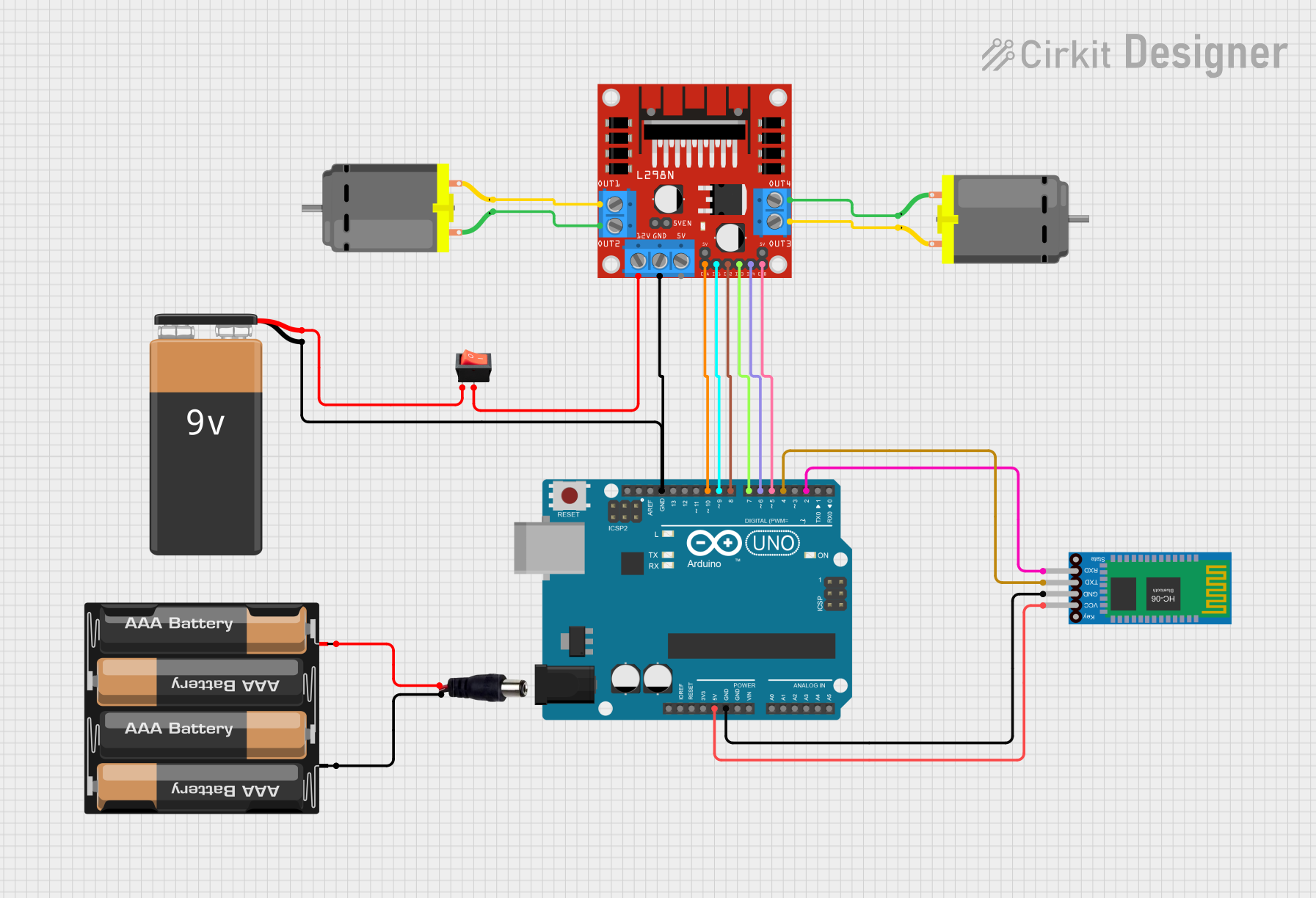
Circuit Documentation
Summary
This circuit is designed to control two DC motors using an Arduino UNO microcontroller and an L298N DC motor driver. It includes a Bluetooth HC-06 module for wireless communication, allowing the motors to be controlled remotely via Bluetooth commands. The circuit is powered by a 9V battery connected through a rocker switch and also includes a 4 x AAA battery mount connected to a power jack for an alternative power source.
Component List
Arduino UNO
- Microcontroller board based on the ATmega328P
- It has 14 digital input/output pins, 6 analog inputs, a 16 MHz quartz crystal, a USB connection, a power jack, an ICSP header, and a reset button.
Rocker Switch
- A simple on/off switch that controls the connection of the circuit to the power source.
DC Motor (x2)
- Electric motors that convert DC electrical energy into mechanical energy.
Bluetooth HC-06
- A Bluetooth module that allows for wireless communication with the Arduino.
4 x AAA Battery Mount
- A battery holder for four AAA batteries, providing an alternative power source.
9V Battery
- A standard 9V battery used to power the circuit.
L298N DC Motor Driver
- A motor driver module capable of driving two DC motors or one stepper motor.
Power Jack
- A connector that allows the circuit to be powered by an external power supply.
Wiring Details
Arduino UNO
5Vconnected to Bluetooth HC-06VCCGNDconnected to Bluetooth HC-06GND, L298NGND, and 9V Battery-D10connected to L298NENAD9connected to L298NIN1D8connected to L298NIN2D7connected to L298NIN3D6connected to L298NIN4D5connected to L298NENBD4connected to Bluetooth HC-06TXDD2connected to Bluetooth HC-06RXD
Rocker Switch
outputconnected to L298N12Vinputconnected to 9V Battery+
DC Motor #1
pin 1connected to L298NOUT4pin 2connected to L298NOUT3
DC Motor #2
pin 1connected to L298NOUT2pin 2connected to L298NOUT1
Bluetooth HC-06
VCCconnected to Arduino UNO5VGNDconnected to Arduino UNOGNDTXDconnected to Arduino UNOD4RXDconnected to Arduino UNOD2
4 x AAA Battery Mount
-connected to Power JackNEGATIF+connected to Power JackPOSITIF
9V Battery
-connected to Arduino UNOGND, L298NGND+connected to Rocker Switchinput
L298N DC Motor Driver
GNDconnected to Arduino UNOGND, 9V Battery-ENAconnected to Arduino UNOD10IN1connected to Arduino UNOD9IN2connected to Arduino UNOD8IN3connected to Arduino UNOD7IN4connected to Arduino UNOD6ENBconnected to Arduino UNOD512Vconnected to Rocker SwitchoutputOUT1connected to DC Motor #2pin 2OUT2connected to DC Motor #2pin 1OUT3connected to DC Motor #1pin 2OUT4connected to DC Motor #1pin 1
Power Jack
NEGATIFconnected to 4 x AAA Battery Mount-POSITIFconnected to 4 x AAA Battery Mount+
Documented Code
#include <SoftwareSerial.h>
SoftwareSerial BT(4,2); // Bluetooth communication on pins D4 (TX) and D2 (RX)

// Motor 1
int ENA = 10; // Enable pin for motor A
int IN1 = 9;  // Input 1 for motor A
int IN2 = 8;  // Input 2 for motor A

// Motor 2
int ENB = 5;  // Enable pin for motor B
int IN3 = 7;  // Input 3 for motor B
int IN4 = 6;  // Input 4 for motor B

void setup() {
  Serial.begin(9600); // Start serial communication at 9600 baud rate
  BT.begin(9600);     // Start Bluetooth communication at 9600 baud rate

  // Set motor control pins as outputs
  pinMode(ENA, OUTPUT);
  pinMode(ENB, OUTPUT);
  pinMode(IN1, OUTPUT);
  pinMode(IN2, OUTPUT);
  pinMode(IN3, OUTPUT);
  pinMode(IN4, OUTPUT);
}

void loop() {
  if (BT.available()) { // Check if there is Bluetooth data available
    char data = BT.read(); // Read the incoming byte

    switch(data) {
      case 'a': // Command to move forward
        Forward();
        break;
      case 'r': // Command to move backward
        Backward();
        break;
      case 'd': // Command to turn right
        Right();
        break;
      case 'g': // Command to turn left
        Left();
        break;
      case 'p': // Command to stop
        Stop();
        break;
    }
  }
}

void Forward() {
  // Set motor A direction and speed
  digitalWrite(IN1, HIGH);
  digitalWrite(IN2, LOW);
  analogWrite(ENA, 255); // Full speed
  // Set motor B direction and speed
  digitalWrite(IN3, HIGH);
  digitalWrite(IN4, LOW);
  analogWrite(ENB, 255); // Full speed
}

void Right() {
  // Set motor A to reverse direction at a slower speed
  digitalWrite(IN1, LOW);
  digitalWrite(IN2, HIGH);
  analogWrite(ENA, 100); // Reduced speed
  // Set motor B to forward direction at a slower speed
  digitalWrite(IN3, HIGH);
  digitalWrite(IN4, LOW);
  analogWrite(ENB, 100); // Reduced speed
}

void Left() {
  // Set motor A to forward direction at a slower speed
  digitalWrite(IN1, HIGH);
  digitalWrite(IN2, LOW);
  analogWrite(ENA, 100); // Reduced speed
  // Set motor B to reverse direction at a slower speed
  digitalWrite(IN3, LOW);
  digitalWrite(IN4, HIGH);
  analogWrite(ENB, 100); // Reduced speed
}

void Backward() {
  // Set motor A to reverse direction and speed
  digitalWrite(IN1, LOW);
  digitalWrite(IN2, HIGH);
  analogWrite(ENA, 255); // Full speed
  // Set motor B to reverse direction and speed
  digitalWrite(IN3, LOW);
  digitalWrite(IN4, HIGH);
  analogWrite(ENB, 255); // Full speed
}

void Stop() {
  // Stop motor A
  digitalWrite(IN1, LOW);
  digitalWrite(IN2, LOW);
  analogWrite(ENA, 0); // No speed
  // Stop motor B
  digitalWrite(IN3, LOW);
  digitalWrite(IN4, LOW);
  analogWrite(ENB, 0); // No speed
}
This code is designed to be uploaded to the Arduino UNO microcontroller. It sets up a SoftwareSerial connection for Bluetooth communication and defines functions to control the direction and speed of two DC motors using the L298N motor driver. The Arduino listens for Bluetooth commands to control the motors: 'a' for forward, 'r' for backward, 'd' for right, 'g' for left, and 'p' for stop.