
ESP32-C6 and ST7735S Display: Wi-Fi Controlled TFT Display Module
View and Edit Project In Cirkit Designer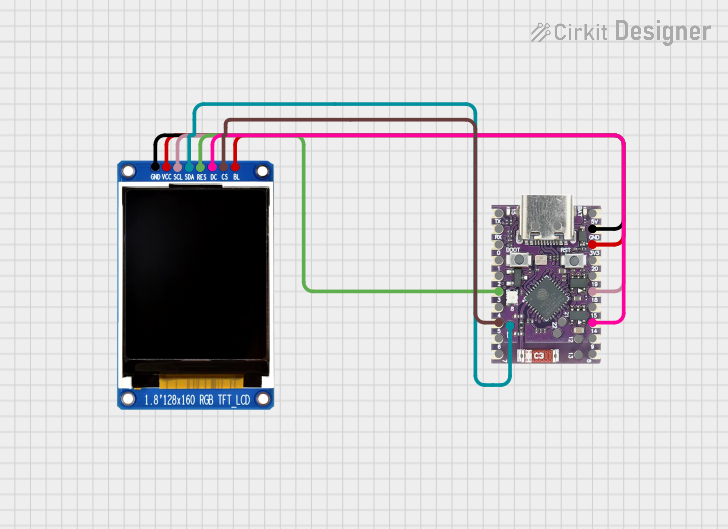
Circuit Documentation
Summary
This circuit involves an ESP32-C6 SuperMini microcontroller interfacing with a China ST7735S 160x128 TFT display. The ESP32-C6 is responsible for driving the display and running the provided code to demonstrate various graphical functions on the TFT screen.
Component List
ESP32-C6 SuperMini
- Description: A powerful microcontroller with built-in Wi-Fi and Bluetooth capabilities.
- Pins: TX, RX, 0, 1, 2, 3, 4, 5, 6, 7, DC 5V, GND, 3.3V Out, 20, 19, 18, 15, 14, 9, 8, 23, 21, 22, Batt -, Batt +, 12, 13
China ST7735S 160x128
- Description: A 1.8" TFT display with a resolution of 160x128 pixels, driven by the ST7735S controller.
- Pins: GND, VCC, SCL, SDA, RES, DC, CS, BL
Wiring Details
ESP32-C6 SuperMini to China ST7735S 160x128
- ESP32-C6 SuperMini Pin 3 ↔ China ST7735S 160x128 Pin RES
- ESP32-C6 SuperMini Pin 5 ↔ China ST7735S 160x128 Pin CS
- ESP32-C6 SuperMini Pin GND ↔ China ST7735S 160x128 Pin GND
- ESP32-C6 SuperMini Pin 3.3V Out ↔ China ST7735S 160x128 Pin VCC
- ESP32-C6 SuperMini Pin 3.3V Out ↔ China ST7735S 160x128 Pin BL
- ESP32-C6 SuperMini Pin 18 ↔ China ST7735S 160x128 Pin SCL
- ESP32-C6 SuperMini Pin 14 ↔ China ST7735S 160x128 Pin DC
- ESP32-C6 SuperMini Pin 23 ↔ China ST7735S 160x128 Pin SDA
Documented Code
/**************************************************************************
  This is a library for several Adafruit displays based on ST77* drivers.

  Works with the Adafruit 1.8" TFT Breakout w/SD card
    ----> http://www.adafruit.com/products/358
  The 1.8" TFT shield
    ----> https://www.adafruit.com/product/802
  The 1.44" TFT breakout
    ----> https://www.adafruit.com/product/2088
  The 1.14" TFT breakout
  ----> https://www.adafruit.com/product/4383
  The 1.3" TFT breakout
  ----> https://www.adafruit.com/product/4313
  The 1.54" TFT breakout
    ----> https://www.adafruit.com/product/3787
  The 1.69" TFT breakout
    ----> https://www.adafruit.com/product/5206
  The 2.0" TFT breakout
    ----> https://www.adafruit.com/product/4311
  as well as Adafruit raw 1.8" TFT display
    ----> http://www.adafruit.com/products/618

  Check out the links above for our tutorials and wiring diagrams.
  These displays use SPI to communicate, 4 or 5 pins are required to
  interface (RST is optional).

  Adafruit invests time and resources providing this open source code,
  please support Adafruit and open-source hardware by purchasing
  products from Adafruit!

  Written by Limor Fried/Ladyada for Adafruit Industries.
  MIT license, all text above must be included in any redistribution
 **************************************************************************/

#include <Adafruit_GFX.h>     // Core graphics library
#include <Adafruit_ST7735.h>  // Hardware-specific library for ST7735
#include <Adafruit_ST7789.h>  // Hardware-specific library for ST7789
#include <SPI.h>

#if defined(ARDUINO_FEATHER_ESP32)  // Feather Huzzah32
#define TFT_CS 14
#define TFT_RST 15
#define TFT_DC 32

#elif defined(ESP8266)
#define TFT_CS 4
#define TFT_RST 16
#define TFT_DC 5

#else
// For the breakout board, you can use any 2 or 3 pins.
// These pins will also work for the 1.8" TFT shield.
#define TFT_CS 5
#define TFT_RST 2  // Or set to -1 and connect to Arduino RESET pin
#define TFT_DC 14
#endif

// OPTION 1 (recommended) is to use the HARDWARE SPI pins, which are unique
// to each board and not reassignable. For Arduino Uno: MOSI = pin 11 and
// SCLK = pin 13. This is the fastest mode of operation and is required if
// using the breakout board's microSD card.

// For 1.44" and 1.8" TFT with ST7735 use:
Adafruit_ST7735 tft = Adafruit_ST7735(TFT_CS, TFT_DC, TFT_RST);

// For 1.14", 1.3", 1.54", 1.69", and 2.0" TFT with ST7789:
// Adafruit_ST7789 tft = Adafruit_ST7789(TFT_CS, TFT_DC, TFT_RST);

// OPTION 2 lets you interface the display using ANY TWO or THREE PINS,
// tradeoff being that performance is not as fast as hardware SPI above.
// #define TFT_MOSI 23  // Data out
// #define TFT_SCLK 18  // Clock out

// For ST7735-based displays, we will use this call
//Adafruit_ST7735 tft = Adafruit_ST7735(TFT_CS, TFT_DC, TFT_MOSI, TFT_SCLK, TFT_RST);

// OR for the ST7789-based displays, we will use this call
// Adafruit_ST7789 tft = Adafruit_ST7789(TFT_CS, TFT_DC, TFT_MOSI, TFT_SCLK, TFT_RST);

float p = 3.1415926;

void setup(void) {
  Serial.begin(9600);
  Serial.print(F("Hello! ST77xx TFT Test"));

  // Initialize SPI with the correct pins (SCK, MISO, MOSI, CS)
  SPI.begin(18, 19, 23, TFT_CS);
  pinMode(TFT_DC, OUTPUT);

  // Use this initializer if using a 1.8" TFT screen:
  // tft.initR(INITR_BLACKTAB);  // Init ST7735S chip, black tab

  // OR use this initializer if using a 1.8" TFT screen with offset such as WaveShare:
  tft.initR(INITR_GREENTAB);      // Init ST7735S chip, green tab

  // OR use this initializer (uncomment) if using a 1.44" TFT:
  //tft.initR(INITR_144GREENTAB); // Init ST7735R chip, green tab

  // OR use this initializer (uncomment) if using a 0.96" 160x80 TFT:
  //tft.initR(INITR_MINI160x80);  // Init ST7735S mini display
  // OR use this initializer (uncomment) if using a 0.96" 160x80 TFT with
  // plug-in FPC (if you see the display is inverted!)
  //tft.initR(INITR_MINI160x80_PLUGIN);  // Init ST7735S mini display

  // OR use this initializer (uncomment) if using a 1.3" or 1.54" 240x240 TFT:
  //tft.init(240, 240);           // Init ST7789 240x240

  // OR use this initializer (uncomment) if using a 1.69" 280x240 TFT:
  //tft.init(240, 280);           // Init ST7789 280x240

  // OR use this initializer (uncomment) if using a 2.0" 320x240 TFT:
    //   tft.init(240, 320);           // Init ST7789 320x240

  // OR use this initializer (uncomment) if using a 1.14" 240x135 TFT:
  // tft.init(135, 240);           // Init ST7789 240x135

  // OR use this initializer (uncomment) if using a 1.47" 172x320 TFT:
  //tft.init(172, 320);           // Init ST7789 172x320

  // SPI speed defaults to SPI_DEFAULT_FREQ defined in the library, you can override it here
  // Note that speed allowable depends on chip and quality of wiring, if you go too fast, you
  // may end up with a black screen some times, or all the time.
  // tft.setSPISpeed(80000000);