
Circuit Documentation
Summary
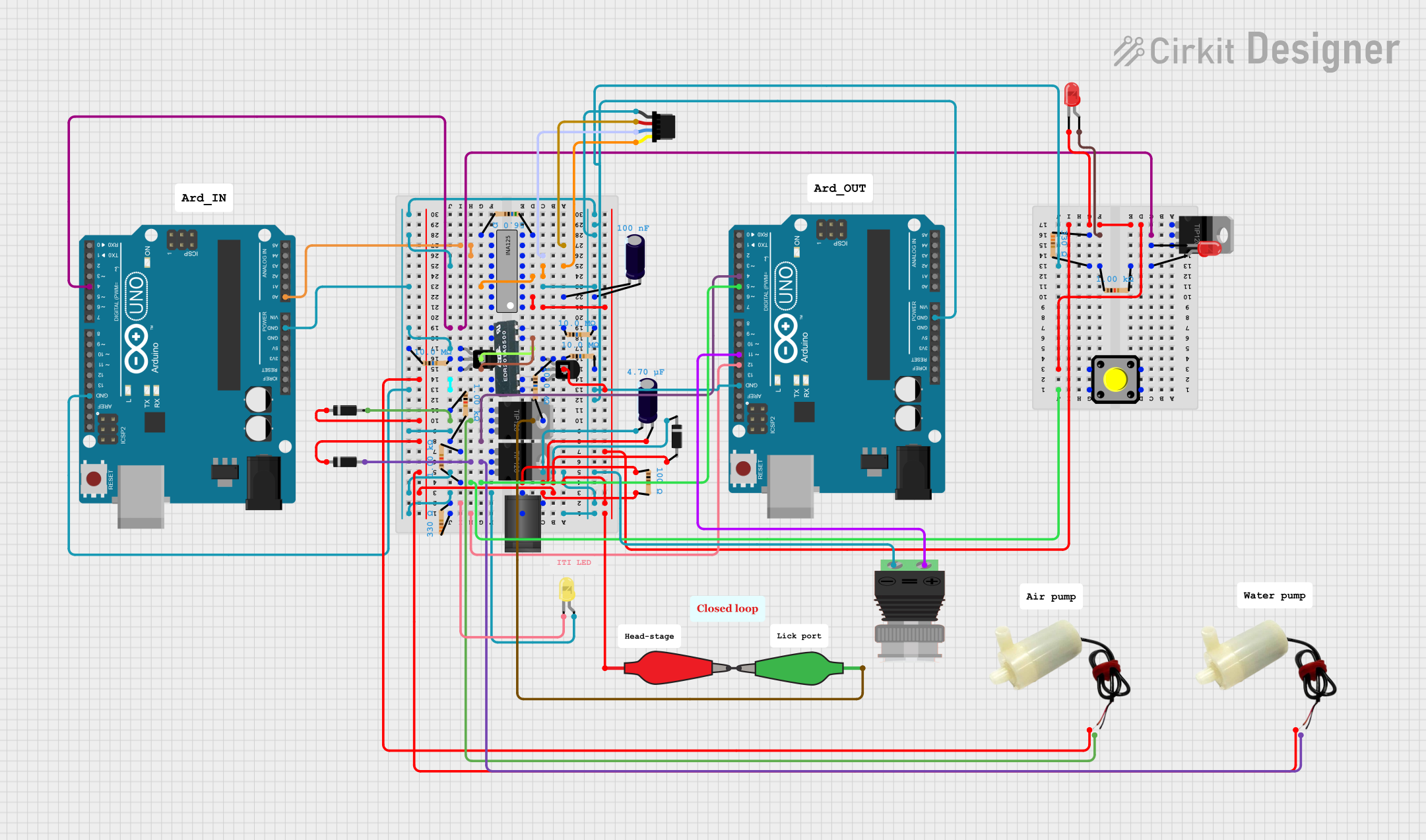
This document provides a detailed overview of a circuit that includes various components such as Arduino UNO microcontrollers, TIP120 high-current Darlington transistors, an INA125 instrumentation amplifier, resistors, capacitors, diodes, LEDs, water pumps, a pushbutton, a BNC connector, reed relays, a Qwiic cable, and a DC barrel jack. The circuit appears to be designed for controlling water pumps and reading sensor data, with signal conditioning and amplification provided by the INA125. The circuit also includes protection and power management elements such as zener diodes and capacitors.
Component List
- Arduino UNO: A microcontroller board based on the ATmega328P, featuring digital and analog I/O pins.
- TIP120 High-Current Darlington Transistor: A transistor used for controlling high-current loads.
- INA125: An instrumentation amplifier with precision voltage reference.
- Resistor: A passive two-terminal electrical component that implements electrical resistance.
- 5V Mini Water Pump: A small pump that operates at 5 volts for pumping water.
- LED (Red and Yellow): Light-emitting diodes used as visual indicators.
- Pushbutton: A simple switch mechanism for controlling some aspect of a machine or a process.
- Reed Relays: An electromagnetic relay used in various types of switching applications.
- PNP Transistor (EBC): A type of bipolar junction transistor used for amplification and switching.
- Qwiic Cable - Breadboard Jumper (4-pin): A cable used for making quick and easy I2C connections.
- 2.1mm DC Barrel Jack: A power connector used for attaching external power sources.
- Zener Diode: A diode that allows current to flow in the forward direction like a normal diode, but also in the reverse direction if the voltage is larger than the breakdown voltage.
- Diode: A two-terminal electronic component that conducts current primarily in one direction.
- Electrolytic Capacitor: A type of capacitor that uses an electrolyte to achieve a larger capacitance than other capacitor types.
- BNC Connector: A type of connector used with coaxial cable in radio, television, and other radio-frequency electronic equipment.
- Alligator Clip Cable: A cable with a clip at one end that can be used for temporary electrical connections.
Wiring Details
Arduino UNO
- Digital Pins: Used for interfacing with various components like LEDs, transistors, and relays.
- Analog Pins: Used for reading analog sensor data.
- Power Pins (3.3V, 5V, GND, Vin): Provide power to the circuit and ground connections.
TIP120 High-Current Darlington Transistor
- BASE: Connected to digital output pins of the Arduino through a resistor to control the transistor.
- COLLECTOR: Connected to the positive pin of the water pump and diode.
- EMITTER: Connected to the ground.
INA125
- V+: Connected to the positive voltage supply.
- V-: Connected to the ground.
- V_ref Out, IA_ref, V_REF 2.5: Configured for reference voltage settings.
- V_in +, V_in -: Input pins for sensor signals.
- Sense, V_O: Output pins for the amplified signal to the Arduino.
Resistor
- Various resistors are used throughout the circuit for current limiting, pull-up/pull-down configurations, and voltage division.
5V Mini Water Pump
- Positive Pin: Connected to the collector of the TIP120 transistor.
- Negative Pin: Connected to the ground through the emitter of the TIP120 transistor.
LED (Red and Yellow)
- Anode: Connected to the positive voltage supply through a resistor.
- Cathode: Connected to the ground or the emitter of a transistor for control.
Pushbutton
- Connected between a digital input pin on the Arduino and ground, with a pull-up resistor.
Reed Relays
- Used for switching applications, controlled by the Arduino and transistors.
PNP Transistor (EBC)
- Emitter: Connected to the positive voltage supply.
- Base: Connected to the control signal through a resistor.
- Collector: Connected to the load or next stage in the circuit.
Qwiic Cable - Breadboard Jumper (4-pin)
- Used for I2C communication between components.
2.1mm DC Barrel Jack
- Center: Connected to the positive voltage supply.
- Switch: Connected to the ground through a resistor.
Zener Diode
- Connected in reverse bias for voltage regulation and protection.
Diode
- Used for preventing reverse current flow and protecting components like water pumps.
Electrolytic Capacitor
- Used for smoothing out voltage fluctuations and power supply decoupling.
BNC Connector
- Used for connecting external sensors or signals to the circuit.
Alligator Clip Cable
- Used for making temporary connections to components like LEDs.
Documented Code
Arduino UNO (Instance ID: f5e5a4dc-4eaf-4d27-b9a4-062fd2103abc)
void setup() {
  // put your setup code here, to run once:

}

void loop() {
  // put your main code here, to run repeatedly:

}
Arduino UNO (Instance ID: d31de88f-4581-463d-874b-dbb3a870416b)
void setup() {
  // put your setup code here, to run once:

}

void loop() {
  // put your main code here, to run repeatedly:

}
(Note: The provided code for both Arduino UNO instances is a template with no specific functionality. The actual implementation should be added to the setup() and loop() functions as per the circuit's requirements.)