
Circuit Documentation
Summary
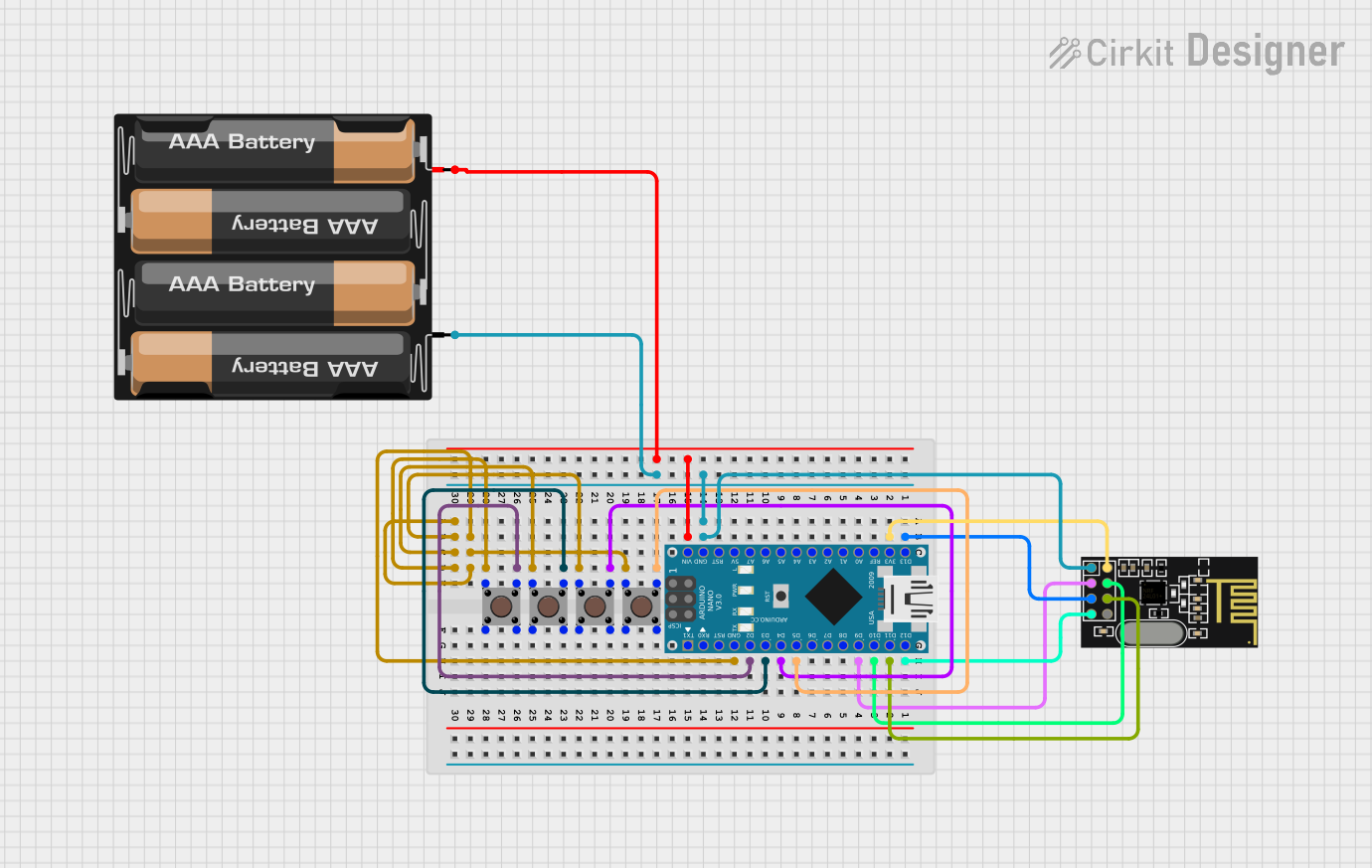
This circuit is designed to interface an Arduino Nano with an NRF24L01 wireless transceiver module and multiple pushbuttons. The pushbuttons are used to send commands wirelessly via the NRF24L01 module. The Arduino Nano is programmed to read the state of the pushbuttons and send corresponding commands to control a remote device. The circuit is powered by a 4 x AAA battery mount, providing the necessary voltage for the Arduino Nano and the NRF24L01 module.
Component List
Pushbutton
- Description: A standard tactile pushbutton used to trigger actions when pressed.
- Pins: Pin 3 (out), Pin 4 (out), Pin 1 (in), Pin 2 (in)
NRF24L01
- Description: A 2.4GHz wireless transceiver module used for short-range wireless communication.
- Pins: IRQ (not used), MOSI, CSN, VCC (3V), GND, CE, SCK, MISO
4 x AAA Battery Mount
- Description: A battery holder for four AAA batteries, providing power to the circuit.
- Pins: -, +
Arduino Nano
- Description: A small, breadboard-friendly microcontroller board based on the ATmega328P.
- Pins: D1/TX, D0/RX, RESET, GND, D2, D3, D4, D5, D6, D7, D8, D9, D10, D11/MOSI, D12/MISO, VIN, 5V, A7, A6, A5, A4, A3, A2, A1, A0, AREF, 3V3, D13/SCK
Wiring Details
Pushbuttons
- Pushbutton 1: Connected to Arduino Nano D2
- Pushbutton 2: Connected to Arduino Nano D3
- Pushbutton 3: Connected to Arduino Nano D4
- Pushbutton 4: Connected to Arduino Nano D5
- All pushbuttons have their Pin 1 (in) connected to Arduino Nano GND
NRF24L01
- SCK: Connected to Arduino Nano D13/SCK
- MISO: Connected to Arduino Nano D12/MISO
- VCC (3V): Connected to Arduino Nano 3V3
- MOSI: Connected to Arduino Nano D11/MOSI
- CSN: Connected to Arduino Nano D10
- CE: Connected to Arduino Nano D9
- GND: Connected to Arduino Nano GND
4 x AAA Battery Mount
- +: Connected to Arduino Nano VIN
- -: Connected to Arduino Nano GND
Documented Code
#include <SPI.h>
#include <nRF24L01.h>
#include <RF24.h>

// Pin definitions for the tactile push buttons
const int button1Pin = 2;  // Forward
const int button2Pin = 3;  // Backward
const int button3Pin = 4;  // Left
const int button4Pin = 5;  // Right
const int button5Pin = 6;  // Return to Origin

RF24 radio(9, 10); // NRF24L01 CE, CSN pins
const byte address[6] = "00001";

// Commands
enum Commands {
  FORWARD,
  BACKWARD,
  LEFT,
  RIGHT,
  STOP,
  RETURN_TO_ORIGIN
};

void setup() {
  // Set up buttons as inputs
  pinMode(button1Pin, INPUT_PULLUP);
  pinMode(button2Pin, INPUT_PULLUP);
  pinMode(button3Pin, INPUT_PULLUP);
  pinMode(button4Pin, INPUT_PULLUP);
  pinMode(button5Pin, INPUT_PULLUP);

  // Start the NRF24L01 radio
  radio.begin();
  radio.openWritingPipe(address);
  radio.setPALevel(RF24_PA_LOW);
}

void loop() {
  // Check button states
  if (digitalRead(button1Pin) == LOW) {
    sendCommand(FORWARD);
    delay(200); // Debounce delay
  }
  if (digitalRead(button2Pin) == LOW) {
    sendCommand(BACKWARD);
    delay(200); // Debounce delay
  }
  if (digitalRead(button3Pin) == LOW) {
    sendCommand(LEFT);
    delay(200); // Debounce delay
  }
  if (digitalRead(button4Pin) == LOW) {
    sendCommand(RIGHT);
    delay(200); // Debounce delay
  }
  if (digitalRead(button5Pin) == LOW) {
    sendCommand(RETURN_TO_ORIGIN);
    delay(200); // Debounce delay
  }
}

// Function to send commands to the receiver
void sendCommand(Commands cmd) {
  radio.stopListening(); // Stop listening before sending
  radio.write(&cmd, sizeof(cmd)); // Send the command
  radio.startListening(); // Start listening again
}
This code is designed to be uploaded to the Arduino Nano. It initializes the pushbuttons and NRF24L01 module, then continuously checks the state of the pushbuttons. When a button is pressed, it sends a corresponding command wirelessly to the receiver. The sendCommand function is used to send the commands through the NRF24L01 module.