
Circuit Documentation
Summary
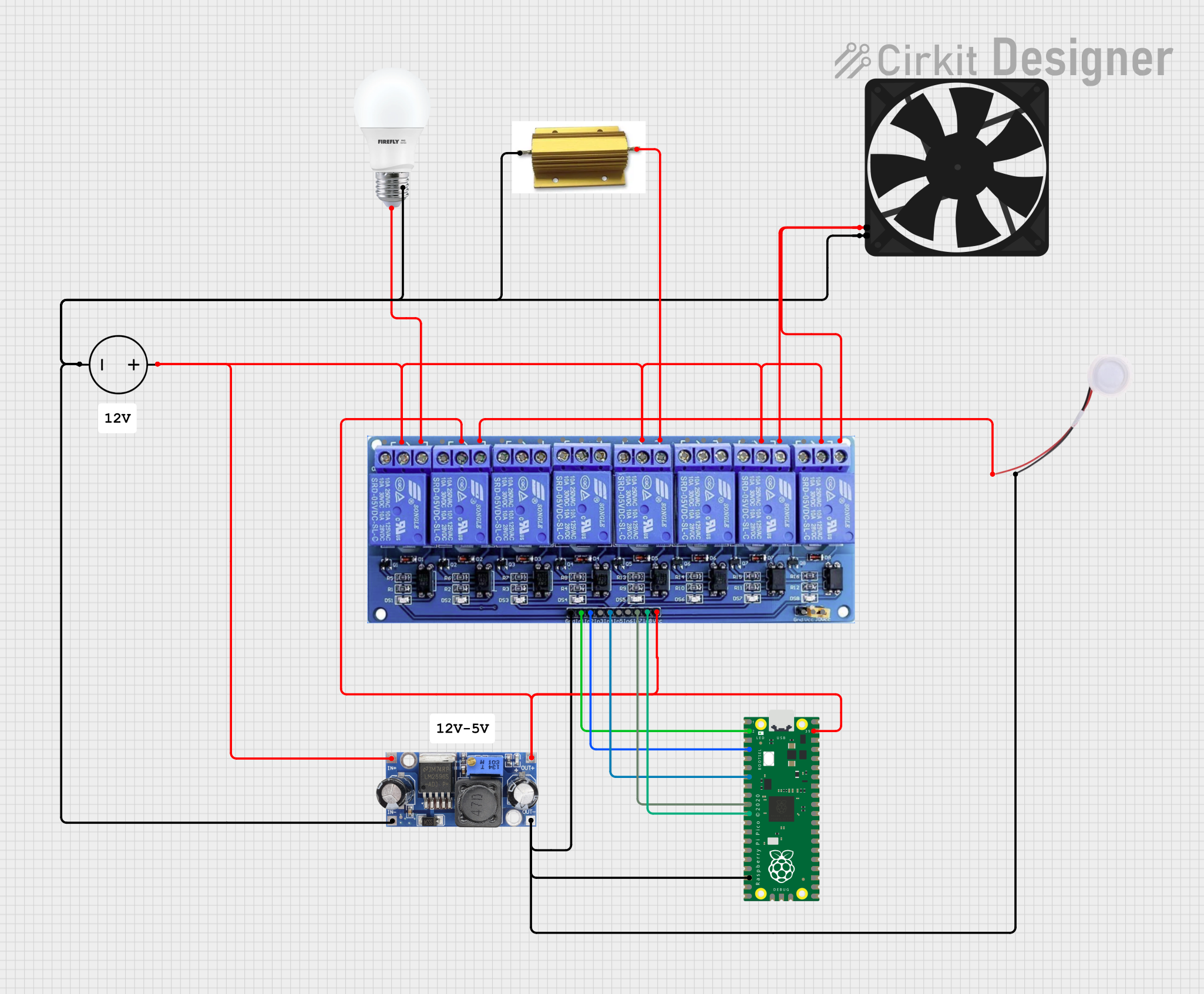
This document provides a detailed overview of a circuit involving a Raspberry Pi Pico microcontroller, an 8 Channel Relay, a DC-DC converter, a DC Power Source, a bulb, a fan, a humidifier, and a resistor. The circuit is designed to control various devices through the relay module, powered by a DC power source and regulated by a DC-DC converter.
Component List
Raspberry Pi Pico
- Description: A microcontroller board based on the RP2040 microcontroller chip.
- Pins: 43 pins including GPIO, power, and ground pins.
BULB
- Description: A simple light bulb.
- Pins: +, -
8 Channel Relay JD-VCC
- Description: A relay module with 8 channels, used to control high voltage devices.
- Pins: JD-VCC, VCC, GND, In1 to In8, IN1_NC, IN1_COM, IN1_NO, IN2_NC, IN2_COM, IN2_NO, IN3_NC, IN3_COM, IN3_NO, IN4_NC, IN4_COM, IN4_NO, IN5_NC, IN5_COM, IN5_NO, IN6_NC, IN6_COM, IN6_NO, IN7_NC, IN7_COM, IN7_NO, IN8_NC, IN8_COM, IN8_NO
DC DC converter
- Description: A device that converts DC voltage levels.
- Pins: +VCC IN, GND IN, +VCC OUT, GND OUT
DC Power Source
- Description: A power supply providing DC voltage.
- Pins: Ground, Positive
Fan
- Description: A fan for cooling purposes.
- Pins: GND, 5V
Humidifier
- Description: A device that adds moisture to the air.
- Pins: GND, 5V
HSC10047RJ
- Description: A resistor.
- Pins: +, -
Wiring Details
Raspberry Pi Pico
- pin 2 is connected to In1 of the 8 Channel Relay.
- pin 4 is connected to In2 of the 8 Channel Relay.
- pin 7 is connected to In4 of the 8 Channel Relay.
- pin 10 is connected to In7 of the 8 Channel Relay.
- pin 11 is connected to In8 of the 8 Channel Relay.
- pin 18 is connected to GND of the Humidifier, GND of the 8 Channel Relay, and GND OUT of the DC DC converter.
- pin 39 is connected to IN2_COM and VCC of the 8 Channel Relay, and +VCC OUT of the DC DC converter.
8 Channel Relay JD-VCC
- In1 is connected to pin 2 of the Raspberry Pi Pico.
- In2 is connected to pin 4 of the Raspberry Pi Pico.
- In4 is connected to pin 7 of the Raspberry Pi Pico.
- In7 is connected to pin 10 of the Raspberry Pi Pico.
- In8 is connected to pin 11 of the Raspberry Pi Pico.
- GND is connected to pin 18 of the Raspberry Pi Pico, GND of the Humidifier, and GND OUT of the DC DC converter.
- VCC is connected to pin 39 of the Raspberry Pi Pico and +VCC OUT of the DC DC converter.
- IN2_COM is connected to pin 39 of the Raspberry Pi Pico and +VCC OUT of the DC DC converter.
- IN1_COM, IN5_COM, IN7_COM, and IN8_COM are connected to Positive of the DC Power Source and +VCC IN of the DC DC converter.
- IN1_NO is connected to + of the BULB.
- IN2_NO is connected to 5V of the Humidifier.
- IN5_NO is connected to - of the HSC10047RJ.
- IN7_NO and IN8_NO are connected to 5V of the Fan.
DC DC converter
- +VCC IN is connected to Positive of the DC Power Source and IN1_COM, IN5_COM, IN7_COM, and IN8_COM of the 8 Channel Relay.
- GND IN is connected to Ground of the DC Power Source, + of the HSC10047RJ, - of the BULB, and GND of the Fan.
- +VCC OUT is connected to pin 39 of the Raspberry Pi Pico, IN2_COM, and VCC of the 8 Channel Relay.
- GND OUT is connected to pin 18 of the Raspberry Pi Pico, GND of the Humidifier, and GND of the 8 Channel Relay.
DC Power Source
- Positive is connected to IN1_COM, IN5_COM, IN7_COM, and IN8_COM of the 8 Channel Relay, and +VCC IN of the DC DC converter.
- Ground is connected to + of the HSC10047RJ, - of the BULB, GND IN of the DC DC converter, and GND of the Fan.
BULB
- + is connected to IN1_NO of the 8 Channel Relay.
- - is connected to Ground of the DC Power Source.
Fan
- GND is connected to Ground of the DC Power Source.
- 5V is connected to IN7_NO and IN8_NO of the 8 Channel Relay.
Humidifier
- GND is connected to pin 18 of the Raspberry Pi Pico, GND of the 8 Channel Relay, and GND OUT of the DC DC converter.
- 5V is connected to IN2_NO of the 8 Channel Relay.
HSC10047RJ
- + is connected to Ground of the DC Power Source.
- - is connected to IN5_NO of the 8 Channel Relay.
Documented Code
Raspberry Pi Pico Code
void setup() {
  // put your setup code here, to run once:

}

void loop() {
  // put your main code here, to run repeatedly:

}
This code is a basic template for the Raspberry Pi Pico, with setup and loop functions defined but not yet implemented.