
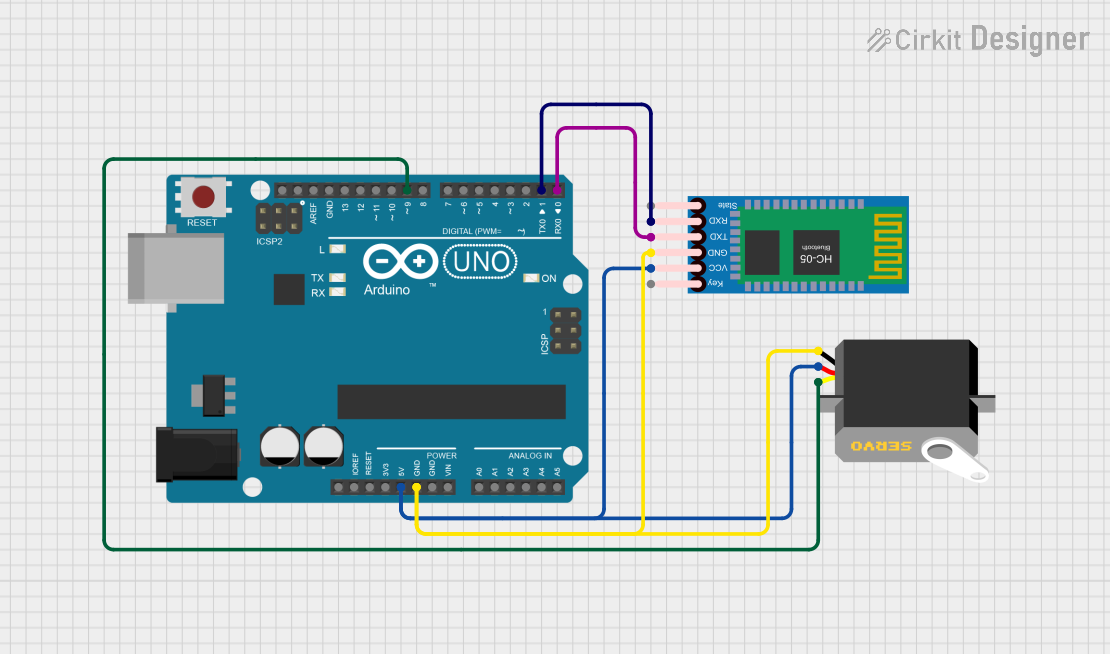
Circuit Documentation
Summary
The circuit in question is designed to control a servo motor via commands received from a Bluetooth module, with an Arduino UNO serving as the central microcontroller. The servo motor's position can be adjusted to open or close a door based on the received Bluetooth commands, which are authenticated with a predefined password.
Component List
Arduino UNO
- Description: A microcontroller board based on the ATmega328P.
- Purpose: Acts as the central processing unit for the circuit, controlling the servo motor and communicating with the HC-05 Bluetooth module.
- Pins: UNUSED, IOREF, Reset, 3.3V, 5V, GND, Vin, A0-A5, SCL, SDA, AREF, D0-D13.
Servo
- Description: An actuator that can be precisely controlled for angular or linear position, velocity, and acceleration.
- Purpose: To physically open or close a door based on commands received from the Arduino UNO.
- Pins: gnd, vcc, pulse.
HC-05 Bluetooth Module
- Description: A Bluetooth module that allows for wireless communication.
- Purpose: To receive commands wirelessly from a Bluetooth-enabled device and relay them to the Arduino UNO.
- Pins: Key, VCC, GND, TXD, RXD, State.
Wiring Details
Arduino UNO
- 5V: Connected to the VCC pins of the Servo and HC-05 Bluetooth Module to provide power.
- GND: Connected to the GND pins of the Servo and HC-05 Bluetooth Module to complete the power circuit.
- D9: Connected to the pulse pin of the Servo to control its position.
- D1 (TX): Connected to the RXD pin of the HC-05 Bluetooth Module to transmit data.
- D0 (RX): Connected to the TXD pin of the HC-05 Bluetooth Module to receive data.
Servo
- vcc: Connected to the 5V pin of the Arduino UNO.
- gnd: Connected to the GND pin of the Arduino UNO.
- pulse: Connected to the D9 pin of the Arduino UNO.
HC-05 Bluetooth Module
- VCC: Connected to the 5V pin of the Arduino UNO.
- GND: Connected to the GND pin of the Arduino UNO.
- TXD: Connected to the D0 (RX) pin of the Arduino UNO.
- RXD: Connected to the D1 (TX) pin of the Arduino UNO.
Documented Code
#include <Servo.h>

Servo myservo;
String inputString = "";
String command = "";
String value = "";
String password = "arduPi";
boolean stringComplete = false;

void setup(){
  Serial.begin(9600);
  inputString.reserve(50);
  command.reserve(50);
  value.reserve(50);
  boolean stringOK = false;
  myservo.attach(9);
}

void loop(){
  if (stringComplete) {
    delay(100);
    int pos = inputString.indexOf('=');
    if (pos > -1) {
      command = inputString.substring(0, pos);
      value = inputString.substring(pos+1, inputString.length()-1);

      if(!password.compareTo(value) && (command == "OPEN")){
        openDoor();
        Serial.println(" OPEN");
        delay(100);
      }
      else if(!password.compareTo(value) && (command == "CLOSE")){
        closeDoor();
        Serial.println(" CLOSE");
        delay(100);
      }
      else if(password.compareTo(value)){
        Serial.println(" WRONG");
        delay(100);
      }
    }
    inputString = "";
    stringComplete = false;
  }
}

void serialEvent() {
  while (Serial.available()) {
    char inChar = (char)Serial.read();
    inputString += inChar;
    if (inChar == '\n' || inChar == '\r') {
      stringComplete = true;
    }
  }
}

void openDoor(){
  myservo.write(0);
  delay(100);
}

void closeDoor(){
  myservo.write(65);
  delay(100);
}
Filename: sketch.ino
Description: This Arduino sketch is designed to receive commands via the HC-05 Bluetooth module. When a complete string is received, it checks if the command is "OPEN" or "CLOSE" and matches the password. If the authentication is successful, it triggers the openDoor or closeDoor function to move the servo to the respective position. If the password is incorrect, it prints "WRONG" to the serial monitor.