
Arduino UNO Based Air Quality and Temperature Monitoring System with Alert Indicators
View and Edit Project In Cirkit Designer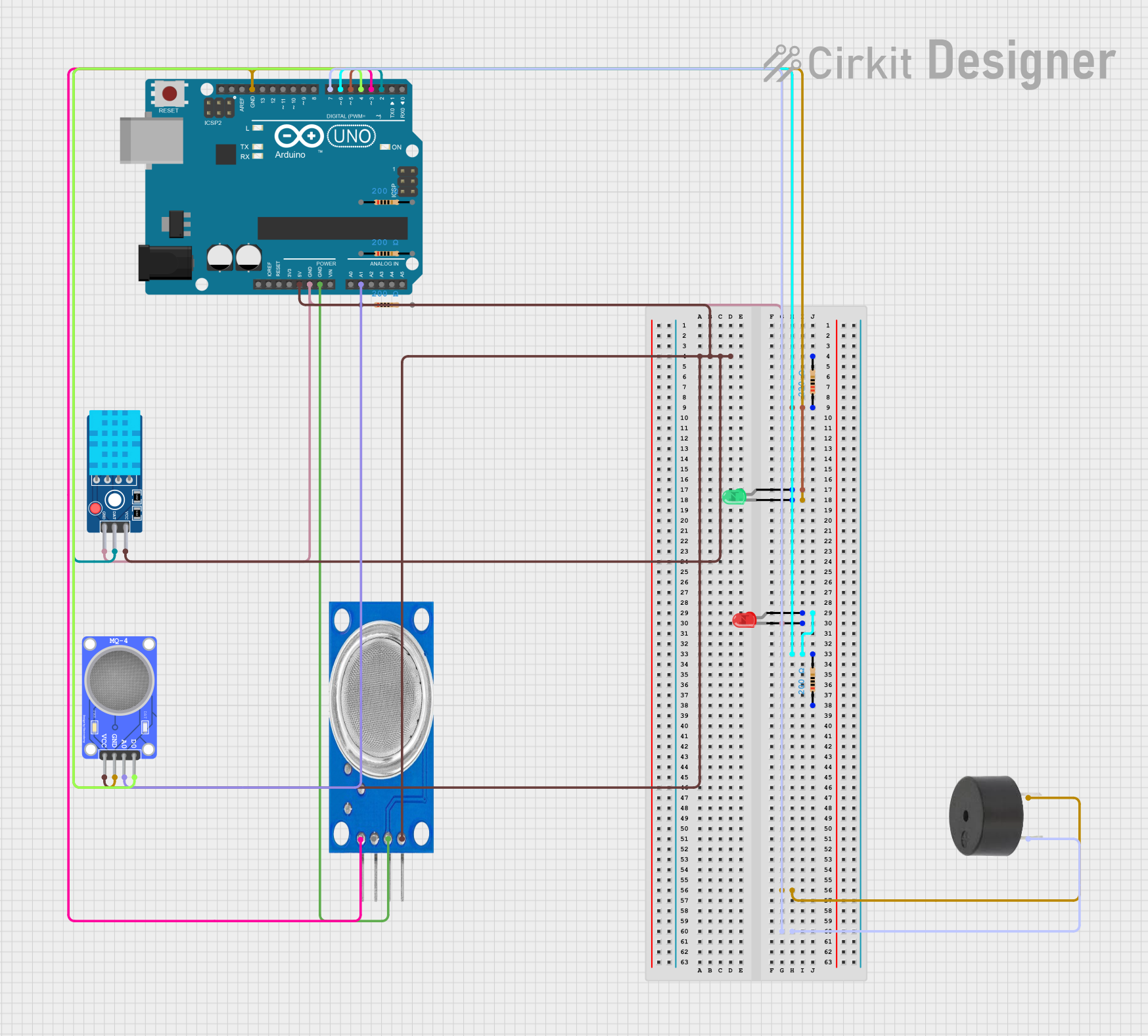
Circuit Documentation
Summary
The circuit in question is designed to monitor environmental conditions such as gas levels and temperature, and to provide visual and auditory alerts based on the readings. It utilizes a set of sensors including the MQ135 and MQ-4 for gas detection, and the DHT11 for temperature and humidity measurement. The circuit employs an Arduino UNO as the central microcontroller to process sensor data and control outputs such as LEDs and a buzzer based on predefined threshold values.
Component List
MQ135 Gas Sensor
- Pins: VCC, GND, A0, D0
- Description: A sensor for detecting a wide range of gases, including NH3, NOx, alcohol, benzene, smoke, and CO2.
MQ-4 Methane Gas Sensor
- Pins: VCC, GND, A0, D0
- Description: A sensor for detecting methane (CH4) gas.
DHT11 Temperature and Humidity Sensor V2
- Pins: GND, DAT, VCC
- Description: A sensor for measuring ambient temperature and humidity.
LED: Two Pin (Red)
- Pins: Cathode, Anode
- Description: A red indicator LED.
LED: Two Pin (Green)
- Pins: Cathode, Anode
- Description: A green indicator LED.
Arduino UNO
- Pins: UNUSED, IOREF, Reset, 3.3V, 5V, GND, Vin, A0-A5, SCL, SDA, AREF, D0-D13
- Description: A microcontroller board based on the ATmega328P.
Resistor (220 Ohms)
- Pins: Pin1, Pin2
- Description: A resistor with a resistance of 220 Ohms.
Resistor (200 Ohms)
- Pins: Pin1, Pin2
- Description: A resistor with a resistance of 200 Ohms.
Buzzer
- Pins: PIN, GND
- Description: An audible signaling device.
Wiring Details
MQ135 Gas Sensor
- VCC: Connected to 5V on Arduino UNO.
- GND: Connected to GND on Arduino UNO.
- A0: Not connected.
- D0: Connected to D3 on Arduino UNO.
MQ-4 Methane Gas Sensor
- VCC: Connected to 5V on Arduino UNO.
- GND: Connected to GND on Arduino UNO.
- A0: Connected to A1 on Arduino UNO.
- D0: Connected to D4 on Arduino UNO.
DHT11 Temperature and Humidity Sensor V2
- GND: Connected to GND on Arduino UNO.
- DAT: Connected to D2 on Arduino UNO.
- VCC: Connected to 5V on Arduino UNO.
LED: Two Pin (Red)
- Cathode: Connected to GND on Arduino UNO.
- Anode: Connected to D6 on Arduino UNO through a 200 Ohm resistor.
LED: Two Pin (Green)
- Cathode: Connected to GND on Arduino UNO.
- Anode: Connected to D5 on Arduino UNO through a 220 Ohm resistor.
Buzzer
- PIN: Connected to D7 on Arduino UNO.
- GND: Connected to GND on Arduino UNO.
Documented Code
#include <UnoWiFiDevEd.h>
#include <DHT.h>

// Pin assignments
#define DHTPIN 2
#define DHTTYPE DHT11
#define MQ135_A0 A0
#define MQ135_D0 3
#define MQ4_A0 A1
#define MQ4_D0 4
#define RED_LED 5
#define GREEN_LED 6
#define BUZZER 7

// Threshold values for gas levels and temperature
int gasThreshold = 400; // Analog threshold for gas sensors (MQ135 and MQ-4)
float tempThreshold = 25.0; // Temperature threshold in Celsius

// DHT11 sensor
DHT dht(DHTPIN, DHTTYPE);

void setup() {
  // Initialize serial communication
  Serial.begin(9600);

  // Initialize DHT11 sensor
  dht.begin();

  // Initialize LED and buzzer pins
  pinMode(RED_LED, OUTPUT);
  pinMode(GREEN_LED, OUTPUT);
  pinMode(BUZZER, OUTPUT);

  // Initialize MQ sensor pins
  pinMode(MQ135_A0, INPUT);
  pinMode(MQ135_D0, INPUT);
  pinMode(MQ4_A0, INPUT);
  pinMode(MQ4_D0, INPUT);
}

void loop() {
  // Read temperature and humidity from DHT11
  float humidity = dht.readHumidity();
  float temperature = dht.readTemperature();

  // Read MQ135 and MQ-4 gas sensor analog values
  int mq135_analog = analogRead(MQ135_A0);
  int mq4_analog = analogRead(MQ4_A0);

  // Calculate combined gas levels
  int combinedGasLevel = (mq135_analog + mq4_analog) / 2;

  if (isnan(humidity) || isnan(temperature)) {
    Serial.println("Failed to read from DHT11 sensor!");
  } else {
    Serial.print("Humidity: ");
    Serial.print(humidity);
    Serial.print("%  Temperature: ");
    Serial.print(temperature);
    Serial.println("°C");
  }

  // Print pesticide level based on gas sensor readings
  if (combinedGasLevel >= gasThreshold) {
    Serial.println("Pesticide Level: High");
  } else {
    Serial.println("Pesticide Level: Low");
  }

  // Determine and print food safety status based on gas and temperature
  if (combinedGasLevel >= gasThreshold || temperature >= tempThreshold) {
    Serial.println("Food Status: Spoiled");
    digitalWrite(RED_LED, HIGH);   // Turn on red LED (spoiled)
    digitalWrite(GREEN_LED, LOW);  // Turn off green LED (safe)
    digitalWrite(BUZZER, HIGH);    // Turn on buzzer (alert)
  } else {
    Serial.println("Food Status: Safe");
    digitalWrite(RED_LED, LOW);    // Turn off red LED (spoiled)
    digitalWrite(GREEN_LED, HIGH); // Turn on green LED (safe)
    digitalWrite(BUZZER, LOW);     // Turn off buzzer
  }

  // Print gas sensor readings
  Serial.print("MQ135 Analog: ");
  Serial.println(mq135_analog);
  Serial.print("MQ4 Analog: ");
  Serial.println(mq4_analog);

  // Delay between readings
  delay(2000);
}
This code is designed to run on the Arduino UNO microcontroller. It initializes the sensors and output devices, reads sensor data, and controls the LEDs and buzzer based on the sensor readings. The code includes comments explaining the purpose of each section and the logic behind the alert conditions.