
Arduino UNO Bluetooth-Controlled Dual Motor Robot with L298N Driver
View and Edit Project In Cirkit Designer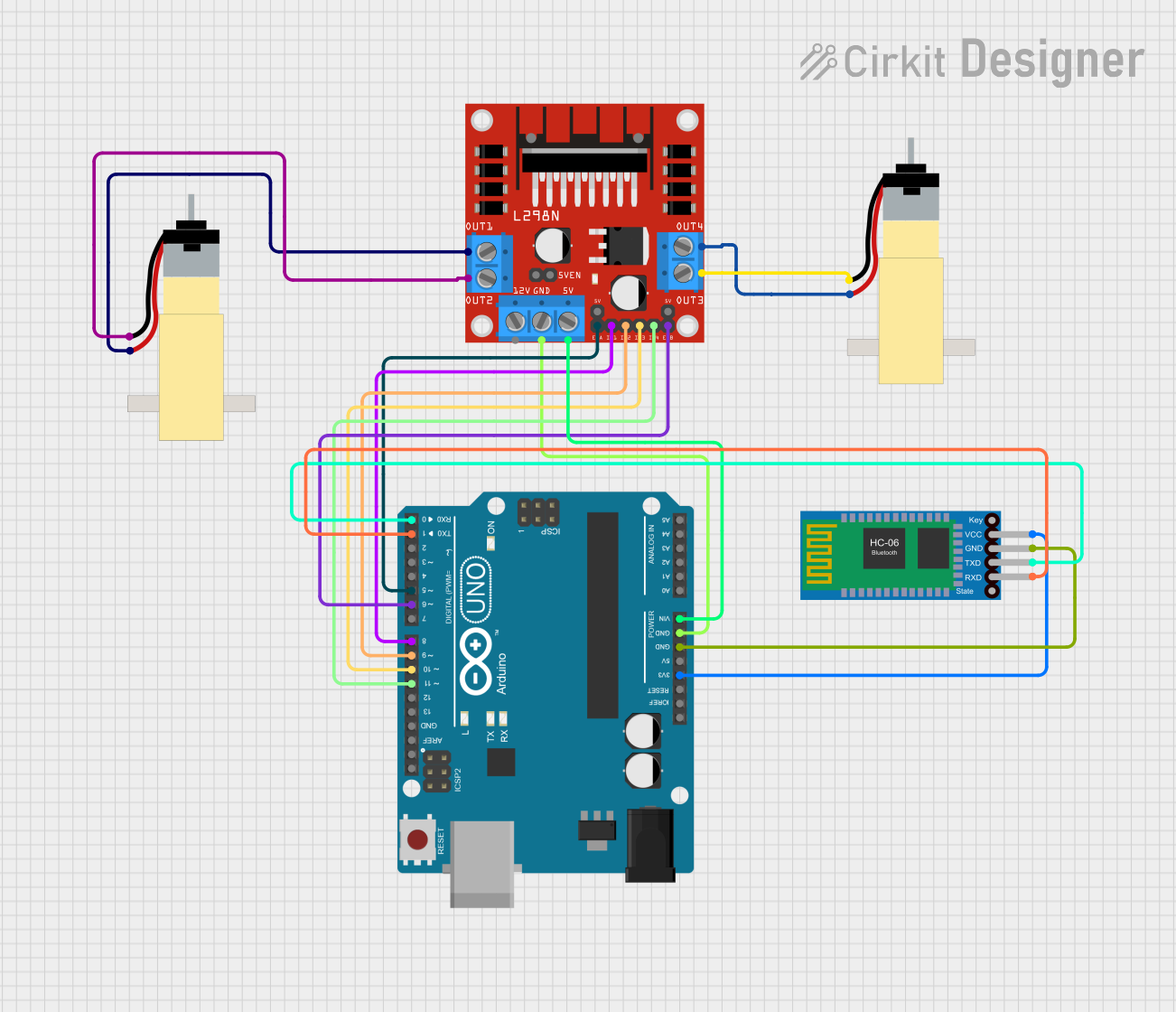
Circuit Documentation
Summary
This circuit is designed to control two hobby gearmotors using an L298N DC motor driver, an Arduino UNO, and a Bluetooth HC-06 module. The Arduino UNO receives commands via Bluetooth and controls the motors accordingly.
Component List
Hobby Gearmotor with 48:1 gearbox
- Description: A DC motor with a 48:1 gearbox for increased torque.
- Pins: pin 1, pin 2
L298N DC motor driver
- Description: A dual H-bridge motor driver that allows control of two DC motors.
- Pins: OUT1, OUT2, 12V, GND, 5V, OUT3, OUT4, 5V-ENA-JMP-I, 5V-ENA-JMP-O, +5V-J1, +5V-J2, ENA, IN1, IN2, IN3, IN4, ENB
Arduino UNO
- Description: A microcontroller board based on the ATmega328P.
- Pins: UNUSED, IOREF, Reset, 3.3V, 5V, GND, Vin, A0, A1, A2, A3, A4, A5, SCL, SDA, AREF, D13, D12, D11, D10, D9, D8, D7, D6, D5, D4, D3, D2, D1, D0
Bluetooth HC-06
- Description: A Bluetooth module for wireless communication.
- Pins: VCC, GND, TXD, RXD
Wiring Details
Hobby Gearmotor with 48:1 gearbox (Motor 1)
- pin 1 connected to L298N DC motor driver OUT2
- pin 2 connected to L298N DC motor driver OUT1
Hobby Gearmotor with 48:1 gearbox (Motor 2)
- pin 1 connected to L298N DC motor driver OUT3
- pin 2 connected to L298N DC motor driver OUT4
L298N DC motor driver
- GND connected to Arduino UNO GND
- 5V connected to Arduino UNO Vin
- ENA connected to Arduino UNO D5
- IN1 connected to Arduino UNO D8
- IN2 connected to Arduino UNO D9
- IN3 connected to Arduino UNO D10
- IN4 connected to Arduino UNO D11
- ENB connected to Arduino UNO D6
Arduino UNO
- 3.3V connected to Bluetooth HC-06 VCC
- GND connected to Bluetooth HC-06 GND
- D1 connected to Bluetooth HC-06 RXD
- D0 connected to Bluetooth HC-06 TXD
Code Documentation
// Define motor driver pins
#define ENA 5  // PWM for left motor
#define ENB 6  // PWM for right motor
#define IN1 8  // Left motor - Input 1
#define IN2 9  // Left motor - Input 2
#define IN3 10 // Right motor - Input 1
#define IN4 11 // Right motor - Input 2

char command; // Variable to receive Bluetooth commands

void setup() {
  // Initialize motor pins as outputs
  pinMode(ENA, OUTPUT);
  pinMode(ENB, OUTPUT);
  pinMode(IN1, OUTPUT);
  pinMode(IN2, OUTPUT);
  pinMode(IN3, OUTPUT);
  pinMode(IN4, OUTPUT);

  // Initialize serial communication for Bluetooth
  Serial.begin(9600); // HC-06 communication speed
}

void loop() {
  // Check if data is available from Bluetooth
  if (Serial.available()) {
    command = Serial.read(); // Read command from Bluetooth

    // Execute action based on command
    switch (command) {
      case 'F': // Move forward
        moveForward();
        break;

      case 'B': // Move backward
        moveBackward();
        break;

      case 'L': // Turn left
        turnLeft();
        break;

      case 'R': // Turn right
        turnRight();
        break;

      case 'S': // Stop
        stopMoving();
        break;

      default:
        // Stop robot if command is unknown
        stopMoving();
        break;
    }
  }
}

// Function to move forward
void moveForward() {
  digitalWrite(IN1, HIGH);
  digitalWrite(IN2, LOW);
  digitalWrite(IN3, HIGH);
  digitalWrite(IN4, LOW);
  analogWrite(ENA, 200); // Left motor speed
  analogWrite(ENB, 200); // Right motor speed
}

// Function to move backward
void moveBackward() {
  digitalWrite(IN1, LOW);
  digitalWrite(IN2, HIGH);
  digitalWrite(IN3, LOW);
  digitalWrite(IN4, HIGH);
  analogWrite(ENA, 200);
  analogWrite(ENB, 200);
}

// Function to turn left
void turnLeft() {
  digitalWrite(IN1, LOW);
  digitalWrite(IN2, HIGH);
  digitalWrite(IN3, HIGH);
  digitalWrite(IN4, LOW);
  analogWrite(ENA, 150); // Lower left motor speed
  analogWrite(ENB, 200); // Right motor speed
}

// Function to turn right
void turnRight() {
  digitalWrite(IN1, HIGH);
  digitalWrite(IN2, LOW);
  digitalWrite(IN3, LOW);
  digitalWrite(IN4, HIGH);
  analogWrite(ENA, 200); // Left motor speed
  analogWrite(ENB, 150); // Lower right motor speed
}

// Function to stop moving
void stopMoving() {
  digitalWrite(IN1, LOW);
  digitalWrite(IN2, LOW);
  digitalWrite(IN3, LOW);
  digitalWrite(IN4, LOW);
  analogWrite(ENA, 0);
  analogWrite(ENB, 0);
}
This code initializes the motor driver pins and sets up serial communication for the Bluetooth module. It reads commands from the Bluetooth module and controls the motors to move forward, backward, turn left, turn right, or stop based on the received command.