
Arduino UNO Based Ultrasonic Distance Measurement with TM1637 Display
View and Edit Project In Cirkit Designer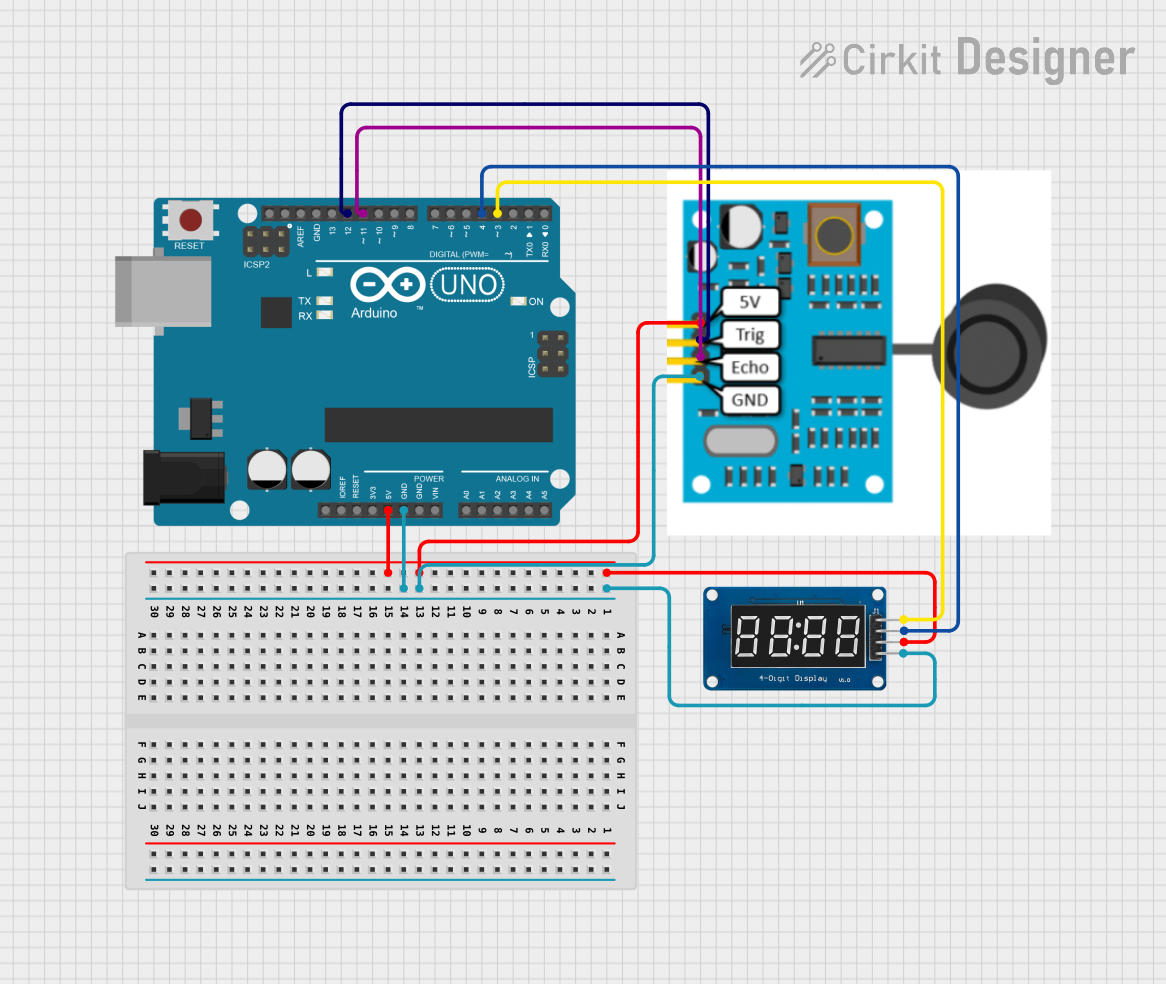
Circuit Documentation
Summary
This circuit integrates an Arduino UNO microcontroller with a JSN-SR04T ultrasonic sensor and a TM1637 4-digit 7-segment display. The purpose of the circuit is to measure distances using the ultrasonic sensor and display the measured values on the TM1637 display. The Arduino UNO serves as the central processing unit, controlling the sensor to perform distance measurements and driving the display to show the results.
Component List
Arduino UNO
- Description: A microcontroller board based on the ATmega328P.
- Purpose: Acts as the central controller for the circuit, interfacing with the ultrasonic sensor and the display module.
- Pins: UNUSED, IOREF, Reset, 3.3V, 5V, GND, Vin, Analog Pins (A0-A5), SCL, SDA, AREF, Digital Pins (D0-D13).
JSN-SR04T Sensor
- Description: A waterproof ultrasonic distance sensor.
- Purpose: Measures distances by emitting ultrasonic waves and receiving the reflected signal.
- Pins: 5V, TRIG, ECHO, GND.
TM1637
- Description: A 4-digit 7-segment display module with TM1637 driver.
- Purpose: Displays the distance measured by the ultrasonic sensor.
- Pins: CLK, DIO, VCC, GND.
Wiring Details
Arduino UNO
- 5V: Powers the JSN-SR04T Sensor and TM1637 display.
- GND: Common ground for the JSN-SR04T Sensor and TM1637 display.
- D12: Connected to the TRIG pin of the JSN-SR04T Sensor.
- D11: Connected to the ECHO pin of the JSN-SR04T Sensor.
- D4: Connected to the DIO pin of the TM1637 display.
- D3: Connected to the CLK pin of the TM1637 display.
JSN-SR04T Sensor
- 5V: Receives power from the Arduino UNO.
- TRIG: Connected to the D12 pin of the Arduino UNO.
- ECHO: Connected to the D11 pin of the Arduino UNO.
- GND: Connected to the common ground on the Arduino UNO.
TM1637
- VCC: Receives power from the Arduino UNO.
- GND: Connected to the common ground on the Arduino UNO.
- DIO: Connected to the D4 pin of the Arduino UNO.
- CLK: Connected to the D3 pin of the Arduino UNO.
Documented Code
#include "NewPing.h"
#include "TM1637Display.h"

// Display
const int clkPin = 3; // CLK pin connected to TM1637
const int dioPin = 4; // DIO pin connected to TM1637

// Sonar
const int trigPin = 12; // TRIG pin connected to JSN-SR04T Sensor
const int echoPin = 11; // ECHO pin connected to JSN-SR04T Sensor
const int maxDist = 450; // Maximum distance to measure

NewPing sonar(trigPin, echoPin, maxDist); // Initialize sonar object
TM1637Display display(clkPin, dioPin); // Initialize display object

void setup() {
  Serial.begin(115200); // Start serial communication at 115200 baud
  display.setBrightness(5); // Set display brightness
}

void loop() {
  long distance = sonar.ping_cm(); // Measure distance in centimeters
  Serial.print("Distance:"); // Print distance to serial monitor
  Serial.println(distance);
  display.showNumberDec(distance); // Display distance on TM1637
  delay(200); // Wait for 200 milliseconds
}
This code initializes the ultrasonic sensor and the display, then continuously measures the distance and displays it on the TM1637. The serial monitor also outputs the distance for debugging purposes. The NewPing library is used for easy interfacing with the ultrasonic sensor, and the TM1637Display library is used to control the 7-segment display.