
ESP32-Based OBD-II Car Speed Display with ILI9488 TFT Screen
View and Edit Project In Cirkit Designer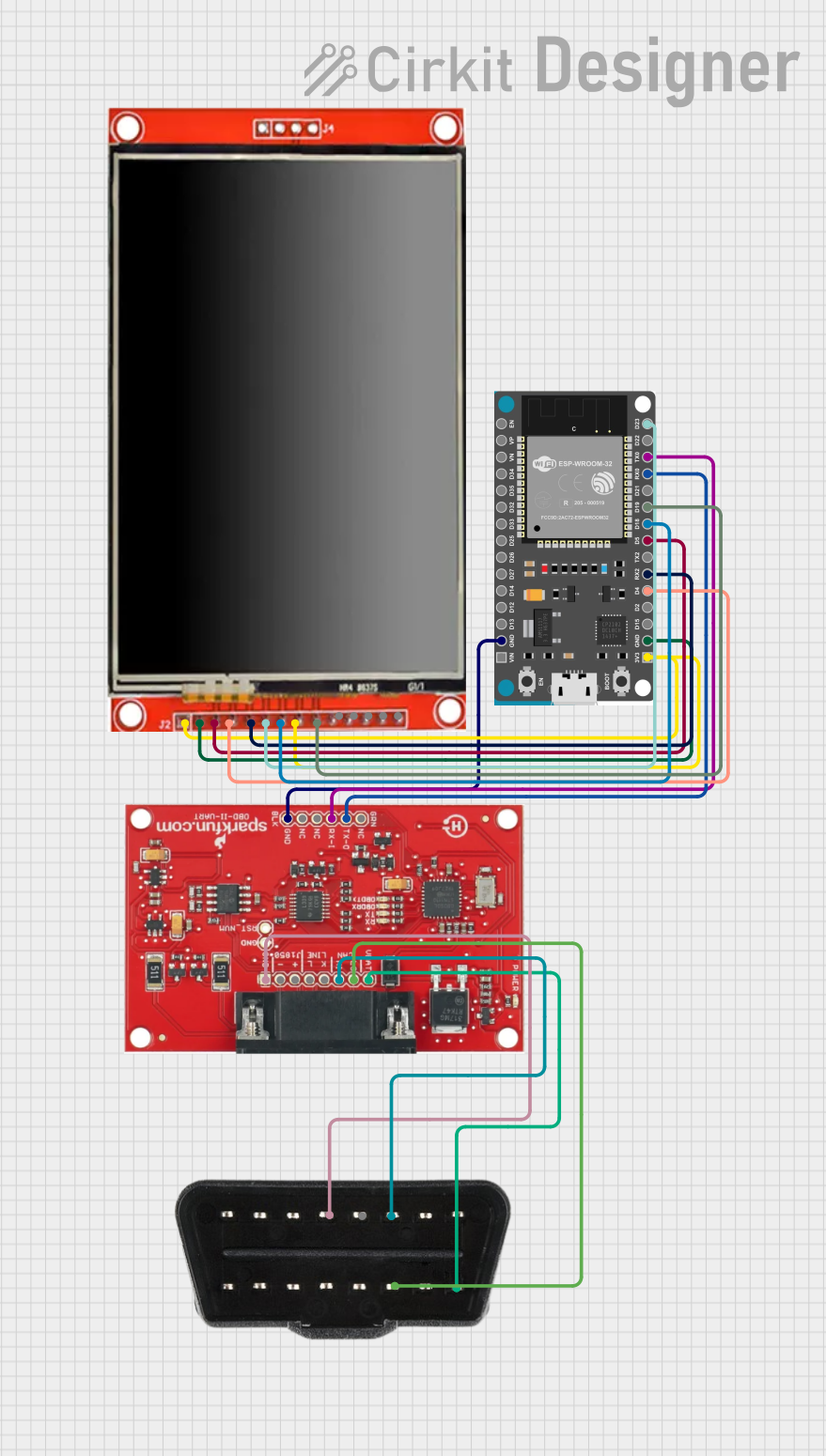
Circuit Documentation
Summary
This circuit integrates an ESP32 Devkit V1 microcontroller with an LCD TFT screen ILI9488 HD and interfaces with an OBD2 Diag module through UART communication. The ESP32 is responsible for controlling the display and processing data received from the OBD2 Diag module, which is connected to an OBD-II port for vehicle diagnostics. The circuit is designed to read vehicle speed from the OBD2 interface and display it on the LCD screen.
Component List
ESP32 Devkit V1
- Microcontroller with WiFi and Bluetooth capabilities.
- It has multiple GPIO pins for interfacing with peripherals and sensors.
LCD TFT screen ILI9488 HD
- A color display module with an ILI9488 controller.
- It supports SPI communication and has a backlight control pin.
OBD2 Diag
- A module for interfacing with a vehicle's On-Board Diagnostics (OBD) system.
- It provides access to various vehicle parameters and diagnostics data.
OBD-II port
- A standardized hardware interface in vehicles for self-diagnostics and reporting capability.
Wiring Details
ESP32 Devkit V1
3V3connected to LCD TFT screen ILI9488 HDVCC (3.3~5V)for power.GNDconnected to LCD TFT screen ILI9488 HDGNDand OBD2 DiagGNDfor common ground.D4connected to LCD TFT screen ILI9488 HDRSTfor reset control.RX2connected to LCD TFT screen ILI9488 HDD/Cfor data/command selection.D5connected to LCD TFT screen ILI9488 HDCSfor chip select.D18connected to LCD TFT screen ILI9488 HDSCKfor SPI clock.D19connected to LCD TFT screen ILI9488 HDSDO(MISO)for SPI Master In Slave Out.D23connected to LCD TFT screen ILI9488 HDSDI(MOSI)for SPI Master Out Slave In.RX0connected to OBD2 DiagTX-Ofor UART receive.TX0connected to OBD2 DiagRX-Ifor UART transmit.
LCD TFT screen ILI9488 HD
BLconnected to ESP32 Devkit V13V3for backlight control.- Other connections to ESP32 Devkit V1 as detailed above.
OBD2 Diag
GNDconnected to ESP32 Devkit V1GNDfor common ground.TX-Oconnected to ESP32 Devkit V1RX0for UART transmit.RX-Iconnected to ESP32 Devkit V1TX0for UART receive.
OBD-II port
GNDconnected to OBD2 DiagGNDfor common ground.CANHconnected to OBD2 DiagCAN HIfor CAN high signal.CANLconnected to OBD2 DiagCAN LOfor CAN low signal.12vconnected to OBD2 Diag12V+for power supply.
Documented Code
#include <Wire.h>
#include <Adafruit_ILI9341.h>
#include <Adafruit_GFX.h>
#include <HardwareSerial.h>

#define TFT_CS     5
#define TFT_RST    4
#define TFT_DC     16
Adafruit_ILI9341 tft = Adafruit_ILI9341(TFT_CS, TFT_DC, TFT_RST);

HardwareSerial mySerial(2); // UART2 (GPIO 16 RX, GPIO 17 TX)

void setup() {
  Serial.begin(115200);
  mySerial.begin(9600, SERIAL_8N1, 16, 17); // Setup UART2
  tft.begin();
  tft.setRotation(2); // Set display orientation
  tft.fillScreen(ILI9341_BLACK);
}

void loop() {
  mySerial.println("010D"); // Command to get speed from OBD2
  delay(1000);

  if (mySerial.available()) {
    String speedData = mySerial.readStringUntil('\r');
    int speed = parseSpeed(speedData);
    displaySpeed(speed);
  }
}

int parseSpeed(String data) {
  // Process data from OBD2
  if (data.length() > 6) {
    String speedHex = data.substring(6, 8);
    return strtol(speedHex.c_str(), NULL, 16);
  }
  return 0;
}

void displaySpeed(int speed) {
  tft.fillScreen(ILI9341_BLACK);

  // Set text size and color for speed
  tft.setTextSize(9); // Text size 9x standard size (corresponds to 90 pixels)
  tft.setTextColor(ILI9341_WHITE);

  // Calculate position for speed (center of display)
  int16_t x1, y1;
  uint16_t w, h;
  String speedStr = String(speed);
  tft.getTextBounds(speedStr, 0, 0, &x1, &y1, &w, &h);
  int speedX = (tft.width() - w) / 2;
  int speedY = (tft.height() - h) / 2 - 25; // Move slightly up

  // Display speed
  tft.setCursor(speedX, speedY);
  tft.print(speedStr);

  // Set text size and color for "km/h"
  tft.setTextSize(5); // Text size 5x standard size (corresponds to 50 pixels)
  tft.setTextColor(ILI9341_WHITE);

  // Calculate position for "km/h" (below speed)
  String unitStr = "km/h";
  tft.getTextBounds(unitStr, 0, 0, &x1, &y1, &w, &h);
  int unitX = (tft.width() - w) / 2;
  int unitY = speedY + h + 10; // Move below speed

  // Display "km/h"
  tft.setCursor(unitX, unitY);
  tft.print(unitStr);
}
This code initializes the ESP32 Devkit V1 and the LCD TFT screen ILI9488 HD, sets up UART communication with the OBD2 Diag module, and continuously reads and displays the vehicle speed on the LCD screen. The speed is requested from the OBD2 module, parsed from the response, and then displayed in a large font with the unit "km/h" below it.