
Arduino UNO-Based Line Following and Object Detecting Robot with Bluetooth Control
View and Edit Project In Cirkit Designer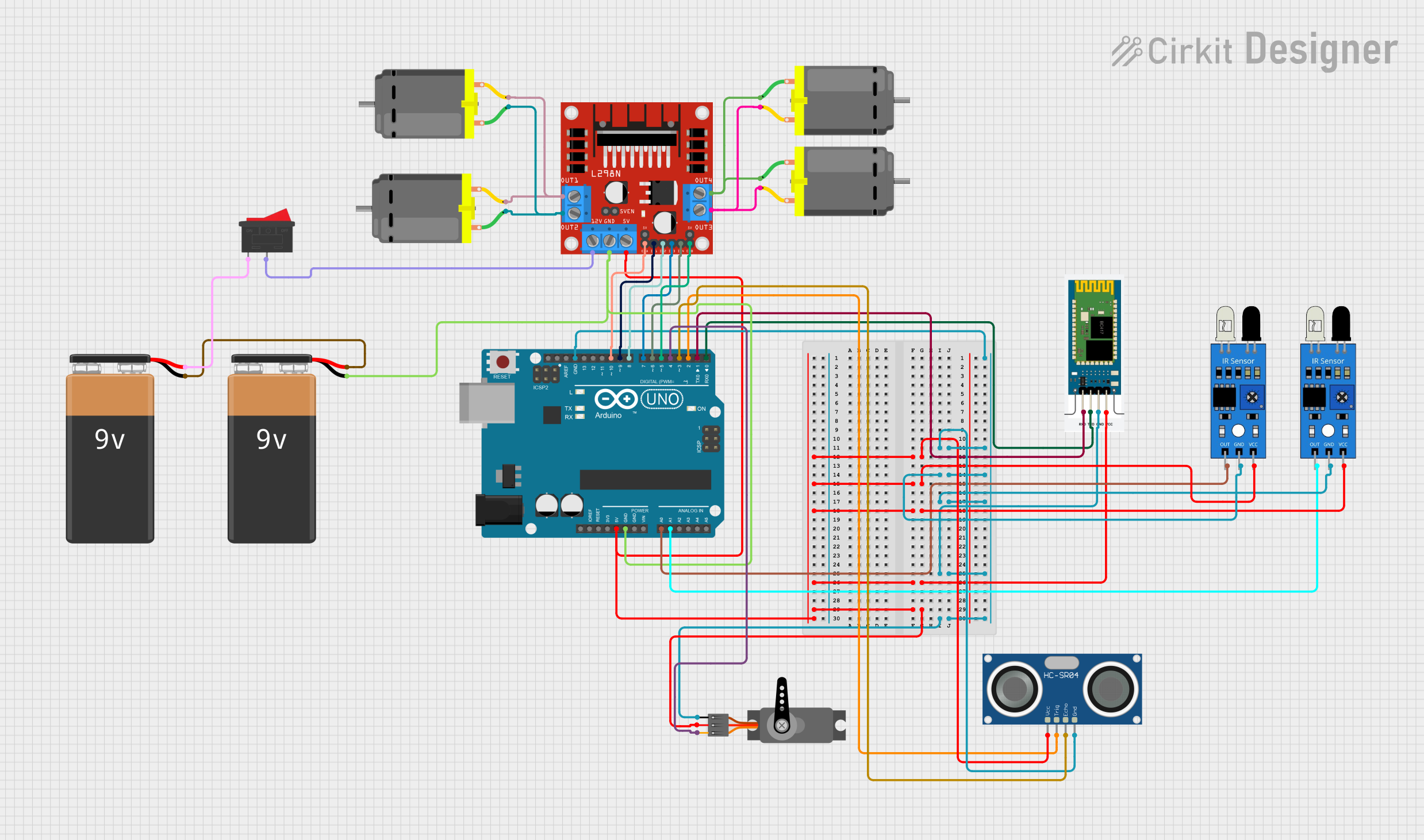
Circuit Documentation
Summary
This document provides a detailed overview of a circuit designed to control a robotic vehicle with object detection and line-following capabilities. The circuit includes an Arduino UNO microcontroller, various sensors, a motor driver, and other components to achieve the desired functionality. The vehicle can operate in both manual and automatic modes, with manual control via Bluetooth and automatic control using IR sensors and an ultrasonic sensor.
Component List
Arduino UNO
- Description: Microcontroller board based on the ATmega328P.
- Pins: UNUSED, IOREF, Reset, 3.3V, 5V, GND, Vin, A0, A1, A2, A3, A4, A5, SCL, SDA, AREF, D13, D12, D11, D10, D9, D8, D7, D6, D5, D4, D3, D2, D1, D0
HC-06
- Description: Bluetooth module for wireless communication.
- Pins: RXD, TXD, GND, VCC
9V Battery
- Description: Power source for the circuit.
- Pins: -, +
Servo
- Description: Servo motor for object grabbing.
- Pins: GND, VCC, PWM
L298N DC Motor Driver
- Description: Dual H-Bridge motor driver for controlling DC motors.
- Pins: OUT1, OUT2, 12V, GND, 5V, OUT3, OUT4, 5V-ENA-JMP-I, 5V-ENA-JMP-O, +5V-J1, +5V-J2, ENA, IN1, IN2, IN3, IN4, ENB
HC-SR04 Ultrasonic Sensor
- Description: Ultrasonic sensor for distance measurement.
- Pins: VCC, TRIG, ECHO, GND
DC Motor
- Description: DC motor for vehicle movement.
- Pins: pin 1, pin 2
Rocker Switch
- Description: Switch for controlling power.
- Pins: 1, 2
IR Sensor
- Description: Infrared sensor for line following.
- Pins: out, gnd, vcc
Wiring Details
Arduino UNO
- GND: Connected to GND of HC-SR04 Ultrasonic Sensor, IR Sensors, HC-06, Servo, and L298N DC Motor Driver.
- 5V: Connected to VCC of HC-SR04 Ultrasonic Sensor, IR Sensors, HC-06, Servo, and L298N DC Motor Driver.
- A0: Connected to out of IR Sensor.
- A1: Connected to out of IR Sensor.
- D10: Connected to ENA of L298N DC Motor Driver.
- D9: Connected to IN1 of L298N DC Motor Driver.
- D8: Connected to IN2 of L298N DC Motor Driver.
- D7: Connected to IN3 of L298N DC Motor Driver.
- D6: Connected to IN4 of L298N DC Motor Driver.
- D5: Connected to ENB of L298N DC Motor Driver.
- D4: Connected to PWM of Servo.
- D3: Connected to ECHO of HC-SR04 Ultrasonic Sensor.
- D2: Connected to TRIG of HC-SR04 Ultrasonic Sensor.
- D1: Connected to RXD of HC-06.
- D0: Connected to TXD of HC-06.
HC-06
- GND: Connected to GND of Arduino UNO.
- VCC: Connected to 5V of Arduino UNO.
- RXD: Connected to D1 of Arduino UNO.
- TXD: Connected to D0 of Arduino UNO.
9V Battery
- -: Connected to GND of L298N DC Motor Driver.
- +: Connected to 1 of Rocker Switch.
Servo
- GND: Connected to GND of Arduino UNO.
- VCC: Connected to 5V of Arduino UNO.
- PWM: Connected to D4 of Arduino UNO.
L298N DC Motor Driver
- GND: Connected to GND of Arduino UNO.
- 5V: Connected to 5V of Arduino UNO.
- ENA: Connected to D10 of Arduino UNO.
- IN1: Connected to D9 of Arduino UNO.
- IN2: Connected to D8 of Arduino UNO.
- IN3: Connected to D7 of Arduino UNO.
- IN4: Connected to D6 of Arduino UNO.
- ENB: Connected to D5 of Arduino UNO.
- OUT1: Connected to pin 2 of DC Motor.
- OUT2: Connected to pin 1 of DC Motor.
- OUT3: Connected to pin 2 of DC Motor.
- OUT4: Connected to pin 1 of DC Motor.
- 12V: Connected to 2 of Rocker Switch.
HC-SR04 Ultrasonic Sensor
- GND: Connected to GND of Arduino UNO.
- VCC: Connected to 5V of Arduino UNO.
- TRIG: Connected to D2 of Arduino UNO.
- ECHO: Connected to D3 of Arduino UNO.
DC Motor
- pin 1: Connected to OUT2 of L298N DC Motor Driver.
- pin 2: Connected to OUT1 of L298N DC Motor Driver.
Rocker Switch
- 1: Connected to + of 9V Battery.
- 2: Connected to 12V of L298N DC Motor Driver.
IR Sensor
- gnd: Connected to GND of Arduino UNO.
- vcc: Connected to 5V of Arduino UNO.
- out: Connected to A0 of Arduino UNO.
IR Sensor
- gnd: Connected to GND of Arduino UNO.
- vcc: Connected to 5V of Arduino UNO.
- out: Connected to A1 of Arduino UNO.
Documented Code
Arduino UNO Code
#include <Servo.h>

// Pin definitions
const int irSensor1Pin = A0;
const int irSensor2Pin = A1;
const int trigPin = 2;
const int echoPin = 3;
const int servoPin = 4;
const int motorENAPin = 10;
const int motorIN1Pin = 9;
const int motorIN2Pin = 8;
const int motorIN3Pin = 7;
const int motorIN4Pin = 6;
const int motorENBPin = 5;
const int btRxPin = 0;
const int btTxPin = 1;

// Servo object
Servo grabberServo;

// Variables
bool manualMode = false;
bool objectDetected = false;
long duration;
int distance;

void setup() {
  // Initialize serial communication
  Serial.begin(9600);

  // Initialize pins
  pinMode(irSensor1Pin, INPUT);
  pinMode(irSensor2Pin, INPUT);
  pinMode(trigPin, OUTPUT);
  pinMode(echoPin, INPUT);
  pinMode(motorENAPin, OUTPUT);
  pinMode(motorIN1Pin, OUTPUT);
  pinMode(motorIN2Pin, OUTPUT);
  pinMode(motorIN3Pin, OUTPUT);
  pinMode(motorIN4Pin, OUTPUT);
  pinMode(motorENBPin, OUTPUT);

  // Attach servo
  grabberServo.attach(servoPin);

  // Set initial servo position
  grabberServo.write(0);
}

void loop() {
  if (manualMode) {
    // Manual mode: control via Bluetooth
    if (Serial.available() > 0) {
      char command = Serial.read();
      handleBluetoothCommand(command);
    }
  } else {
    // Automatic mode: follow line and detect object
    int irSensor1Value = digitalRead(irSensor1Pin);
    int irSensor2Value = digitalRead(irSensor2Pin);

    if (irSensor1Value == HIGH && irSensor2Value == HIGH) {
      // Move forward
      moveForward();
    } else if (irSensor1Value == LOW && irSensor2Value == HIGH) {
      // Turn left
      turnLeft();
    } else if (irSensor1Value == HIGH && irSensor2Value == LOW) {
      // Turn right
      turnRight();
    } else {
      // Stop
      stopMotors();
    }

    // Check for object detection
    distance = getUltrasonicDistance();
    if (distance < 10) {
      objectDetected = true;
      grabObject();
    }
  }
}

void handleBluetoothCommand(char command) {
  switch (command) {
    case 'F':
      moveForward();
      break;
    case 'B':
      moveBackward();
      break;
    case 'L':
      turnLeft();
      break;
    case 'R':
      turnRight();
      break;
    case 'S':