
Raspberry Pi 5-Based Smart Environment Monitor with Motion-Activated LED
View and Edit Project In Cirkit Designer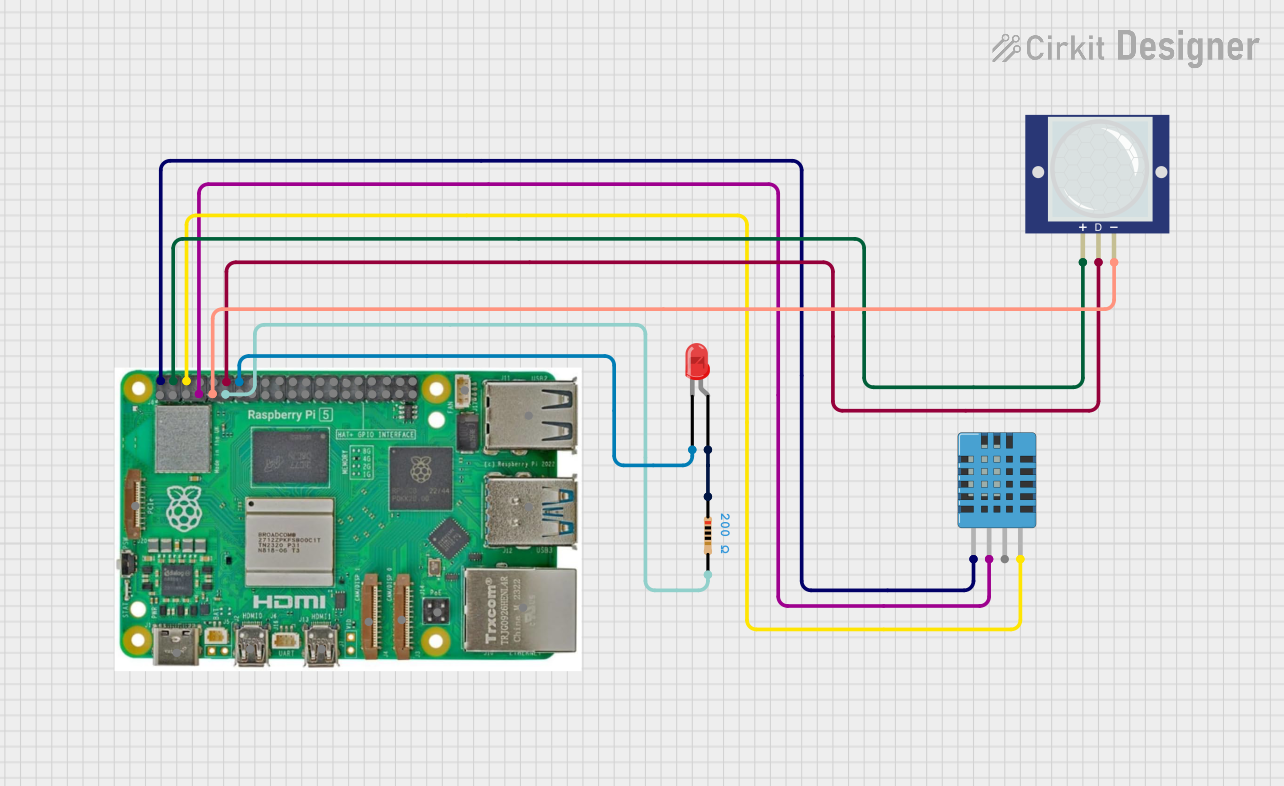
Circuit Documentation
Summary
The circuit in question is designed to interface a Raspberry Pi 5 with a PIR motion sensor, a DHT11 humidity and temperature sensor, and an LED with a series resistor. The Raspberry Pi 5 serves as the central processing unit, controlling the sensors and the LED based on the data it receives. The PIR motion sensor detects the presence of humans or animals by sensing changes in infrared radiation, while the DHT11 sensor measures ambient temperature and humidity. The LED indicates the detection of motion, and it is protected by a series resistor to limit the current flow.
Component List
Raspberry Pi 5
- Description: A powerful microcomputer with a variety of I/O options.
- Purpose: Acts as the central controller for the circuit, reading sensor data and controlling the LED.
PIR Motion Sensor (Wokwi Compatible)
- Description: A sensor that detects motion through changes in infrared radiation.
- Purpose: To detect the presence of humans or animals in the environment.
DHT11 Humidity and Temperature Sensor
- Description: A sensor that measures ambient humidity and temperature.
- Purpose: To provide environmental data to the Raspberry Pi for processing.
LED: Two Pin (red)
- Description: A basic red LED.
- Purpose: To visually indicate the detection of motion.
Resistor
- Description: A passive two-terminal electrical component that implements electrical resistance.
- Properties: 200 Ohms resistance.
- Purpose: To limit the current flowing through the LED, protecting it from damage.
Wiring Details
Raspberry Pi 5
- 5V connected to:
- DHT11 Humidity and Temperature Sensor VDD
- PIR Motion Sensor VCC
- GND connected to:
- DHT11 Humidity and Temperature Sensor GND
- PIR Motion Sensor GND
- LED cathode (through series resistor)
- GPIO 4 connected to DHT11 Humidity and Temperature Sensor DATA
- GPIO 17 connected to Resistor pin2
- GPIO 18 connected to PIR Motion Sensor OUT
PIR Motion Sensor (Wokwi Compatible)
- VCC connected to Raspberry Pi 5V
- OUT connected to Raspberry Pi GPIO 18
- GND connected to Raspberry Pi GND
DHT11 Humidity and Temperature Sensor
- VDD connected to Raspberry Pi 5V
- DATA connected to Raspberry Pi GPIO 4
- GND connected to Raspberry Pi GND
LED: Two Pin (red)
- anode connected to Resistor pin1
- cathode connected to Raspberry Pi GND
Resistor
- pin1 connected to LED anode
- pin2 connected to Raspberry Pi GPIO 17
Documented Code
import RPi.GPIO as GPIO
import Adafruit_DHT
import time

# Define sensor pins
DHT_PIN = 4           # DHT11 data pin
PIR_PIN = 18          # PIR motion sensor output pin
LED_PIN = 17          # LED control pin

# Define DHT11 sensor type
DHT_SENSOR = Adafruit_DHT.DHT11

# Set up GPIO using BCM numbering
GPIO.setmode(GPIO.BCM)
GPIO.setup(PIR_PIN, GPIO.IN)  # Set PIR_PIN as input to read motion sensor
GPIO.setup(LED_PIN, GPIO.OUT) # Set LED_PIN as output to control the LED

try:
    while True:
        # Read from PIR motion sensor
        occupancy = GPIO.input(PIR_PIN)
        if occupancy:
            print("Occupancy detected!")
            GPIO.output(LED_PIN, GPIO.HIGH)  # Turn on LED
        else:
            print("No occupancy detected.")
            GPIO.output(LED_PIN, GPIO.LOW)   # Turn off LED

        # Read from DHT11 sensor
        humidity, temperature = Adafruit_DHT.read(DHT_SENSOR, DHT_PIN)
        if humidity is not None and temperature is not None:
            print(f"Temperature: {temperature}°C, Humidity: {humidity}%")
        else:
            print("Failed to retrieve data from DHT sensor")

        time.sleep(2)  # Wait for 2 seconds before reading again

except KeyboardInterrupt:
    print("Exiting program")

finally:
    GPIO.cleanup()  # Clean up GPIO on exit
The code is written in Python and is intended to run on the Raspberry Pi 5. It initializes the GPIO pins, reads data from the DHT11 sensor, detects motion using the PIR sensor, and controls the LED based on the presence of motion. The program prints the temperature and humidity readings to the console and indicates motion detection status. It also handles a graceful shutdown when a keyboard interrupt (Ctrl+C) is received.