
Circuit Documentation
Summary of the Circuit
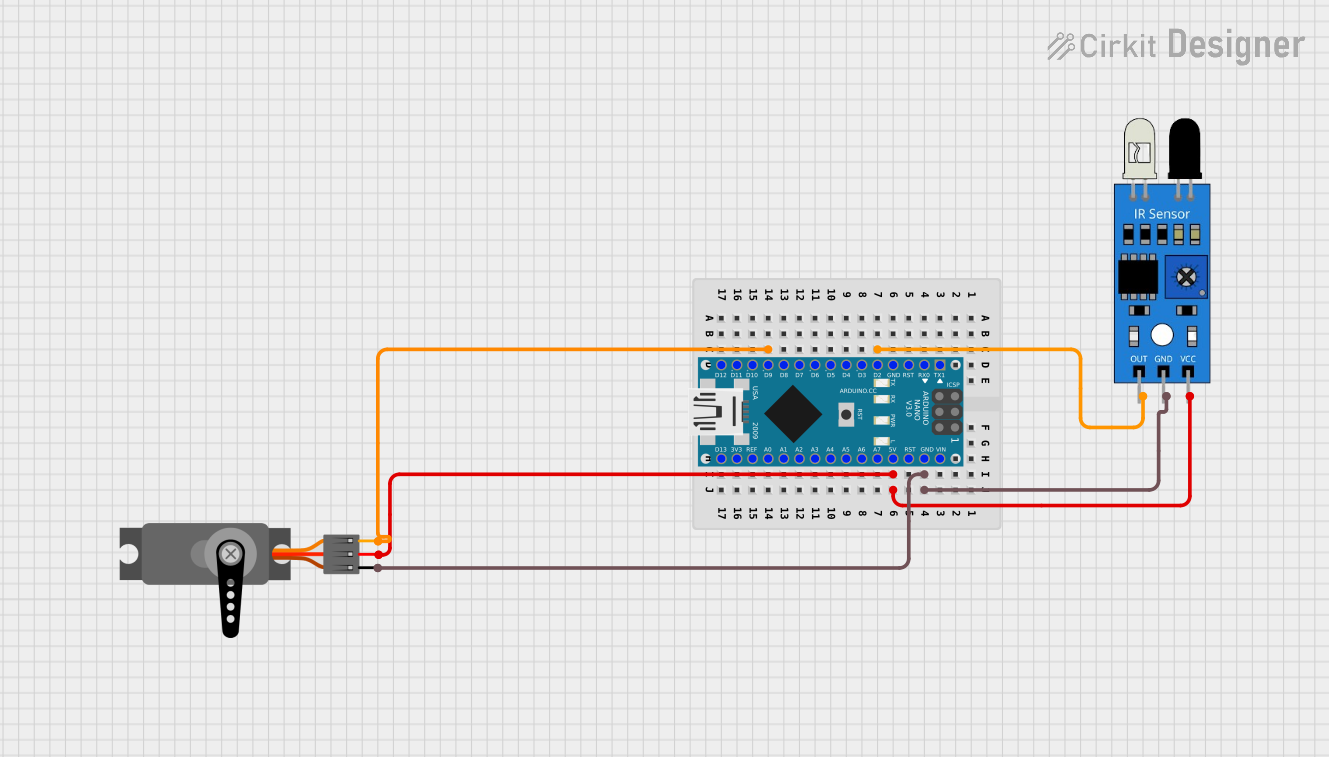
This circuit consists of an Arduino Nano microcontroller, an infrared (IR) sensor, and a servo motor. The Arduino Nano serves as the central processing unit, controlling the servo motor based on the input received from the IR sensor. The IR sensor detects the presence of objects within its range and sends a signal to the Arduino Nano, which then processes this information and actuates the servo motor accordingly. The servo motor is used to perform mechanical movements in response to the processed signals.
Component List
Arduino Nano
- Description: A compact microcontroller board based on the ATmega328P.
- Pins: D1/TX, D0/RX, RESET, GND, D2, D3, D4, D5, D6, D7, D8, D9, D10, D11/MOSI, D12/MISO, VIN, 5V, A7, A6, A5, A4, A3, A2, A1, A0, AREF, 3V3, D13/SCK.
IR Sensor
- Description: A sensor that detects infrared light to sense the presence of objects.
- Pins: out, gnd, vcc.
Servo
- Description: An actuator that can be precisely controlled for angular rotation.
- Pins: GND, VCC, PWM.
Wiring Details
Arduino Nano
- GND: Connected to the GND pins of the IR sensor and the Servo.
- 5V: Connected to the VCC pins of the IR sensor and the Servo.
- D2: Connected to the 'out' pin of the IR sensor.
- D9: Connected to the 'PWM' pin of the Servo.
IR Sensor
- out: Connected to the D2 pin of the Arduino Nano.
- gnd: Connected to the GND pin of the Arduino Nano.
- vcc: Connected to the 5V pin of the Arduino Nano.
Servo
- GND: Connected to the GND pin of the Arduino Nano.
- VCC: Connected to the 5V pin of the Arduino Nano.
- PWM: Connected to the D9 pin of the Arduino Nano.
Documented Code
Arduino Nano Code (sketch.ino)
void setup() {
  // put your setup code here, to run once:

}

void loop() {
  // put your main code here, to run repeatedly:

}
Note: The provided code is a template and does not contain any functional code. It is expected that the user will fill in the setup and loop functions with the necessary logic to read the IR sensor and control the servo motor.
Additional Files
- documentation.txt: This file is mentioned but no content is provided. It is likely intended for additional notes or manual documentation.