
Arduino UNO-Based Water Quality Monitoring System with LCD Display
View and Edit Project In Cirkit Designer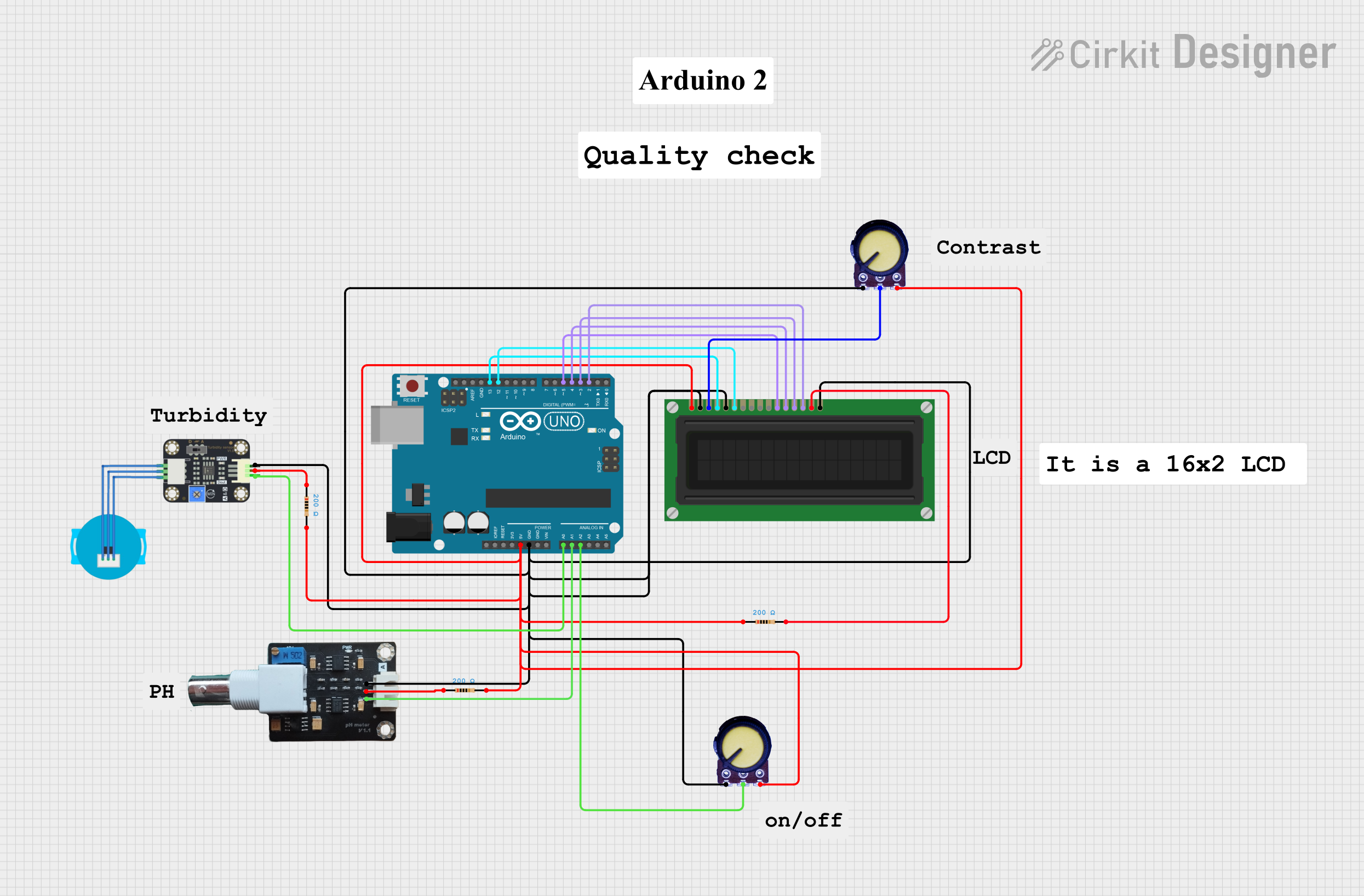
Circuit Documentation
Summary
This circuit is designed to monitor water quality by measuring pH levels and turbidity. The system uses an Arduino UNO microcontroller to read sensor data and display the results on an LCD screen. The circuit includes various components such as resistors, potentiometers, a pH meter, a turbidity sensor, and an LCD display.
Component List
Arduino UNO
- Description: Microcontroller board based on the ATmega328P.
- Pins: UNUSED, IOREF, Reset, 3.3V, 5V, GND, Vin, A0, A1, A2, A3, A4, A5, SCL, SDA, AREF, D13, D12, D11, D10, D9, D8, D7, D6, D5, D4, D3, D2, D1, D0
Resistor
- Description: 200 Ohms resistor.
- Pins: pin1, pin2
- Properties: Resistance: 200 Ohms
Potentiometer
- Description: Variable resistor.
- Pins: GND, Output, VCC
LCD Display (16 pin)
- Description: 16x2 character LCD display.
- Pins: VSS, VDD, VO, RS, R_W, E, DB0, DB1, DB2, DB3, DB4, DB5, DB6, DB7, A, K
Turbidity Sensor
- Description: Sensor to measure water turbidity.
- Pins: OUT, VCC, GND
pH Meter V1.1
- Description: Sensor to measure pH levels.
- Pins: DATA, VCC, GND
Wiring Details
Arduino UNO
5V connected to:
- Resistor (pin2)
- Potentiometer (VCC)
- LCD Display (VSS)
- Potentiometer (VCC)
- Resistor (pin1)
- Resistor (pin2)
GND connected to:
- pH Meter V1.1 (GND)
- Potentiometer (GND)
- LCD Display (VDD)
- LCD Display (K)
- LCD Display (R_W)
- Potentiometer (GND)
- Turbidity Sensor (GND)
A0 connected to:
- Turbidity Sensor (OUT)
A1 connected to:
- pH Meter V1.1 (DATA)
A2 connected to:
- Potentiometer (Output)
D13 connected to:
- LCD Display (RS)
D12 connected to:
- LCD Display (E)
D5 connected to:
- LCD Display (DB4)
D4 connected to:
- LCD Display (DB5)
D3 connected to:
- LCD Display (DB6)
D2 connected to:
- LCD Display (DB7)
Resistor
pin2 connected to:
- Arduino UNO (5V)
- Resistor (pin1)
- Turbidity Sensor (VCC)
pin1 connected to:
- Resistor (pin2)
- pH Meter V1.1 (VCC)
Potentiometer
VCC connected to:
- Arduino UNO (5V)
- Resistor (pin2)
GND connected to:
- Arduino UNO (GND)
- LCD Display (VDD)
- LCD Display (K)
- LCD Display (R_W)
- Potentiometer (GND)
- Turbidity Sensor (GND)
Output connected to:
- Arduino UNO (A2)
- LCD Display (VO)
LCD Display (16 pin)
VSS connected to:
- Arduino UNO (5V)
VDD connected to:
- Arduino UNO (GND)
VO connected to:
- Potentiometer (Output)
RS connected to:
- Arduino UNO (D13)
R_W connected to:
- Arduino UNO (GND)
E connected to:
- Arduino UNO (D12)
DB4 connected to:
- Arduino UNO (D5)
DB5 connected to:
- Arduino UNO (D4)
DB6 connected to:
- Arduino UNO (D3)
DB7 connected to:
- Arduino UNO (D2)
A connected to:
- Resistor (pin2)
K connected to:
- Arduino UNO (GND)
Turbidity Sensor
OUT connected to:
- Arduino UNO (A0)
VCC connected to:
- Resistor (pin1)
GND connected to:
- Arduino UNO (GND)
pH Meter V1.1
DATA connected to:
- Arduino UNO (A1)
VCC connected to:
- Resistor (pin1)
GND connected to:
- Arduino UNO (GND)
Code Documentation
#include <LiquidCrystal.h>

// LCD pin configuration
const int rs = 13, en = 12, d4 = 5, d5 = 4, d6 = 3, d7 = 2;
LiquidCrystal lcd(rs, en, d4, d5, d6, d7);

// Sensor pin configuration
const int pH_PIN = A1;
const int TURBIDITY_PIN = A0;

// Thresholds for water quality
const float PH_MIN = 6.5;
const float PH_MAX = 8.5;
const int TURBIDITY_THRESHOLD = 300;

void setup() {
  // Initialize the LCD
  lcd.begin(16, 2);
  lcd.print("Water Quality:");
  delay(2000);
}

void loop() {
  // Read sensor values
  float pHValue = analogRead(pH_PIN) * (5.0 / 1023.0) * 3.5;
  int turbidityValue = analogRead(TURBIDITY_PIN);

  // Display pH value
  lcd.setCursor(0, 0);
  lcd.print("pH: ");
  lcd.print(pHValue);

  // Display turbidity value
  lcd.setCursor(0, 1);
  lcd.print("Turbidity: ");
  lcd.print(turbidityValue);

  // Determine water quality
  // Clear the second row before displaying water quality
  lcd.setCursor(0, 1);
  lcd.print("                "); // Clear the second row
  lcd.setCursor(0, 1);
  if (pHValue >= PH_MIN && pHValue <= PH_MAX && turbidityValue < TURBIDITY_THRESHOLD) {
    lcd.print(" Good to Drink ");
  } else {
    lcd.print(" Not Drinkable ");
  }

  delay(2000); // Update every 2 seconds
}
This code initializes the LCD and reads the pH and turbidity sensor values. It then displays the pH and turbidity values on the LCD and determines if the water is good to drink based on predefined thresholds. The display updates every 2 seconds.