
Arduino UNO-Based Password-Protected Servo Lock with 4x4 Keypad
View and Edit Project In Cirkit Designer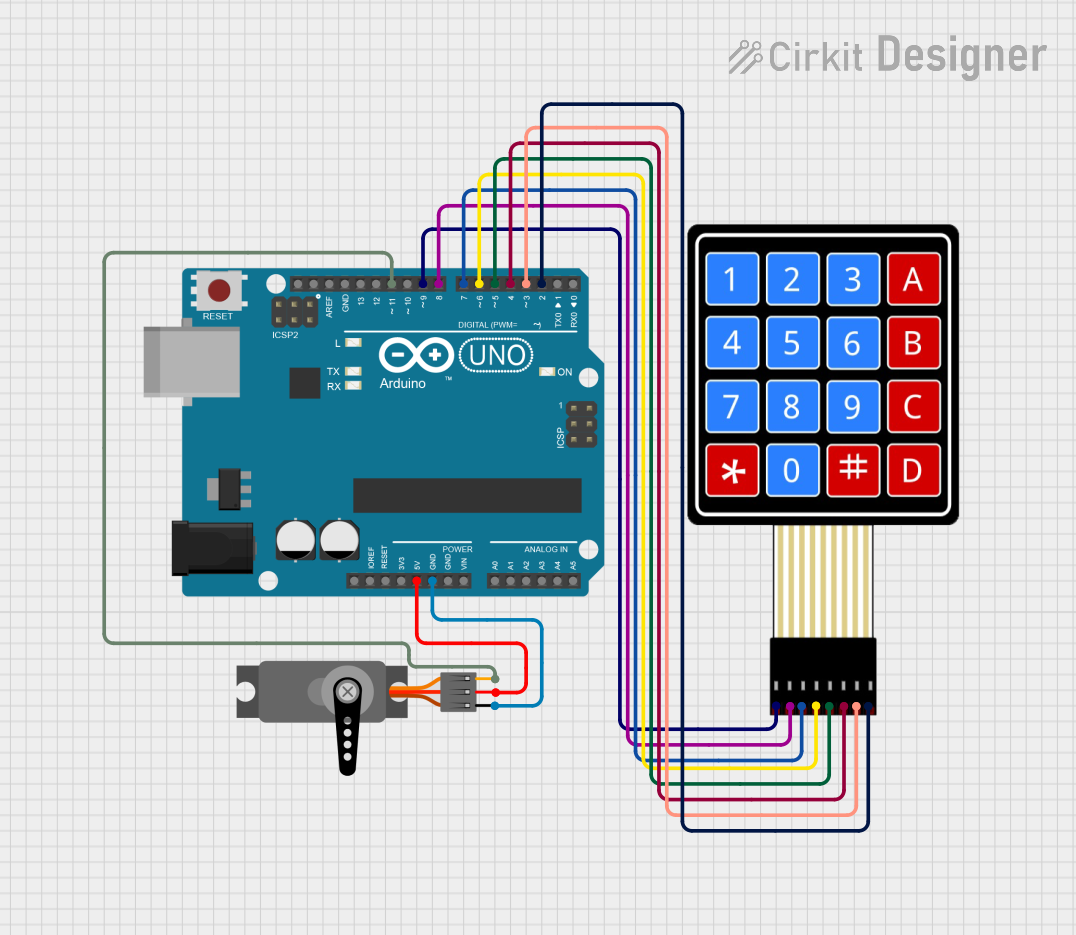
Circuit Documentation
Summary
This circuit is designed to control a servo motor using an Arduino UNO and a 4x4 membrane matrix keypad. The keypad is used to input a password, and upon entering the correct password, the servo motor will move to an unlocked position. The circuit also includes LEDs to indicate the locked and unlocked states.
Component List
Arduino UNO
- Description: A microcontroller board based on the ATmega328P.
- Pins: UNUSED, IOREF, Reset, 3.3V, 5V, GND, Vin, A0, A1, A2, A3, A4, A5, SCL, SDA, AREF, D13, D12, D11, D10, D9, D8, D7, D6, D5, D4, D3, D2, D1, D0
4x4 Membrane Matrix Keypad
- Description: A keypad with 4 rows and 4 columns, used for inputting data.
- Pins: R1, R2, R3, R4, C1, C2, C3, C4
Servo
- Description: A servo motor used for precise control of angular position.
- Pins: GND, VCC, PWM
Wiring Details
Arduino UNO
- 5V connected to Servo VCC
- GND connected to Servo GND
- D11 connected to Servo PWM
- D9 connected to Keypad R1
- D8 connected to Keypad R2
- D7 connected to Keypad R3
- D6 connected to Keypad R4
- D5 connected to Keypad C1
- D4 connected to Keypad C2
- D3 connected to Keypad C3
- D2 connected to Keypad C4
4x4 Membrane Matrix Keypad
- R1 connected to Arduino UNO D9
- R2 connected to Arduino UNO D8
- R3 connected to Arduino UNO D7
- R4 connected to Arduino UNO D6
- C1 connected to Arduino UNO D5
- C2 connected to Arduino UNO D4
- C3 connected to Arduino UNO D3
- C4 connected to Arduino UNO D2
Servo
- VCC connected to Arduino UNO 5V
- GND connected to Arduino UNO GND
- PWM connected to Arduino UNO D11
Code Documentation
#include <Servo.h>
#include <Keypad.h>

Servo ServoMotor;
char* password = "0221"; // You can change the Password

int position = 0;
const byte ROWS = 4;
const byte COLS = 4;
char keys[ROWS][COLS] = {
  {'1','2','3','A'},
  {'4','5','6','B'},
  {'7','8','9','C'},
  {'*','0','#','D'}
};
byte rowPins[ROWS] = { 9, 8, 7, 6 };
byte colPins[COLS] = { 5, 4, 3, 2 };
Keypad keypad = Keypad( makeKeymap(keys), rowPins, colPins, ROWS, COLS );

// Create two variables for LED Lights
int RedpinLock = 12;
int GreenpinUnlock = 10;

unsigned long lastUnlockedTime = 0; // To store the time when unlocked
bool isUnlocked = false; // To track the current state

void setup()
{
  pinMode(RedpinLock, OUTPUT);
  pinMode(GreenpinUnlock, OUTPUT);
  ServoMotor.attach(11);
  LockedPosition(true);
}

void loop()
{
  char key = keypad.getKey();

  // Reset position if '*' or '#' is pressed
  if (key == '*' || key == '#')
  {
    position = 0;
    LockedPosition(true);
  }

  // Check if key matches the password
  if (key == password[position])
  {
    position++;
  }

  // Unlock if password is correct
  if (position == 4)
  {
    LockedPosition(false);
    lastUnlockedTime = millis(); // Store the unlock time
    isUnlocked = true; // Mark as unlocked
    position = 0; // Reset position
  }

  // Auto-lock after 5000ms
  if (isUnlocked && (millis() - lastUnlockedTime >= 20000))
  {
    LockedPosition(true);
    isUnlocked = false; // Mark as locked
  }

  delay(100);
}

void LockedPosition(int locked)
{
  if (locked)
  {
    digitalWrite(RedpinLock, HIGH);
    digitalWrite(GreenpinUnlock, LOW);
    ServoMotor.write(11); // Locked position
  }
  else
  {
    digitalWrite(RedpinLock, LOW);
    digitalWrite(GreenpinUnlock, HIGH);
    ServoMotor.write(90); // Unlocked position
  }
}
This code initializes the servo motor and keypad, sets up the pin modes for the LEDs, and defines the locked and unlocked positions for the servo motor. The main loop checks for key presses on the keypad, compares them to the password, and unlocks the servo motor if the correct password is entered. The servo motor will automatically lock again after 20 seconds.