
Circuit Documentation
Summary of the Circuit
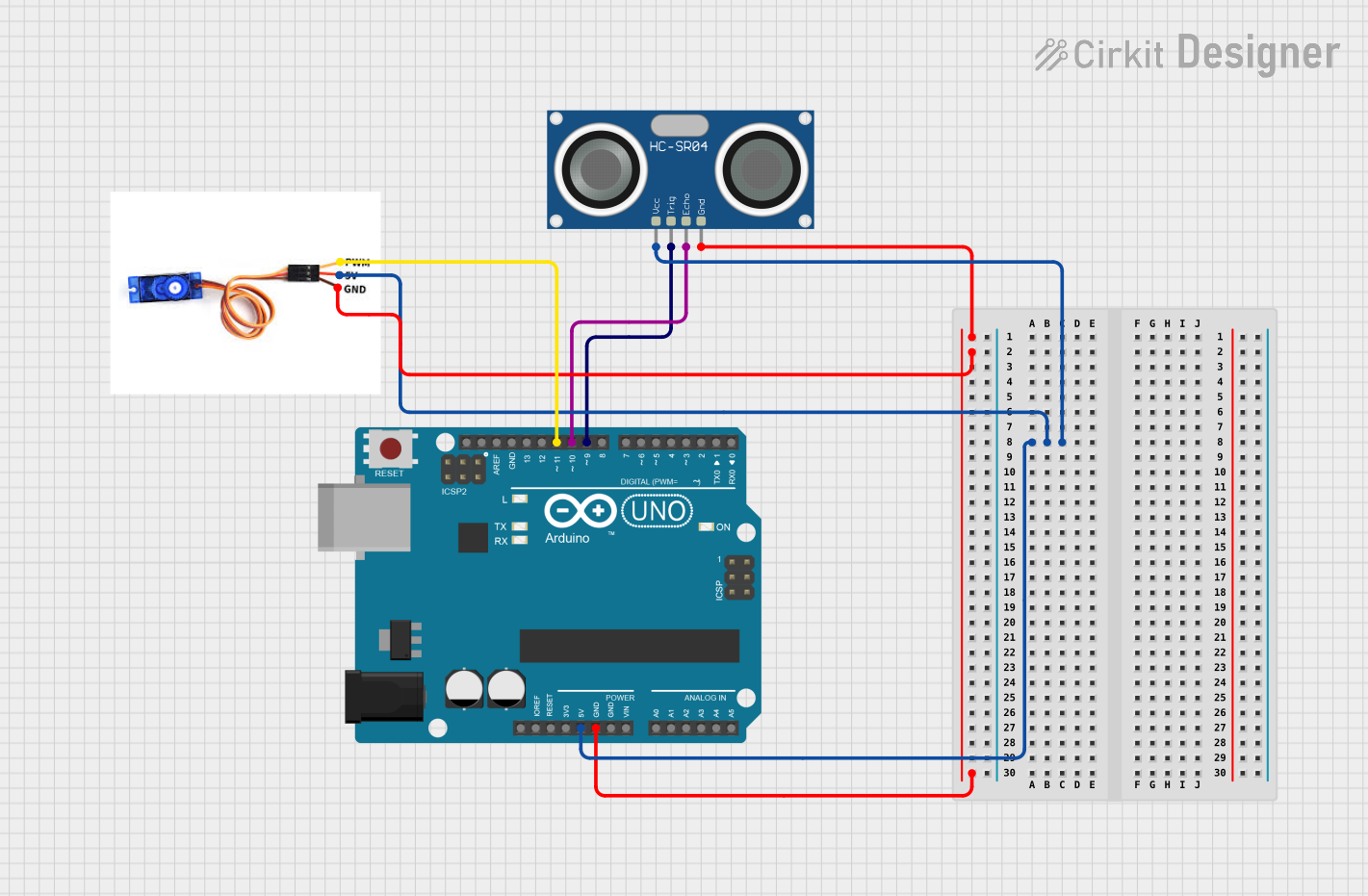
This circuit is designed to create an ultrasonic radar system using an Arduino UNO microcontroller, an HC-SR04 ultrasonic sensor, and an SG90 servo motor. The system operates by sweeping the ultrasonic sensor across a range of 0 to 180 degrees using the servo motor. The sensor detects the presence of obstacles within a certain range and outputs the distance to the obstacle. The Arduino UNO controls the servo's position and processes the distance measurements from the ultrasonic sensor, providing feedback through serial communication.
Component List
Arduino UNO
- Description: A microcontroller board based on the ATmega328P.
- Pins: UNUSED, IOREF, Reset, 3.3V, 5V, GND, Vin, A0-A5, SCL, SDA, AREF, D0-D13
HC-SR04 Ultrasonic Sensor
- Description: An ultrasonic distance sensor capable of measuring distances by emitting ultrasonic waves and measuring the time taken for the echo to return.
- Pins: VCC, TRIG, ECHO, GND
SG90 Servo Motor
- Description: A small and lightweight servo motor capable of precise angular positioning.
- Pins: PWM, 5V, GND
Wiring Details
Arduino UNO
- 5V connected to SG90 servo motor 5V and HC-SR04 Ultrasonic Sensor VCC
- GND connected to SG90 servo motor GND and HC-SR04 Ultrasonic Sensor GND
- D11 connected to SG90 servo motor PWM
- D10 connected to HC-SR04 Ultrasonic Sensor ECHO
- D9 connected to HC-SR04 Ultrasonic Sensor TRIG
HC-SR04 Ultrasonic Sensor
- VCC connected to Arduino UNO 5V
- TRIG connected to Arduino UNO D9
- ECHO connected to Arduino UNO D10
- GND connected to Arduino UNO GND
SG90 Servo Motor
- PWM connected to Arduino UNO D11
- 5V connected to Arduino UNO 5V
- GND connected to Arduino UNO GND
Documented Code
/*
 * Ultrasonic Radar System
 * This code controls an ultrasonic sensor and a servo motor to create a radar
 * system. The servo motor sweeps the ultrasonic sensor from 0 to 180 degrees.
 * When an obstacle is detected within a certain range, an indication is given.
 */

#include <Servo.h>

// Pin definitions
const int trigPin = 9;
const int echoPin = 10;
const int servoPin = 11;

// Create Servo object
Servo myServo;

void setup() {
  // Initialize serial communication
  Serial.begin(9600);

  // Initialize pins
  pinMode(trigPin, OUTPUT);
  pinMode(echoPin, INPUT);

  // Attach servo to pin
  myServo.attach(servoPin);
}

void loop() {
  for (int angle = 0; angle <= 180; angle += 1) {
    myServo.write(angle);
    delay(15); // Allow servo to reach position
    long duration = getDistance();
    long distance = duration * 0.034 / 2;
    Serial.print("Angle: ");
    Serial.print(angle);
    Serial.print(" Distance: ");
    Serial.print(distance);
    Serial.println(" cm");
    if (distance < 20) { // If obstacle is within 20 cm
      Serial.println("Obstacle detected!");
    }
  }
  for (int angle = 180; angle >= 0; angle -= 1) {
    myServo.write(angle);
    delay(15);
    long duration = getDistance();
    long distance = duration * 0.034 / 2;
    Serial.print("Angle: ");
    Serial.print(angle);
    Serial.print(" Distance: ");
    Serial.print(distance);
    Serial.println(" cm");
    if (distance < 20) {
      Serial.println("Obstacle detected!");
    }
  }
}

long getDistance() {
  digitalWrite(trigPin, LOW);
  delayMicroseconds(2);
  digitalWrite(trigPin, HIGH);
  delayMicroseconds(10);
  digitalWrite(trigPin, LOW);
  long duration = pulseIn(echoPin, HIGH);
  return duration;
}
This code is designed to be uploaded to the Arduino UNO microcontroller. It initializes the servo motor and ultrasonic sensor, then enters a loop where the servo sweeps the sensor from 0 to 180 degrees and back, measuring distance at each angle and printing the results to the serial monitor. If an obstacle is detected within 20 cm, an additional message is printed to indicate the detection.