
Arduino UNO Temperature Monitoring System with DHT11 and I2C LCD
View and Edit Project In Cirkit Designer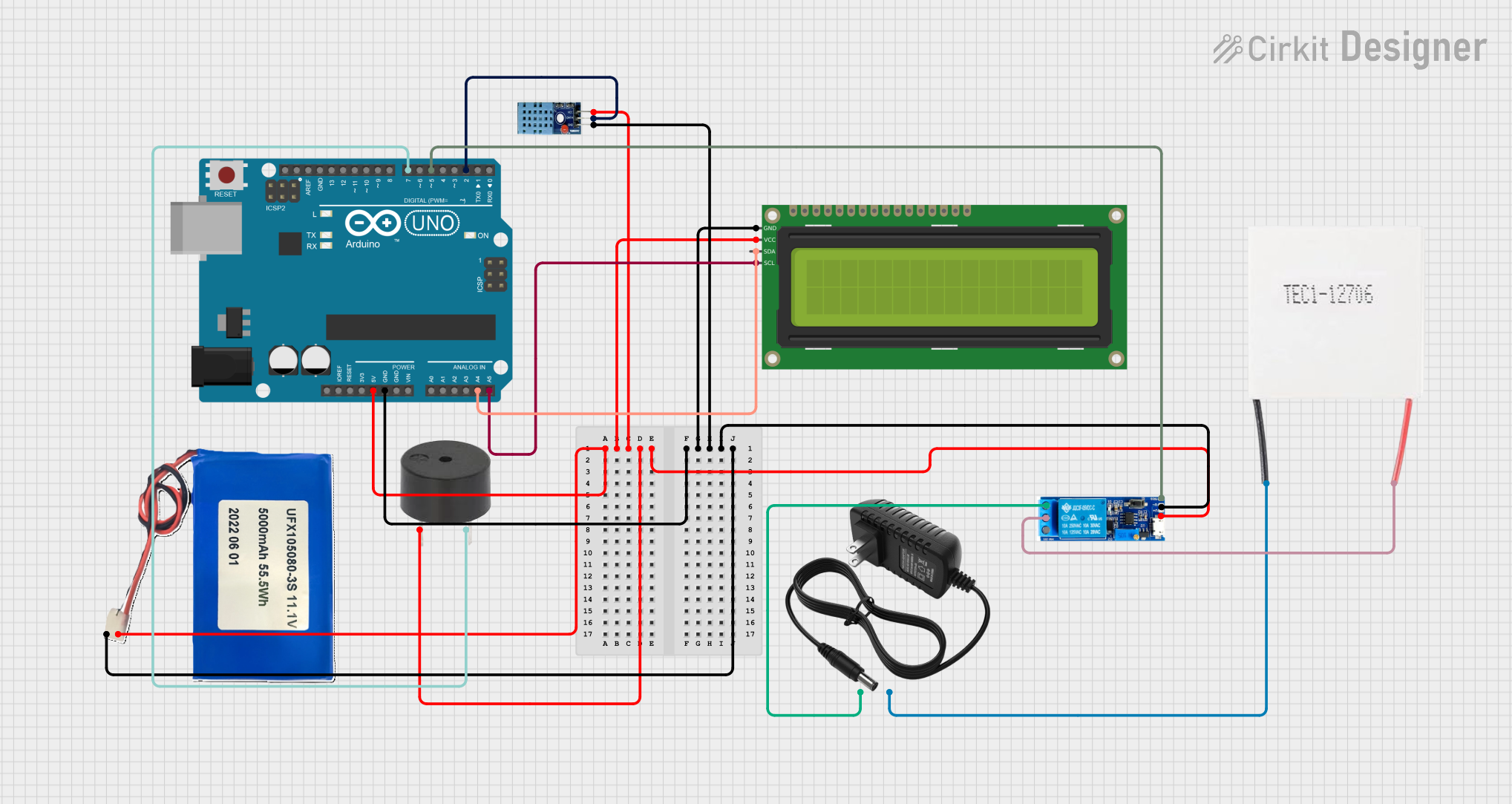
Circuit Documentation
Summary
This circuit is a temperature monitoring system that uses an Arduino UNO to read temperature data from a DHT11 sensor, display the temperature on a 16x2 I2C LCD, and control a Peltier module via a relay. The system also includes a buzzer that activates when the temperature exceeds a certain threshold.
Component List
Arduino UNO
- Description: A microcontroller board based on the ATmega328P.
- Pins: UNUSED, IOREF, Reset, 3.3V, 5V, GND, Vin, A0, A1, A2, A3, A4, A5, SCL, SDA, AREF, D13, D12, D11, D10, D9, D8, D7, D6, D5, D4, D3, D2, D1, D0
12V Power Supply
- Description: Provides 12V power to the circuit.
- Pins: +, -
Relay Module 5V-30V
- Description: A relay module used to control the Peltier module.
- Pins: common contact, normally open, normally closed, trigger, V-, V+
DHT11
- Description: A digital temperature and humidity sensor.
- Pins: VCC, GND, DATA
16x2 I2C LCD
- Description: A 16x2 character LCD with I2C interface.
- Pins: GND, VCC, SDA, SCL
Peltier Module
- Description: A thermoelectric cooler used for temperature control.
- Pins: Negative, Positive
Buzzer
- Description: An audio signaling device.
- Pins: PIN, GND
Li-ion 5000mAh Battery
- Description: A rechargeable lithium-ion battery.
- Pins: 11.1V, GND
Wiring Details
Arduino UNO
5V connected to:
- DHT11 (VCC)
- Relay Module (V+)
- 16x2 I2C LCD (VCC)
- Buzzer (PIN)
- Li-ion Battery (11.1V)
GND connected to:
- DHT11 (GND)
- Relay Module (V-)
- 16x2 I2C LCD (GND)
- Li-ion Battery (GND)
A4 connected to:
- 16x2 I2C LCD (SDA)
A5 connected to:
- 16x2 I2C LCD (SCL)
D2 connected to:
- DHT11 (DATA)
D5 connected to:
- Relay Module (trigger)
D7 connected to:
- Buzzer (GND)
12V Power Supply
+ connected to:
- Relay Module (normally open)
- connected to:
- Peltier Module (Negative)
Relay Module
- common contact connected to:
- Peltier Module (Positive)
Code Documentation
#include <Wire.h>
#include <LiquidCrystal_I2C.h>
#include <DHT.h>

// Pin definitions
#define DHTPIN 2
#define DHTTYPE DHT11
#define BUZZER_PIN 8
#define Rl 5

// Objects for DHT sensor and LCD
DHT dht(DHTPIN, DHTTYPE);
LiquidCrystal_I2C lcd(0x27, 16, 2);

void setup() {
    // Initialize the LCD
    lcd.init();
    lcd.backlight();

    // Initialize the DHT sensor
    dht.begin();

    // Configure buzzer and relay pins as output
    pinMode(BUZZER_PIN, OUTPUT);
    pinMode(Rl, OUTPUT);
    noTone(BUZZER_PIN); // Ensure buzzer is off initially
    digitalWrite(Rl, LOW); // Ensure relay is off initially

    // Display startup message
    lcd.setCursor(0, 0);
    lcd.print("Temp Monitoring");
    lcd.setCursor(0, 1);
    lcd.print("Initializing...");
    delay(2000);
    lcd.clear();
}

void loop() {
    // Read temperature and humidity
    float temperature = dht.readTemperature();
    float humidity = dht.readHumidity();

    // Display temperature on the LCD
    lcd.setCursor(0, 0); // First line
    lcd.print("Temp: ");
    if (!isnan(temperature)) { // Check if reading is valid
        lcd.print(temperature, 1); // Print temperature with 1 decimal
        lcd.print("C");

        // Activate buzzer and relay if temperature exceeds 30°C
        if (temperature > 35) {
            tone(BUZZER_PIN, 1000); // Buzzer at 1kHz
            digitalWrite(Rl, LOW); // Turn on relay (Peltier)
            lcd.setCursor(0, 1);
            lcd.print("High Temp! ON  ");
        } else {
            noTone(BUZZER_PIN); // Turn off buzzer
            digitalWrite(Rl, HIGH); // Turn off relay (Peltier)
            lcd.setCursor(0, 1);
            lcd.print("Temp Normal OFF");
        }
    } else {
        lcd.print("Error"); // Display error message
        lcd.setCursor(0, 1);
        lcd.print("Sensor Error!  ");
    }

    delay(2000); // Update every 2 seconds
}
This code initializes the DHT11 sensor and the 16x2 I2C LCD, reads temperature data, and displays it on the LCD. If the temperature exceeds 35°C, the buzzer and relay are activated to turn on the Peltier module. The system updates every 2 seconds.