
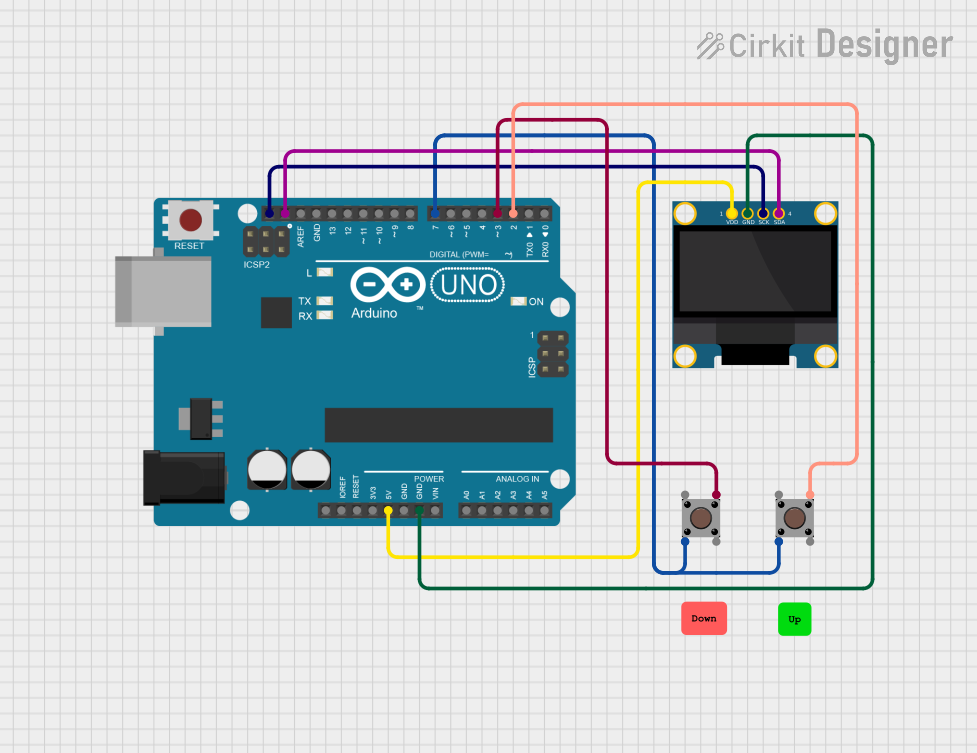
Circuit Documentation
Summary
This circuit is designed to implement a simple Pong game using an Arduino UNO microcontroller and an OLED 128x64 I2C monochrome display. The circuit includes two pushbuttons for player control, allowing the player to move their paddle up and down. The game logic is handled by the Arduino, which updates the display based on the game state and player inputs.
Component List
Arduino UNO
- Description: A microcontroller board based on the ATmega328P. It is used to control the game logic and handle input from the pushbuttons.
- Purpose: Acts as the main controller for the Pong game, processing inputs and updating the display.
OLED 128x64 I2C Monochrome Display
- Description: A small OLED display that can show graphics and text. It communicates with the Arduino via I2C.
- Purpose: Displays the game graphics, including the paddles and ball, as well as the score.
Pushbutton (x2)
- Description: A simple pushbutton switch that can be used to send a signal when pressed.
- Purpose: Used for player input to control the movement of the paddle in the game.
Wiring Details
Arduino UNO
5V: Connected to the VDD pin of the OLED display.
GND: Connected to the GND pin of the OLED display.
SCL: Connected to the SCK pin of the OLED display.
SDA: Connected to the SDA pin of the OLED display.
D2: Connected to Pin 3 (out) of the first pushbutton for paddle movement control.
D3: Connected to Pin 3 (out) of the second pushbutton for paddle movement control.
D7: Connected to Pin 2 (in) of the first pushbutton for paddle movement detection.
OLED 128x64 I2C Monochrome Display
VDD: Connected to the 5V pin of the Arduino UNO.
GND: Connected to the GND pin of the Arduino UNO.
SCK: Connected to the SCL pin of the Arduino UNO.
SDA: Connected to the SDA pin of the Arduino UNO.
Pushbutton (1)
Pin 2 (in): Connected to D7 on the Arduino UNO for input detection.
Pin 3 (out): Connected to D2 on the Arduino UNO for paddle movement control.
Pushbutton (2)
Pin 2 (in): Connected to D7 on the Arduino UNO for input detection.
Pin 3 (out): Connected to D3 on the Arduino UNO for paddle movement control.
Documented Code
/*
  A simple Pong game.
  https://notabug.org/Maverick/WokwiPong

  Based on Arduino Pong by eholk
  https://github.com/eholk/Arduino-Pong
*/

#include <SPI.h>
#include <Wire.h>
#include <Adafruit_GFX.h>
#include <Adafruit_SSD1306.h>

#define UP_BUTTON 2
#define DOWN_BUTTON 3

const unsigned long PADDLE_RATE = 64;
const unsigned long BALL_RATE = 16;
const uint8_t PADDLE_HEIGHT = 12;
const uint8_t SCORE_LIMIT = 9;

Adafruit_SSD1306 display = Adafruit_SSD1306(128, 64, &Wire);

bool game_over, win;

uint8_t player_score, mcu_score;
uint8_t ball_x = 53, ball_y = 26;
uint8_t ball_dir_x = 1, ball_dir_y = 1;

unsigned long ball_update;
unsigned long paddle_update;

const uint8_t MCU_X = 12;
uint8_t mcu_y = 16;

const uint8_t PLAYER_X = 115;
uint8_t player_y = 16;

void setup()
{
    display.begin(SSD1306_SWITCHCAPVCC, 0x3C);

    // Display the splash screen (we're legally required to do so)
    display.display();
    unsigned long start = millis();

    pinMode(UP_BUTTON, INPUT_PULLUP);
    pinMode(DOWN_BUTTON, INPUT_PULLUP);

    pinMode(7, OUTPUT);
    digitalWrite(7, LOW);

    display.clearDisplay();
    drawCourt();

    while(millis() - start < 2000);

    display.display();

    ball_update = millis();
    paddle_update = ball_update;
}

void loop()
{
    bool update_needed = false;
    unsigned long time = millis();

    static bool up_state = false;
    static bool down_state = false;

    up_state |= (digitalRead(UP_BUTTON) == LOW);
    down_state |= (digitalRead(DOWN_BUTTON) == LOW);

    if(time > ball_update)
    {
        uint8_t new_x = ball_x + ball_dir_x;
        uint8_t new_y = ball_y + ball_dir_y;

        // Check if we hit the vertical walls
        if(new_x == 0 || new_x == 127)
        {
            ball_dir_x = -ball_dir_x;
            new_x += ball_dir_x + ball_dir_x;

            if (new_x < 64)
            {
                player_scoreTone();
                player_score++;
            }
            else
            {
                mcu_scoreTone();
                mcu_score++;
            }

            if (player_score == SCORE_LIMIT || mcu_score == SCORE_LIMIT)
            {
                win = player_score > mcu_score;
                game_over = true;
            }
        }

        // Check if we hit the horizontal walls.
        if(new_y == 0 || new_y == 53)
        {
            wallTone();
            ball_dir_y = -ball_dir_y;
            new_y += ball_dir_y + ball_dir_y;
        }

        // Check if we hit the CPU paddle
        if(new_x == MCU_X && new_y >= mcu_y && new_y <= mcu_y + PADDLE_HEIGHT)
        {
            mcuPaddleTone();
            ball_dir_x = -ball_dir_x;
            new_x += ball_dir_x + ball_dir_x;
        }

        // Check if we hit the player paddle
        if(new_x == PLAYER_X && new_y >= player_y && new_y <= player_y + PADDLE_HEIGHT)
        {
            playerPaddleTone();
            ball_dir_x = -ball_dir_x;
            new_x += ball_dir_x + ball_dir_x;
        }

        display.drawPixel(ball_x, ball_y, BLACK);
        display.drawPixel(new_x, new_y, WHITE);
        ball_x = new_x;
        ball_y = new_y;

        ball_update += BALL_RATE;

        update_needed = true;
    }

    if(time > paddle_update)
    {
        paddle_update += PADDLE_RATE;

        // CPU paddle
        display.drawFastVLine(MCU_X, mcu_y, PADDLE_HEIGHT, BLACK);
        const uint8_t half_paddle = PADDLE_HEIGHT >> 1;

        if(mcu_y + half_paddle > ball_y)
        {
            int8_t dir = ball_x > MCU_X ? -1 : 1;
            mcu_y += dir;
        }

        if(mcu_y + half_paddle < ball_y)
        {
            int8_t dir = ball_x > MCU_X ? 1 : -1;
            mcu_y += dir;
        }

        if(mcu_y < 1)
        {
            mcu_y = 1;
        }

        if(mcu_y + PADDLE_HEIGHT > 53)
        {
            mcu_y = 53 - PADDLE_HEIGHT;
        }

        // Player paddle
        display.drawFastVLine(MCU_X, mcu_y, PADDLE_HEIGHT, WHITE);
        display.drawFastVLine(PLAYER_X, player_y, PADDLE_HEIGHT, BLACK);

        if(up_state)
        {
            player_y -= 1;
        }

        if(down_state)
        {
            player_y += 1;
        }

        up_state = down_state = false;

        if(player_y < 1)
        {
            player_y = 1;
        }

        if(player_y + PADDLE_HEIGHT > 53)
        {
            player_y = 53 - PADDLE_HEIGHT;
        }

        display.drawFastVLine(PLAYER_X, player_y, PADDLE_HEIGHT, WHITE);

        update_needed = true;
    }

    if(update_needed)
    {
        if (game_over)
        {
            const char* text = win ? "YOU WIN!!" : "YOU LOSE!";
            display.clearDisplay();
            display.setCursor(40, 28);
            display.print(text);
            display.display();

            delay(5000);

            display.clearDisplay();
            ball_x = 53;
            ball_y = 26;
            ball_dir_x = 1;
            ball_dir_y = 1;
            mcu_y = 16;
            player_y = 16;
            mcu_score = 0;
            player_score = 0;
            game_over = false;
            drawCourt();
        }

        display.setTextColor(WHITE, BLACK);
        display.setCursor(0, 56);
        display.print(mcu_score);
        display.setCursor(122, 56);
        display.print(player_score);