
Arduino UNO Temperature Monitoring System with DS18B20 Sensor and Built-in Pull-up Resistor
View and Edit Project In Cirkit Designer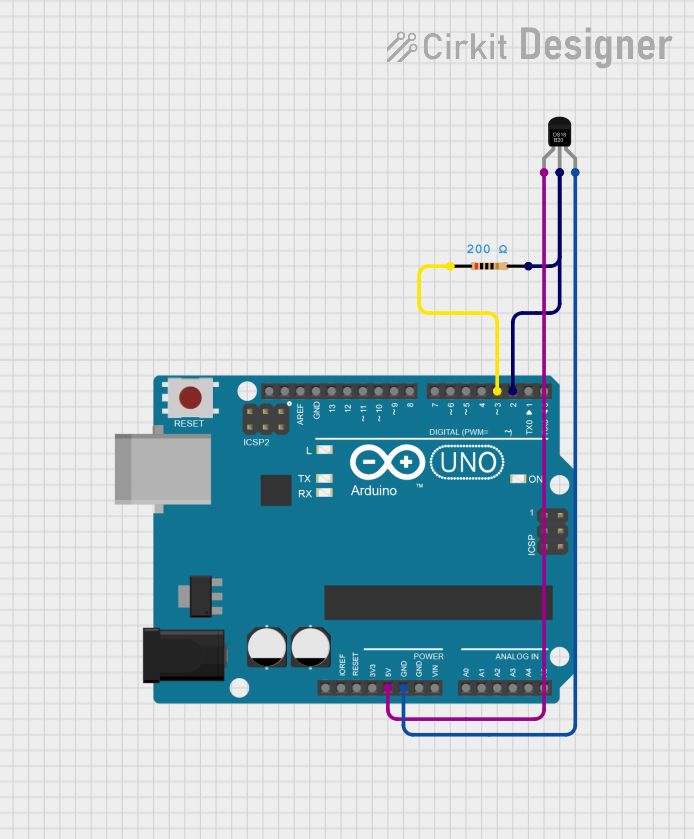
Circuit Documentation
Summary
This circuit is designed to read temperature data from a DS18B20 sensor and print the temperature to the serial console using an Arduino UNO. The DS18B20 sensor is connected to the Arduino UNO, and a resistor is used as a pull-up for the data line.
Component List
Arduino UNO
- Description: A microcontroller board based on the ATmega328P.
- Pins: UNUSED, IOREF, Reset, 3.3V, 5V, GND, Vin, A0, A1, A2, A3, A4, A5, SCL, SDA, AREF, D13, D12, D11, D10, D9, D8, D7, D6, D5, D4, D3, D2, D1, D0
DS18B20
- Description: A digital temperature sensor.
- Pins: VDD, DQ, GND
Resistor
- Description: A resistor with a resistance of 200 Ohms.
- Pins: pin1, pin2
- Properties:
- Resistance: 200 Ohms
Wiring Details
Arduino UNO
- 5V: Connected to VDD of DS18B20
- GND: Connected to GND of DS18B20
- D3: Connected to pin1 of Resistor
- D2: Connected to pin2 of Resistor and DQ of DS18B20
DS18B20
- VDD: Connected to 5V of Arduino UNO
- GND: Connected to GND of Arduino UNO
- DQ: Connected to pin2 of Resistor and D2 of Arduino UNO
Resistor
- pin1: Connected to D3 of Arduino UNO
- pin2: Connected to DQ of DS18B20 and D2 of Arduino UNO
Code Documentation
/*
 * This Arduino sketch reads temperature data from a DS18B20 sensor
 * connected to pin D2 and prints the temperature to the serial console.
 * Pin D3 is set to HIGH to act as a pull-up resistor for the DS18B20 data line.
 */

#include <OneWire.h>
#include <DallasTemperature.h>

#define ONE_WIRE_BUS 2
#define PULLUP_PIN 3

OneWire oneWire(ONE_WIRE_BUS);
DallasTemperature sensors(&oneWire);

void setup() {
  // Set D3 as output and set it HIGH for pull-up
  pinMode(3, OUTPUT);
  digitalWrite(3, HIGH);

  // Start serial communication
  Serial.begin(9600);
  // Start up the library
  sensors.begin();
}

void loop() {
  // Request temperature readings
  sensors.requestTemperatures();
  // Fetch and print the temperature in Celsius
  float temperatureC = sensors.getTempCByIndex(0);
  Serial.print("Temperature: ");
  Serial.print(temperatureC);
  Serial.println(" °C");
  // Wait 1 second before repeating
  delay(1000);
}
This code initializes the DS18B20 sensor and sets up the Arduino UNO to read temperature data from the sensor. The temperature is then printed to the serial console every second. Pin D3 is used as a pull-up resistor for the DS18B20 data line.