
Arduino Nano and HX711 Load Cell Amplifier Weight Measurement System
View and Edit Project In Cirkit Designer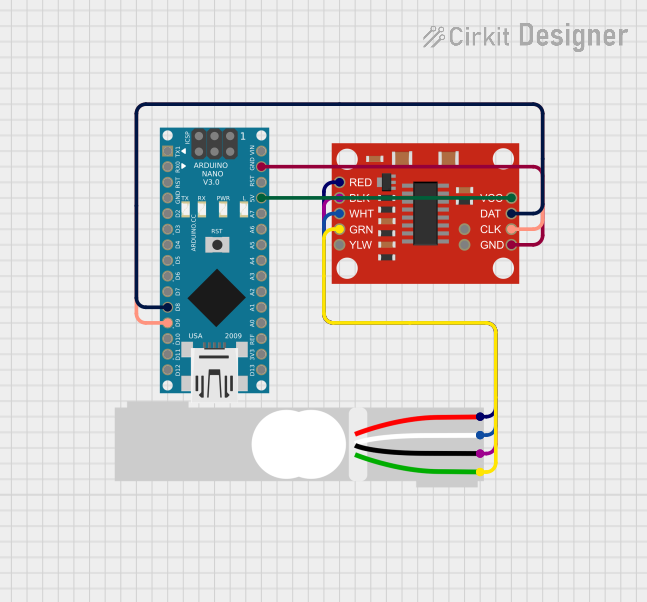
Circuit Documentation
Summary
This circuit integrates an Arduino Nano microcontroller with a SparkFun Load Cell Amplifier (HX711) and a Load Cell. The purpose of the circuit is to measure weight or force applied to the Load Cell, amplify the signal using the HX711, and process the data with the Arduino Nano. The Arduino Nano is programmed to interface with the HX711 and read the Load Cell measurements.
Component List
Arduino Nano
- Description: A compact microcontroller board based on the ATmega328P.
- Pins: D1/TX, D0/RX, RESET, GND, D2, D3, D4, D5, D6, D7, D8, D9, D10, D11/MOSI, D12/MISO, VIN, 5V, A7, A6, A5, A4, A3, A2, A1, A0, AREF, 3V3, D13/SCK.
SparkFun Load Cell Amplifier - HX711
- Description: A precision 24-bit analog-to-digital converter (ADC) designed for weigh scales and industrial control applications to interface directly with a bridge sensor.
- Pins: GND, CLK, DAT, VCC, YLW, GRN, WHT, BLK, RED, B-, B+.
Load Cell - Red/white/black/green
- Description: A transducer that converts force into an electrical signal.
- Pins: E+, A-, E-, A+.
Wiring Details
Arduino Nano
- GND connected to SparkFun Load Cell Amplifier - HX711 GND.
- D9 connected to SparkFun Load Cell Amplifier - HX711 CLK.
- D8 connected to SparkFun Load Cell Amplifier - HX711 DAT.
- 5V connected to SparkFun Load Cell Amplifier - HX711 VCC.
SparkFun Load Cell Amplifier - HX711
- GND connected to Arduino Nano GND.
- CLK connected to Arduino Nano D9.
- DAT connected to Arduino Nano D8.
- VCC connected to Arduino Nano 5V.
- GRN connected to Load Cell A+.
- WHT connected to Load Cell A-.
- BLK connected to Load Cell E-.
- RED connected to Load Cell E+.
Load Cell - Red/white/black/green
- E+ connected to SparkFun Load Cell Amplifier - HX711 RED.
- A- connected to SparkFun Load Cell Amplifier - HX711 WHT.
- E- connected to SparkFun Load Cell Amplifier - HX711 BLK.
- A+ connected to SparkFun Load Cell Amplifier - HX711 GRN.
Documented Code
Arduino Nano Code (sketch.ino)
void setup() {
  // put your setup code here, to run once:

}

void loop() {
  // put your main code here, to run repeatedly:

}
Note: The provided code is a template and does not contain any functional code to interact with the HX711 or the Load Cell. The user must implement the setup and loop functions to initialize the HX711 and read data from the Load Cell.