
Circuit Documentation
Summary
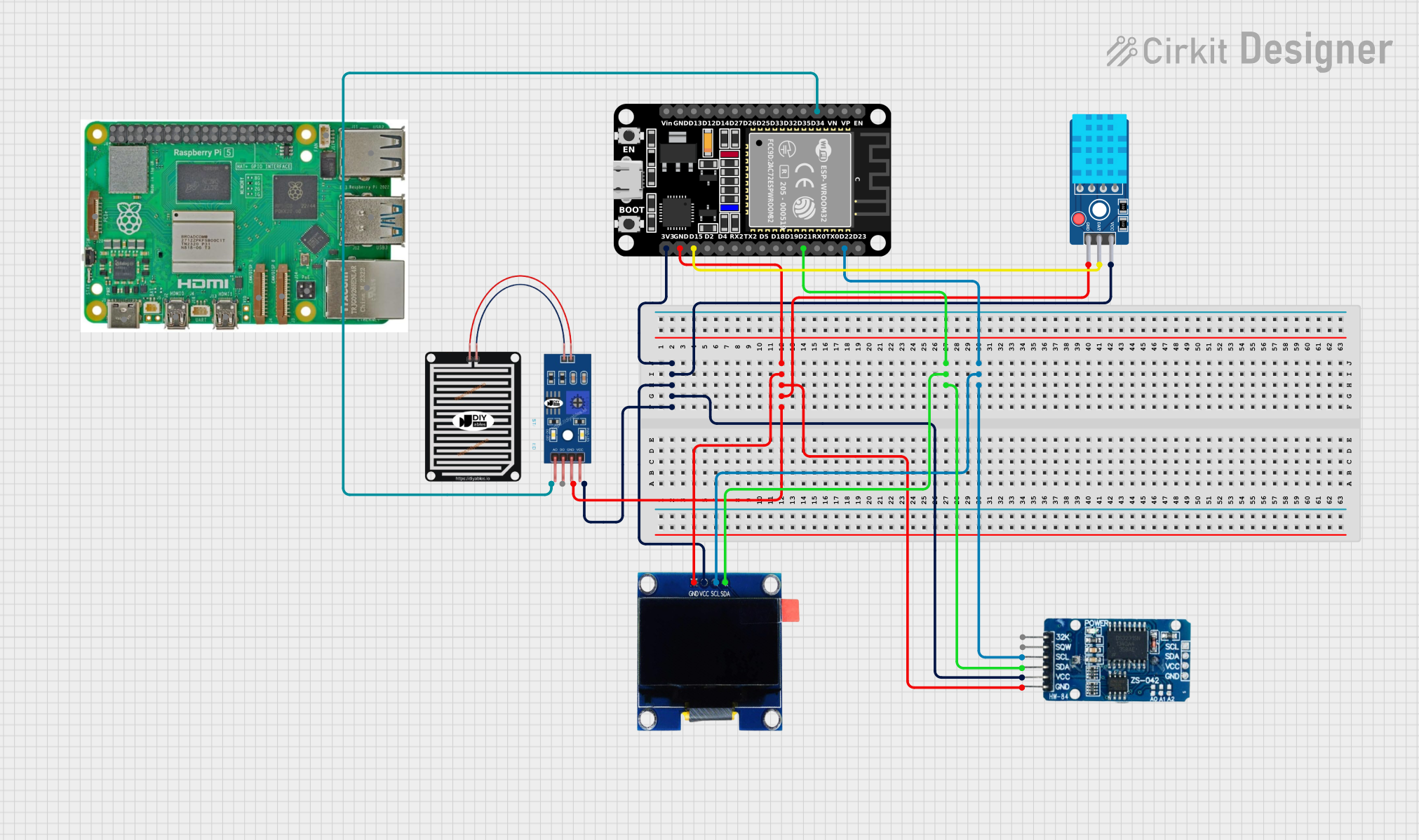
This circuit is designed to read temperature and humidity data from a DHT11 sensor, read analog data from a rain sensor, and display the data on an OLED screen. It also uses an RTC DS3231 to timestamp the readings. The main microcontroller used in this circuit is an ESP32 (30 pin).
Component List
ESP32 (30 pin)
- Description: A powerful microcontroller with built-in Wi-Fi and Bluetooth capabilities.
- Pins: EN, VP, VN, D34, D35, D32, D33, D25, D26, D27, D14, D12, D13, GND, Vin, D23, D22, TX0, RX0, D21, D19, D18, D5, TX2, RX2, D4, D2, D15, 3V3
DHT11 Sensor V2
- Description: A basic, low-cost digital temperature and humidity sensor.
- Pins: GND, DAT, VCC
OLED 1.3"
- Description: A small OLED display used to show text and graphics.
- Pins: GND, VCC, SCL, SDA
RTC DS3231
- Description: A real-time clock module with a temperature-compensated crystal oscillator.
- Pins: 32K, SQW, SCL, SDA, VCC, GND
RAIN SENSOR
- Description: A sensor used to detect the presence of rain.
- Pins: AO, DO, GRD, VCC
Raspberry Pi 5
- Description: A powerful single-board computer.
- Pins: Type-C, Micro HDMI 1, Micro HDMI 2, Camera 1, Camera 2, PoE, Fan, PCIe, USB 3.0, USB 2.0, Ethernet, 5V, GND, 3.3v, GPIO 14, GPIO 15, GPIO 18, GPIO 23, GPIO 24, GPIO 25, GPIO 8, GPIO 7, GPIO 1, GPIO 12, GPIO 16, GPIO 20, GPIO 21, GPIO 2, GPIO 3, GPIO 4, GPIO 17, GPIO 27, GPIO 22, GPIO 10, GPIO 9, GPIO 11, GPIO 0, GPIO 5, GPIO 6, GPIO 13, GPIO 19, GPIO 26
Wiring Details
ESP32 (30 pin)
3V3 connected to:
- VCC of OLED 1.3"
- VCC of RAIN SENSOR
- VCC of DHT11 Sensor V2
- VCC of RTC DS3231
GND connected to:
- GND of OLED 1.3"
- GRD of RAIN SENSOR
- GND of DHT11 Sensor V2
- GND of RTC DS3231
D21 connected to:
- SDA of OLED 1.3"
- SDA of RTC DS3231
D22 connected to:
- SCL of OLED 1.3"
- SCL of RTC DS3231
D34 connected to:
- AO of RAIN SENSOR
D15 connected to:
- DAT of DHT11 Sensor V2
DHT11 Sensor V2
- GND connected to GND of ESP32
- DAT connected to D15 of ESP32
- VCC connected to 3V3 of ESP32
OLED 1.3"
- GND connected to GND of ESP32
- VCC connected to 3V3 of ESP32
- SCL connected to D22 of ESP32
- SDA connected to D21 of ESP32
RTC DS3231
- GND connected to GND of ESP32
- VCC connected to 3V3 of ESP32
- SCL connected to D22 of ESP32
- SDA connected to D21 of ESP32
RAIN SENSOR
- GRD connected to GND of ESP32
- VCC connected to 3V3 of ESP32
- AO connected to D34 of ESP32
Code Documentation
/*
 * This Arduino sketch reads temperature and humidity data from a DHT11 sensor,
 * reads analog data from a rain sensor, and displays the data on an OLED screen.
 * It also uses an RTC DS3231 to timestamp the readings.
 */

#include <Wire.h>
#include <Adafruit_Sensor.h>
#include <DHT.h>
#include <Adafruit_GFX.h>
#include <Adafruit_SSD1306.h>
#include <RTClib.h>

#define DHTPIN 15
#define DHTTYPE DHT11
#define RAIN_SENSOR_PIN 34
#define SCREEN_WIDTH 128
#define SCREEN_HEIGHT 64
#define OLED_RESET -1

DHT dht(DHTPIN, DHTTYPE);
Adafruit_SSD1306 display(SCREEN_WIDTH, SCREEN_HEIGHT, &Wire, OLED_RESET);
RTC_DS3231 rtc;

void setup() {
  Serial.begin(115200);
  dht.begin();
  if (!display.begin(SSD1306_I2C_ADDRESS, OLED_RESET)) {
    Serial.println(F("SSD1306 allocation failed"));
    for (;;);
  }
  display.display();
  delay(2000);
  display.clearDisplay();
  if (!rtc.begin()) {
    Serial.println(F("Couldn't find RTC"));
    while (1);
  }
  if (rtc.lostPower()) {
    rtc.adjust(DateTime(F(__DATE__), F(__TIME__)));
  }
}

void loop() {
  float h = dht.readHumidity();
  float t = dht.readTemperature();
  int rainValue = analogRead(RAIN_SENSOR_PIN);
  DateTime now = rtc.now();
  display.clearDisplay();
  display.setTextSize(1);
  display.setTextColor(SSD1306_WHITE);
  display.setCursor(0, 0);
  display.print(F("Time: "));
  display.print(now.hour(), DEC);
  display.print(F(":"));
  display.print(now.minute(), DEC);
  display.print(F(":"));
  display.print(now.second(), DEC);
  display.print(F("\nTemp: "));
  display.print(t);
  display.print(F(" C\nHumidity: "));
  display.print(h);
  display.print(F(" %\nRain: "));
  display.print(rainValue);
  display.display();
  delay(2000);
}
This code initializes the DHT11 sensor, OLED display, and RTC DS3231. In the loop function, it reads the temperature, humidity, and rain sensor values, gets the current time from the RTC, and displays all this information on the OLED screen. The display is updated every 2 seconds.