
Arduino UNO Based Temperature-Controlled Fan System with OLED Display
View and Edit Project In Cirkit Designer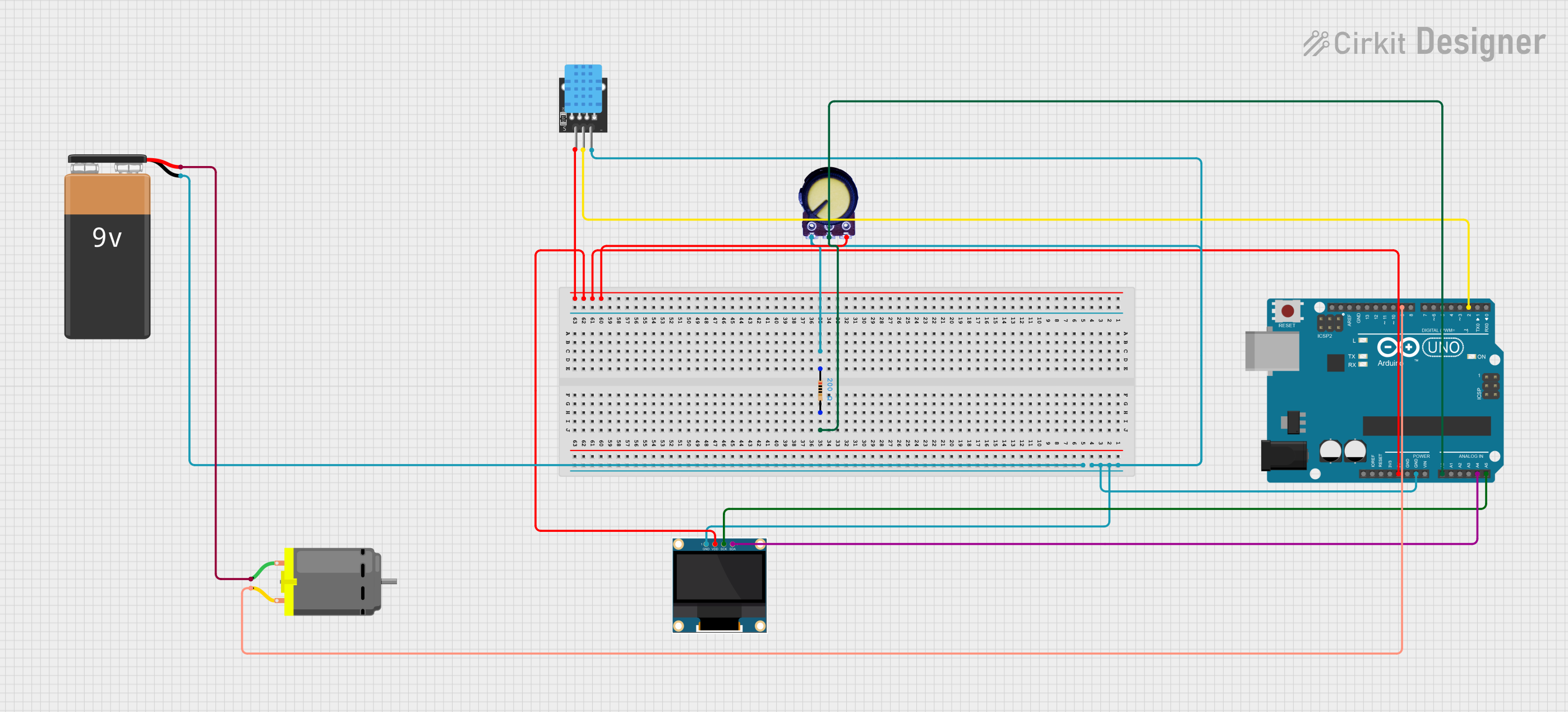
Circuit Documentation
Summary of the Circuit
This circuit is designed to control a DC motor (fan) based on temperature readings from a DHT11 sensor and user input from a potentiometer. The system uses an Arduino UNO as the central microcontroller to process sensor data, control the motor speed, and display information on a 0.96" OLED screen. The temperature threshold for activating the fan is set at 25°C, above which the fan's speed is adjusted proportionally to the temperature and potentiometer setting.
Component List
0.96" OLED
- Description: A small OLED display used for outputting system status such as temperature and fan speed.
- Pins: GND, VDD, SCK, SDA
KY-015 DHT11
- Description: A digital temperature and humidity sensor for environmental sensing.
- Pins: 5V, S, GND
Arduino UNO
- Description: A microcontroller board based on the ATmega328P, used as the main controller for the circuit.
- Pins: IOREF, Reset, 3.3V, 5V, GND, Vin, A0-A5, SCL, SDA, AREF, D0-D13
Potentiometer
- Description: A variable resistor with three terminals, used to adjust the fan speed manually.
- Pins: GND, Output, VCC
Resistor
- Description: A passive two-terminal electrical component that implements electrical resistance as a circuit element.
- Properties: 200 Ohms resistance
9V Battery
- Description: A standard 9V battery used to power the circuit.
- Pins: -, +
DC Motor
- Description: An electric motor that runs on direct current (DC) electricity, used here as a fan.
- Pins: pin 1, pin 2
Wiring Details
0.96" OLED
- GND: Connected to the common ground.
- VDD: Connected to the 5V output from the Arduino UNO.
- SCK: Connected to the A5 pin on the Arduino UNO.
- SDA: Connected to the A4 pin on the Arduino UNO.
KY-015 DHT11
- 5V: Connected to the 5V output from the Arduino UNO.
- S: Connected to the D2 pin on the Arduino UNO.
- GND: Connected to the common ground.
Arduino UNO
- GND: Connected to the common ground.
- 5V: Provides power to the OLED and DHT11 sensor.
- A0: Connected to the output of the potentiometer.
- A4: Connected to the SDA pin of the OLED.
- A5: Connected to the SCK pin of the OLED.
- D2: Receives the signal from the DHT11 sensor.
- D9: Controls the speed of the DC motor via PWM.
Potentiometer
- GND: Connected to the common ground.
- Output: Connected to the A0 pin on the Arduino UNO.
- VCC: Connected to the 5V output from the Arduino UNO.
Resistor
- pin1: Connected to the common ground.
- pin2: Connected to the output of the potentiometer.
9V Battery
- -: Connected to the common ground.
- +: Connected to pin 1 of the DC motor.
DC Motor
- pin 1: Connected to the + terminal of the 9V battery.
- pin 2: Connected to the D9 pin on the Arduino UNO.
Documented Code
#include <DHT.h>          // Include the DHT library
#include <Wire.h>         // Include Wire library for I2C
#include <Adafruit_GFX.h> // Include the graphics library
#include <Adafruit_SSD1306.h> // Include the OLED library

#define DHTPIN 2         // Pin where the sensor is connected
#define FAN_PIN 9        // PWM pin to control the fan
#define POT_PIN A0       // Potentiometer pin
#define DHTTYPE DHT11    // DHT 11

DHT dht(DHTPIN, DHTTYPE);
Adafruit_SSD1306 display(128, 64, &Wire, -1); // Create display object

void setup() {
    pinMode(FAN_PIN, OUTPUT);
    dht.begin();
    display.begin(SSD1306_I2C_ADDRESS, 0x3C); // Initialize OLED
    display.clearDisplay();
    display.setTextSize(1);
    display.setTextColor(WHITE);
    display.setCursor(0, 0);
    display.print("Fan Control System");
    display.display();
    delay(2000);
}

void loop() {
    float temperature = dht.readTemperature(); // Read temperature
    int potValue = analogRead(POT_PIN); // Read potentiometer value
    int fanSpeed = map(potValue, 0, 1023, 0, 255); // Map pot value to fan speed

    // Update fan speed based on temperature
    if (temperature > 25) {
        fanSpeed = map(temperature, 25, 35, 0, 255);
        fanSpeed = constrain(fanSpeed, 0, 255); // Ensure speed is between 0 and 255
    } else {
        fanSpeed = 0; // Turn off fan if temperature is 25°C or below
    }

    // Set fan speed (you may need to modify this based on the fan type)
    analogWrite(FAN_PIN, fanSpeed);

    // Display temperature and fan speed on OLED
    display.clearDisplay();
    display.setCursor(0, 0);
    display.print("Temp: ");
    display.print(temperature);
    display.print(" C");
    display.setCursor(0, 10);
    display.print("Fan Speed: ");
    display.print(fanSpeed);
    display.display();

    delay(1000); // Update every second
}
This code is responsible for reading the temperature from the DHT11 sensor and adjusting the fan speed accordingly. It also reads the potentiometer to allow manual control over the fan speed. The OLED display shows the current temperature and fan speed. The fan is turned off if the temperature is at or below 25°C. If the temperature is above 25°C, the fan speed is increased proportionally to the temperature and potentiometer value.