
Arduino Micro-Controlled Stepper Motor Pump System with TB6600 Driver
View and Edit Project In Cirkit Designer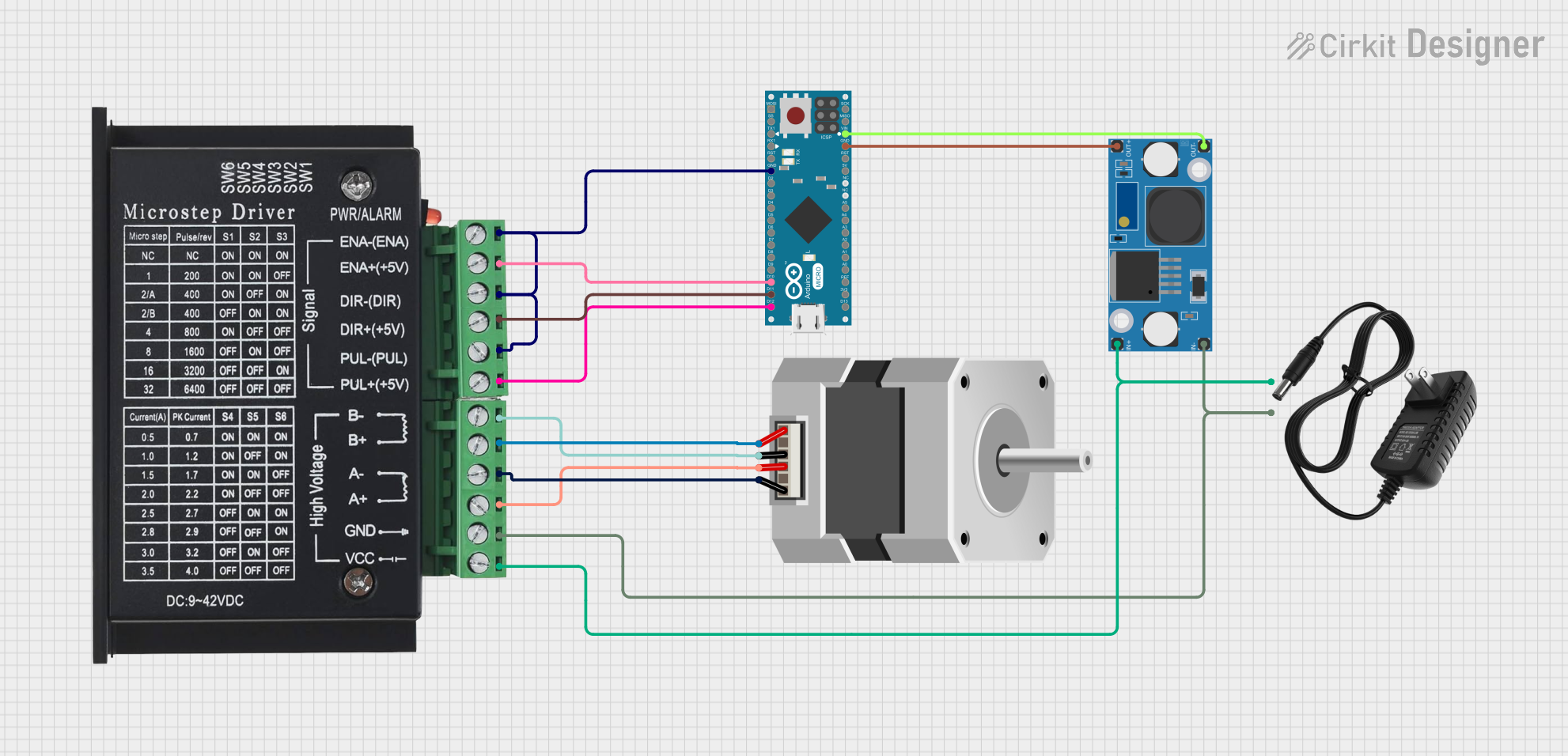
Circuit Documentation
Summary
This circuit is designed to control a stepper motor using an Arduino Micro (Rev3) and a TB6600 stepper motor driver. The circuit is powered by a 12V power supply, which is stepped down using an LM2596 Step Down Module to provide the necessary voltage to the Arduino. The Arduino is programmed to control the stepper motor's speed and direction based on user-defined parameters.
Component List
LM2596 Step Down Module
- Description: A DC-DC buck converter module used to step down voltage.
- Pins: OUT-, OUT+, IN-, IN+
- Purpose in Circuit: To step down the 12V power supply to a suitable voltage for the Arduino Micro.
Stepper Motor (Bipolar)
- Description: A bipolar stepper motor with four pins.
- Pins: D, B, C, A
- Purpose in Circuit: To provide precise control of rotational movement.
12V Power Supply
- Description: A power supply providing 12V DC.
- Pins: +, -
- Purpose in Circuit: To power the entire circuit.
TB6600
- Description: A stepper motor driver capable of driving a bipolar stepper motor.
- Pins: ENA-, ENA+, DIR-, DIR+, PUL-, PUL+, B-, B+, A-, A+, GND, VCC
- Purpose in Circuit: To interface between the Arduino and the stepper motor, providing the necessary current and voltage to drive the motor.
Arduino Micro (Rev3)
- Description: A microcontroller board based on the ATmega32U4.
- Pins: MISO, 5V, SCK, MOSI, RESET, GND, RXLED/SS, D1/TX, D0/RX, D2/SDA, D3/SCL, D4 PWM/A6, D5 PWM, D6 PWM/A7, D7, D8 PWM/A8, D9 PWM/A9, D10 PWM/A10, D11 PWM, D12 PWM/A11, VIN, A5, A4, A3, A2, A1, A0, AREF, 3V3, D13 PWM
- Purpose in Circuit: To control the stepper motor based on user-defined parameters.
Wiring Details
LM2596 Step Down Module
- IN- connected to 12V Power Supply (-)
- IN+ connected to 12V Power Supply (+)
- OUT- connected to Arduino Micro (VIN)
- OUT+ connected to Arduino Micro (GND)
Stepper Motor (Bipolar)
- C connected to TB6600 (B-)
- A connected to TB6600 (B+)
- D connected to TB6600 (A-)
- B connected to TB6600 (A+)
12V Power Supply
- - connected to TB6600 (GND)
- + connected to TB6600 (VCC)
TB6600
- ENA- connected to Arduino Micro (GND)
- ENA+ connected to Arduino Micro (D10 PWM/A10)
- DIR- connected to Arduino Micro (GND)
- DIR+ connected to Arduino Micro (D11 PWM)
- PUL- connected to Arduino Micro (GND)
- PUL+ connected to Arduino Micro (D12 PWM/A11)
- B- connected to Stepper Motor (C)
- B+ connected to Stepper Motor (A)
- A- connected to Stepper Motor (D)
- A+ connected to Stepper Motor (B)
- GND connected to 12V Power Supply (-)
- VCC connected to 12V Power Supply (+)
Arduino Micro (Rev3)
- GND connected to TB6600 (ENA-), TB6600 (DIR-), TB6600 (PUL-)
- D10 PWM/A10 connected to TB6600 (ENA+)
- D11 PWM connected to TB6600 (DIR+)
- D12 PWM/A11 connected to TB6600 (PUL+)
- VIN connected to LM2596 Step Down Module (OUT-)
- GND connected to LM2596 Step Down Module (OUT+)
Code Documentation
Arduino Code
// ============================ USER INPUT SECTION ============================
// Users can adjust these values to control the pump behavior.

#define TARGET_RPM 60           // Target RPM for the pump motor (Revolutions per Minute)
#define MOTOR_RUN_DURATION 5    // Duration the pump runs (in minutes)
#define MOTOR_RUN_INTERVAL 10   // Interval between pump runs (in minutes)

// ============================ END OF USER INPUT SECTION =====================

// ============================= SYSTEM CONSTANTS =============================
#define MICROSTEP 16            // Microstep setting on the TB6600 driver
#define STEPS_PER_REV 200       // Full steps per revolution for the stepper motor
#define STEP_PIN 12             // Step pin
#define DIR_PIN 11              // Direction pin
#define ENABLE_PIN 10           // Enable pin
// ============================================================================

// Globals
unsigned long previousRunTime = 0;  // Keeps track of the last pump cycle start time
unsigned long delayPerStep;         // Time delay per step in microseconds

void setup() {
  // Initialize pins
  pinMode(STEP_PIN, OUTPUT);
  pinMode(DIR_PIN, OUTPUT);
  pinMode(ENABLE_PIN, OUTPUT);

  // Set the motor direction (forward)
  digitalWrite(DIR_PIN, HIGH); // Forward direction

  // Enable the motor driver
  digitalWrite(ENABLE_PIN, LOW); // Active LOW to enable motor

  // Calculate delay per step in microseconds
  delayPerStep = calculateDelay();
}

void loop() {
  unsigned long currentTime = millis(); // Current time in milliseconds

  // Check if it's time to run the motor
  if (currentTime - previousRunTime >= MOTOR_RUN_INTERVAL * 60000UL) {
    previousRunTime = currentTime; // Update the last run time

    // Run the motor for the specified duration
    unsigned long runEndTime = currentTime + (MOTOR_RUN_DURATION * 60000UL);
    while (millis() < runEndTime) {
      stepMotor(1); // Step one step
    }

    // Optionally disable the motor after running
    digitalWrite(ENABLE_PIN, HIGH); // Disable motor
  }
}

// Function to calculate the delay per step based on RPM and motor characteristics
unsigned long calculateDelay() {
  return 60000000L / (TARGET_RPM * STEPS_PER_REV * MICROSTEP); // Delay in microseconds
}

// Function to step the motor by one step
void stepMotor(int steps) {
  for (int i = 0; i < steps; i++) {
    digitalWrite(STEP_PIN, HIGH);
    delayMicroseconds(delayPerStep / 2); // Half delay for HIGH pulse
    digitalWrite(STEP_PIN, LOW);
    delayMicroseconds(delayPerStep / 2); // Half delay for LOW pulse
  }
}
This code is designed to control the stepper motor's speed and direction based on user-defined parameters. The motor runs at a target RPM for a specified duration and interval. The TB6600 driver is used to interface between the Arduino and the stepper motor, providing the necessary current and voltage to drive the motor.