
Cirkit Designer
Your all-in-one circuit design IDE
Home /
Project Documentation
Arduino UNO Based Temperature-Controlled Fan System with OLED Display and Buzzer Alert
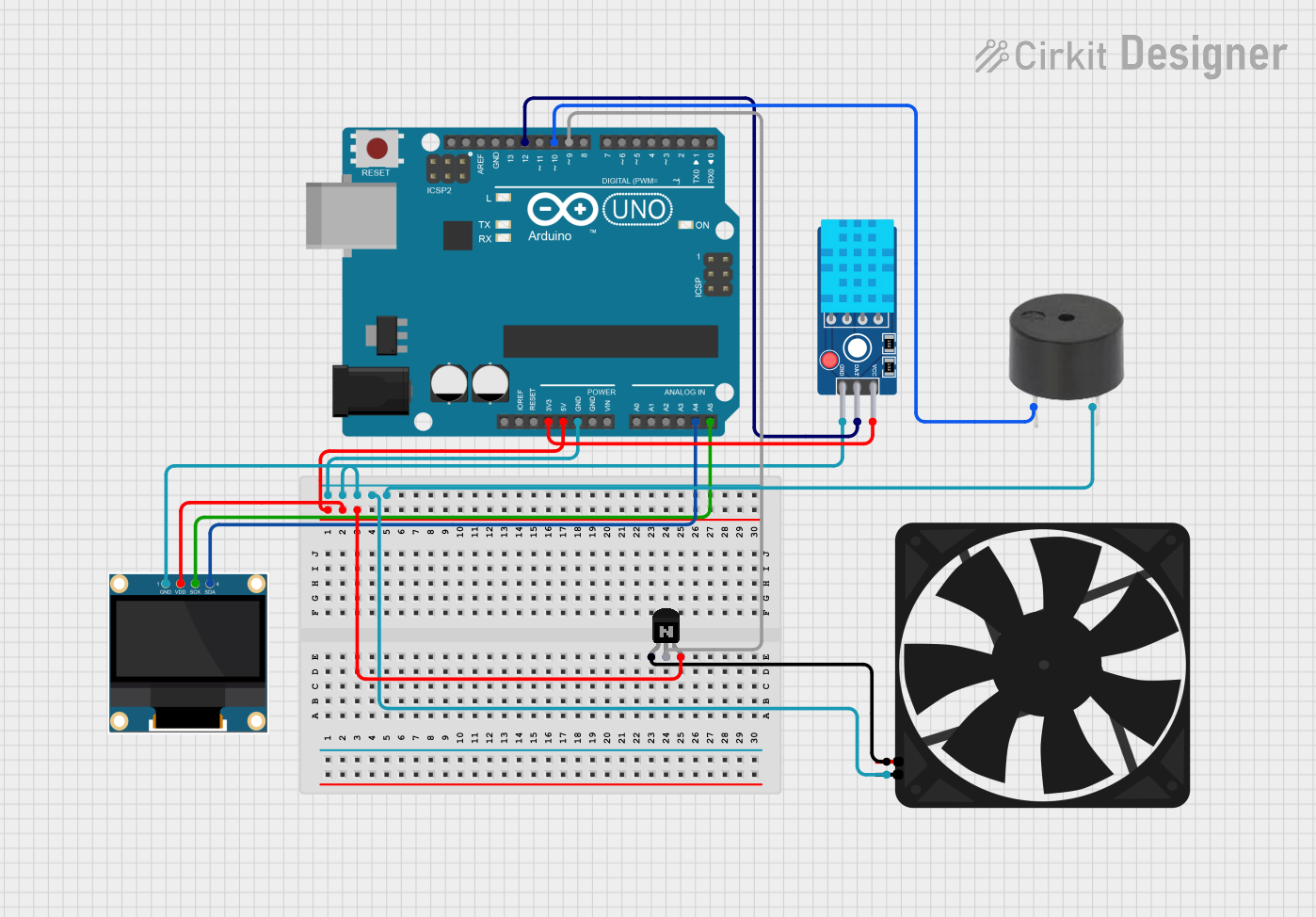
Circuit Documentation
Summary
The circuit in question is designed to monitor environmental conditions and control a fan based on temperature readings. It features an Arduino UNO microcontroller as the central processing unit, interfacing with a DHT11 temperature and humidity sensor, a 0.96" OLED display for output, a buzzer for audible alerts, and a fan controlled by an NPN transistor. The system's purpose is to maintain a comfortable environment by adjusting the fan speed according to the temperature, with visual feedback provided on the OLED display and audible alerts via the buzzer under certain conditions.
Component List
Arduino UNO
- Microcontroller board based on the ATmega328P
- It has 14 digital input/output pins, 6 analog inputs, a 16 MHz quartz crystal, a USB connection, a power jack, an ICSP header, and a reset button.
Buzzer
- An electromechanical component that produces sound
- Typically used for audible alerts or alarms.
NPN Transistor (EBC)
- A bipolar junction transistor with emitter, base, and collector pins
- Used as a switch or amplifier in electronic circuits.
0.96" OLED
- A small display screen that uses organic light-emitting diodes
- Provides a high-contrast visual output for displaying text or graphics.
Fan
- An electric device that creates airflow
- Used for cooling or ventilation purposes.
DHT11 Sensor V2
- A digital temperature and humidity sensor
- Provides reliable readings for environmental monitoring.
Wiring Details
Arduino UNO
D9connected to the base of the NPN Transistor5Vconnected to the collector of the NPN Transistor and VDD of the 0.96" OLEDGNDconnected to the GND of the DHT11 Sensor V2, 0.96" OLED, Fan, and Buzzer3.3Vconnected to VCC of the DHT11 Sensor V2A4connected to SDA of the 0.96" OLEDA5connected to SCK of the 0.96" OLEDD12connected to DAT of the DHT11 Sensor V2D10connected to PIN of the Buzzer
Buzzer
PINconnected toD10on the Arduino UNOGNDconnected toGNDon the Arduino UNO
NPN Transistor (EBC)
emitterconnected to5Vof the Fanbaseconnected toD9on the Arduino UNOcollectorconnected to5Von the Arduino UNO
0.96" OLED
GNDconnected toGNDon the Arduino UNOVDDconnected to5Von the Arduino UNOSCKconnected toA5on the Arduino UNOSDAconnected toA4on the Arduino UNO
Fan
GNDconnected toGNDon the Arduino UNO5Vconnected to the emitter of the NPN Transistor
DHT11 Sensor V2
GNDconnected toGNDon the Arduino UNODATconnected toD12on the Arduino UNOVCCconnected to3.3Von the Arduino UNO
Documented Code
#include "DHT.h"
#include <Wire.h>
#include <Adafruit_GFX.h>
#include <Adafruit_SSD1306.h>

// Define OLED display parameters
#define SCREEN_WIDTH 128
#define SCREEN_HEIGHT 64
#define OLED_RESET    -1  // Reset pin not used for this display
Adafruit_SSD1306 display(SCREEN_WIDTH, SCREEN_HEIGHT, &Wire, OLED_RESET);

#define DHTPIN 12       // DHT sensor pin
#define DHTTYPE DHT22   // Using DHT22 sensor
#define pwm 9           // Pin for controlling fan speed (PWM)
#define buzzer 10       // Pin for the buzzer

DHT dht(DHTPIN, DHTTYPE);

// Variables to track previous fan speed and temperature state
int lastFanSpeed = -1;  // Initial state for fan speed
float lastTemp = -1;    // Initial state for temperature
bool dataDisplayed = false;  // Flag to track if data is being displayed
bool buzzerTriggered = false; // To ensure buzzer only triggers once for each condition

void setup() {
  // Initialize the display
  if (!display.begin(SSD1306_SWITCHCAPVCC, 0x3C)) {  // Address 0x3C for 128x64 OLED
    Serial.println(F("SSD1306 allocation failed"));
    for (;;); // Don't proceed, loop forever
  }

  display.clearDisplay(); // Clear the screen
  display.setTextSize(1);  // Smaller text for title, keeping it elegant
  display.setTextColor(SSD1306_WHITE); // Draw white text

  Serial.begin(9600);
  dht.begin();   // Start DHT sensor
  analogWrite(pwm, 255); // Initial fan speed setting

  // Display the title (centered and split into two lines)
  display.setCursor((SCREEN_WIDTH - (21 * 6)) / 2, (SCREEN_HEIGHT / 2) - 10);  // Center first line
  display.print("Automatic Temperature");

  display.setCursor((SCREEN_WIDTH - (18 * 6)) / 2, (SCREEN_HEIGHT / 2));  // Center second line
  display.print("Humidity Based Fan");

  display.setCursor((SCREEN_WIDTH - (14 * 6)) / 2, (SCREEN_HEIGHT / 2) + 10);  // Center third line
  display.print("Speed Control");

  display.display();  // Show the message
  delay(2000);  // Pause for 2 seconds

  // Clear display for the second message
  display.clearDisplay();

  // Display your name and course information
  display.setTextSize(1);  // Smaller text for personal details
  display.setCursor((SCREEN_WIDTH - (25 * 6)) / 2, 25);  // Center text horizontally
  display.print("By John Carlo D. Martin");
  display.setCursor((SCREEN_WIDTH - (8 * 6)) / 2, 40);   // Below for course info
  display.print("BSCPE4A");
  display.display();  // Show the message
  delay(2000);  // Pause for another 2 seconds

  // Clear the screen for temperature and fan speed updates
  display.clearDisplay();
}

void loop() {
  delay(1000);  // Wait a few seconds between measurements

  // Read temperature and humidity
  float h = dht.readHumidity();
  float t = dht.readTemperature();

  if (isnan(h) || isnan(t)) {
    Serial.println("Failed to read from DHT sensor!");
    return;
  }

  // Serial output for debugging
  Serial.print("Humidity: ");
  Serial.print(h);
  Serial.print(" %\t");
  Serial.print("Temperature: ");
  Serial.print(t);
  Serial.println(" *C");

  // Clear the display before printing
  display.clearDisplay();

  // Display temperature and humidity with more balanced text
  display.setTextSize(1);  // Use smaller text to keep things clean
  display.setCursor(0, 10); // Top left corner for temperature
  display.print("Temperature: ");
  display.print(t);
  display.print((char)247);
  display.print("C");

  display.setCursor(0, 30);  // Below for humidity
  display.print("Humidity: ");
  display.print(h);
  display.print(" %");

  // Control the fan speed and display it cleanly
  int fanSpeed = 0;
  display.setCursor(0, 50); // Lower part of the screen for fan status

  // Buzzer and fan control based on temperature
  if (t < 25) {
    fanSpeed = 0;
    display.print("Fan: OFF");

    if (dataDisplayed && !buzzerTriggered) {
      tone(buzzer, 1000);  // Buzzer ON
      delay(3000);         // Buzzer sounds for 3 seconds
      noTone(buzzer);      // Buzzer OFF
      buzzerTriggered = true;  // Ensure buzzer doesn't repeat
    }

  } else if (t >= 25 && t <= 27) {
    analogWrite(pwm, 85);  // Low fan speed (approx 33%)
    fanSpeed = "Low";
    display.print("Fan Speed: Low");

    if (dataDisplayed && !buzzerTriggered) {
      tone(buzzer, 1000);  // Buzzer ON
      delay(1000);         // Buzzer sounds for 1 second
      noTone(buzzer);      // Buzzer OFF
      buzzerTriggered = true;  // Ensure buzzer doesn't repeat
    }

  } else if (t > 27 && t <= 29) {
    analogWrite(pwm, 170); // Medium fan speed
    fanSpeed = "