
Arduino UNO-Based Smart Irrigation System with Soil Moisture and Temperature Sensors
View and Edit Project In Cirkit Designer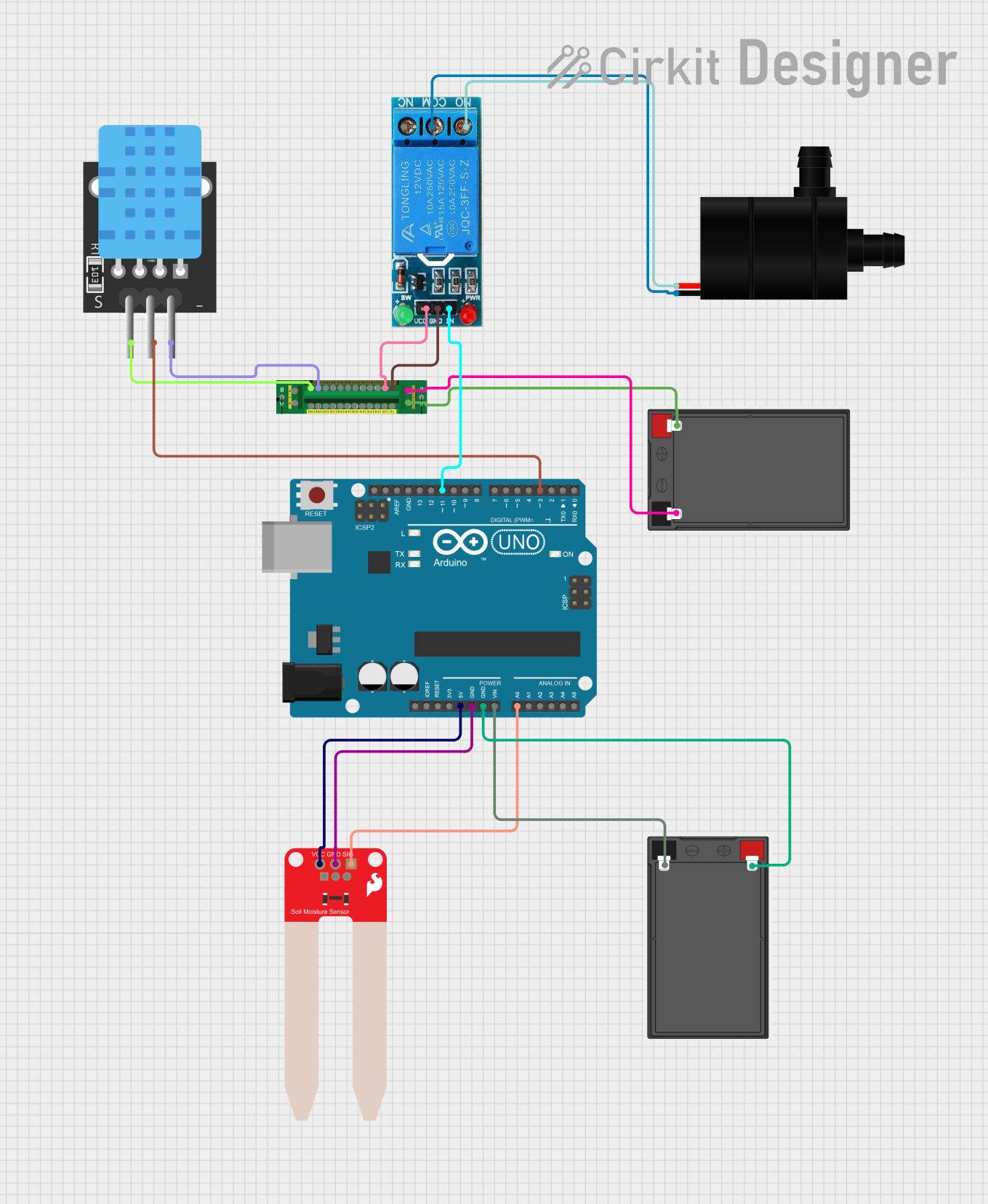
Circuit Documentation
Summary
This circuit is designed to control a water pump based on soil moisture and temperature readings. The system uses an Arduino UNO microcontroller to read data from a soil moisture sensor and a temperature sensor. Based on the sensor readings, the Arduino activates a relay to control the water pump. The pump is activated if the soil moisture sensor reads low moisture levels. Additionally, the temperature sensor determines the frequency of watering: every 6 hours if the temperature is above 30°C, every 12 hours if the temperature is between 25°C and 30°C, and every 24 hours if the temperature is 25°C or below.
Component List
Arduino UNO
- Description: Microcontroller board based on the ATmega328P.
- Pins: UNUSED, IOREF, Reset, 3.3V, 5V, GND, Vin, A0, A1, A2, A3, A4, A5, SCL, SDA, AREF, D13, D12, D11, D10, D9, D8, D7, D6, D5, D4, D3, D2, D1, D0
SparkFun Soil Moisture Sensor
- Description: Sensor to measure soil moisture levels.
- Pins: VCC, GND, SIG
Water Pump
- Description: Pump to water plants.
- Pins: VCC, GND
12V SINGLE CHANNEL RELAY
- Description: Relay module to control high voltage devices.
- Pins: NC, COM, NO, IN, GND, VCC
Battery
- Description: Power source for the circuit.
- Pins: -, +
TEMP
- Description: Temperature sensor.
- Pins: 5V, D3, GND
Power Distribution Board
- Description: Board to distribute power to various components.
- Pins: Output 1+, Input +, Input -, Output 2+, Output 2-, Output 3+, Output 4+, Output 5+, Output 1-, Output 4-, Output 3-, Output 5-, Output 6+, Output 6-, Output 7+, Output 7-, Output 8+, Output 8-, Output 9+, Output 9-, Output 10+, Output 10-, Output 11+, Output 11-, Output 12+, Output 12-, Output +, Output -
Wiring Details
Arduino UNO
- 5V connected to VCC of SparkFun Soil Moisture Sensor
- GND connected to GND of SparkFun Soil Moisture Sensor
- GND connected to + of Battery
- Vin connected to - of Battery
- A0 connected to SIG of SparkFun Soil Moisture Sensor
- D11 connected to IN of 12V SINGLE CHANNEL RELAY
- D3 connected to D3 of TEMP
SparkFun Soil Moisture Sensor
- VCC connected to 5V of Arduino UNO
- GND connected to GND of Arduino UNO
- SIG connected to A0 of Arduino UNO
Water Pump
- VCC connected to NO of 12V SINGLE CHANNEL RELAY
- GND connected to COM of 12V SINGLE CHANNEL RELAY
12V SINGLE CHANNEL RELAY
- IN connected to D11 of Arduino UNO
- NO connected to VCC of Water Pump
- COM connected to GND of Water Pump
- GND connected to Output 1+ of Power Distribution Board
- VCC connected to Output 1- of Power Distribution Board
Battery
- + connected to GND of Arduino UNO
- - connected to Vin of Arduino UNO
- + connected to Input + of Power Distribution Board
- - connected to Input - of Power Distribution Board
TEMP
- 5V connected to Output 6- of Power Distribution Board
- D3 connected to D3 of Arduino UNO
- GND connected to Output 6+ of Power Distribution Board
Power Distribution Board
- Output 1+ connected to GND of 12V SINGLE CHANNEL RELAY
- Output 1- connected to VCC of 12V SINGLE CHANNEL RELAY
- Output 6- connected to 5V of TEMP
- Output 6+ connected to GND of TEMP
- Input + connected to + of Battery
- Input - connected to - of Battery
Code Documentation
/*
 * This Arduino sketch controls a water pump based on soil moisture and temperature.
 * The pump is activated if the soil moisture sensor reads LOW. Additionally, the
 * temperature sensor is used to determine the frequency of watering: every 6 hours
 * if the temperature is above 30°C, every 12 hours if the temperature is 30°C or
 * below, and every 24 hours if the temperature is 25°C.
 */

#include <Wire.h>
#include <DHT.h>

#define SOIL_MOISTURE_PIN A0
#define RELAY_PIN 11
#define TEMP_SENSOR_PIN 3
#define DHTTYPE DHT11

DHT dht(TEMP_SENSOR_PIN, DHTTYPE);

unsigned long lastWateringTime = 0;

void setup() {
  pinMode(SOIL_MOISTURE_PIN, INPUT);
  pinMode(RELAY_PIN, OUTPUT);
  digitalWrite(RELAY_PIN, LOW);
  dht.begin();
  Serial.begin(9600);
}

void loop() {
  int soilMoisture = analogRead(SOIL_MOISTURE_PIN);
  float temperature = dht.readTemperature();
  unsigned long currentTime = millis();
  unsigned long timeSinceLastWatering = (currentTime - lastWateringTime) / 3600000;

  if (isnan(temperature)) {
    Serial.println("Failed to read from DHT sensor!");
    return;
  }

  if (soilMoisture < 500) { // Assuming LOW is below 500
    if (temperature > 30 && timeSinceLastWatering >= 6) {
      activatePump();
    } else if (temperature <= 30 && temperature > 25 && timeSinceLastWatering >= 12) {
      activatePump();
    } else if (temperature <= 25 && timeSinceLastWatering >= 24) {
      activatePump();
    }
  }

  delay(1000); // Check every second
}

void activatePump() {
  digitalWrite(RELAY_PIN, HIGH);
  delay(5000); // Pump runs for 5 seconds
  digitalWrite(RELAY_PIN, LOW);
  lastWateringTime = millis();
}
This code reads the soil moisture level and temperature, and activates the water pump based on the conditions described. The pump runs for 5 seconds when activated.