
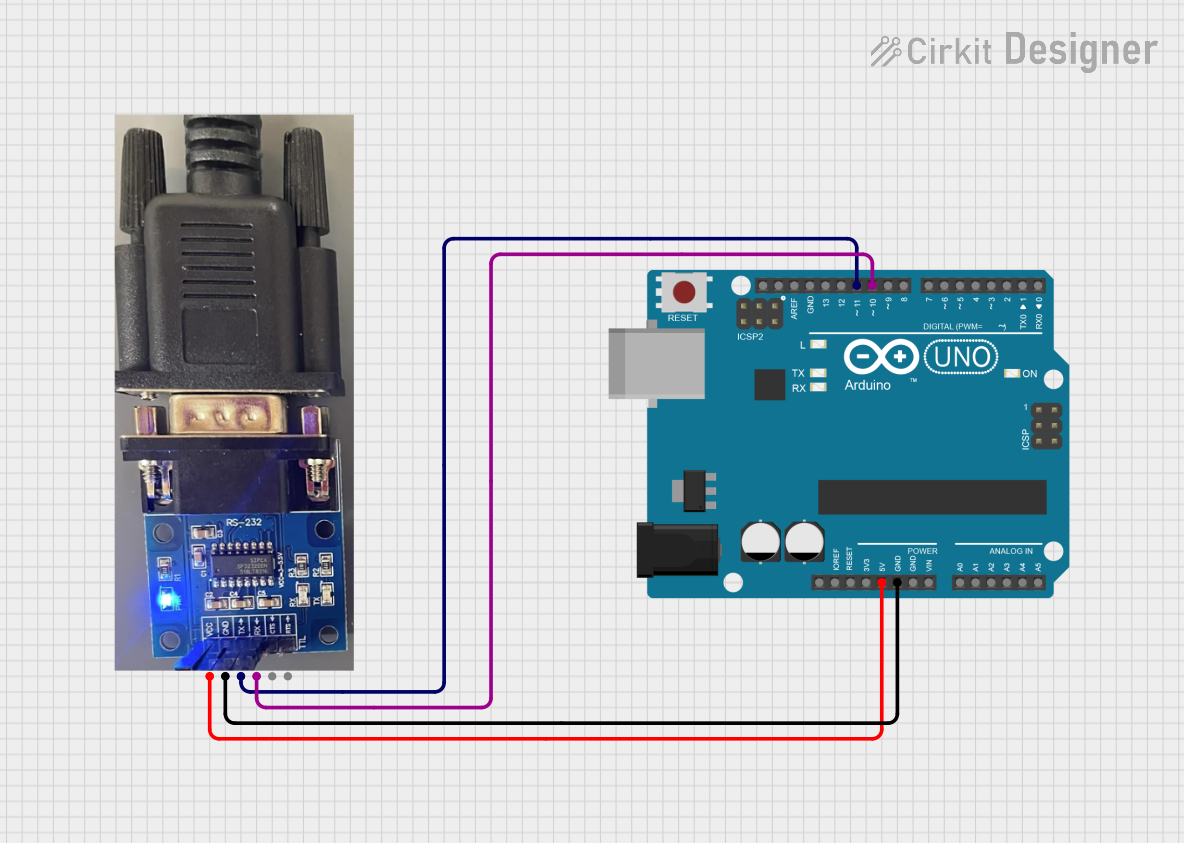
Circuit Documentation
Summary of the Circuit
This circuit consists of an Arduino UNO microcontroller board interfaced with an RS232 to Serial Converter. The purpose of the circuit is to facilitate communication between devices that use RS232 protocol and the Arduino UNO, which operates at TTL logic levels. The Arduino UNO is programmed to relay data between its serial port and the RS232 converter, allowing for bidirectional communication.
Component List
Arduino UNO
- Description: A microcontroller board based on the ATmega328P.
- Pins Used: 5V, GND, D11 (TX), D10 (RX).
RS232 to Serial Converter
- Description: A module that converts signals between RS232 voltage levels and TTL logic levels.
- Pins Used: VCC, GND, TX, RX.
Wiring Details
Arduino UNO
- 5V: Provides power to the RS232 to Serial Converter.
- GND: Common ground with the RS232 to Serial Converter.
- D11 (TX): Transmits data to the RS232 to Serial Converter's RX pin.
- D10 (RX): Receives data from the RS232 to Serial Converter's TX pin.
RS232 to Serial Converter
- VCC: Connected to the Arduino UNO's 5V pin.
- GND: Connected to the Arduino UNO's GND pin.
- TX: Connected to the Arduino UNO's D10 (RX) pin.
- RX: Connected to the Arduino UNO's D11 (TX) pin.
Documented Code
The following code is written for the Arduino UNO to handle the communication between the Serial port and the RS232 to Serial Converter using software serial communication.
#include <SoftwareSerial.h>

#define rxPin 10
#define txPin 11

SoftwareSerial softSerial(rxPin, txPin);

void setup() {
  softSerial.begin(9600); // Initialize software serial communication at 9600 baud rate
  Serial.begin(115200);   // Initialize hardware serial communication at 115200 baud rate
}

void loop() {
  // Relay data from hardware serial to software serial
  while (Serial.available() > 0)
    softSerial.write(Serial.read());

  // Relay data from software serial to hardware serial
  while (softSerial.available() > 0)
    Serial.write(softSerial.read());
}
The code sets up two serial interfaces: the hardware serial port at a baud rate of 115200 and a software serial port at a baud rate of 9600. The loop() function continuously checks for data on both serial interfaces and relays data between them, allowing for communication between the RS232 device and the computer connected to the Arduino's hardware serial port.